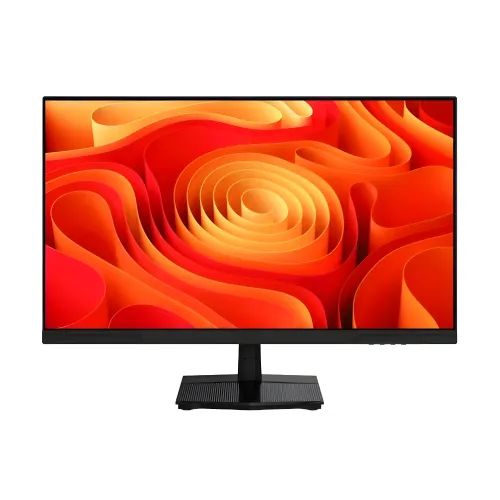
The Titan Army P2710R2 Plus is listed by Bangladesh retailers as a 27-inch WQHD 2560 × 1440 Fast IPS monitor with up to 200Hz refresh, 1ms GTG, Adaptive-Sync and HDR400. Retailer specifications also list 400 cd/m² brightness, 1200:1 contrast, 1.07 billion colors and one DisplayPort plus two HDMI ports. Some details, including stand configuration, HDMI version and HDR certification, require confirmation for the exact local unit. This page distinguishes confirmed seller observations from manufacturer-level verification.
WQHD resolution at 27 inches
The P2710R2 Plus is listed with a 27-inch 2560 × 1440 WQHD panel and a 16:9 aspect ratio. Compared with Full HD, WQHD contains more pixels, which can provide finer edges and extra workspace for timelines, documents and browser windows. Pixel density is approximately 109 pixels per inch when calculated for a 27-inch 16:9 panel.
The extra resolution also increases the workload on a graphics card. A game that reaches a high frame rate at 1080p may run at a lower frame rate at 1440p, depending on the GPU and graphics settings. Decide whether image detail or maximum frame rate is the priority for the games and applications you use.
Fast IPS and refresh rate
Seller specifications identify a Fast IPS panel and a maximum refresh rate of 200Hz. Higher refresh can present more frequent frames when both the computer and game deliver them. This can make fast camera movement and cursor motion appear smoother than on a conventional 60Hz screen, though the benefit depends on stable frame delivery and an enabled high-refresh mode.
After setup, select the desired display mode in your operating system or GPU control panel and confirm the active rate in the monitor OSD. The sources reviewed do not establish that every input, cable, resolution and color mode can reach 200Hz. Check the user guide and test the specific connection rather than assuming every device will expose the maximum.
Response-time expectations
Retail listings quote 1ms GTG. Grey-to-grey is one response-time method, but the reviewed pages do not give the measurement procedure, overdrive level, transition distribution or independent test data. A single best-case number does not establish that every pixel transition completes in one millisecond, nor does it measure total input lag from controller to display.
Use the monitor’s response or overdrive controls conservatively and watch for overshoot, inverse ghosting and brightness changes. A cleaner balanced setting can look better than the most aggressive setting. No hands-on motion test or instrumented response measurement is claimed for this product page.
Adaptive-Sync and variable frame rates
Seller specifications list Adaptive-Sync, with AMD FreeSync and NVIDIA G-SYNC compatibility claims in some listings. Variable refresh can align display refresh with a compatible GPU’s frame output over supported operating ranges, helping reduce tearing and uneven pacing. Actual behavior depends on the GPU, driver, connection, enabled settings and refresh range.
If a variable-refresh option is unavailable, verify the connection, GPU driver, display mode and monitor menu. Certification language on a merchant page is not a substitute for checking a particular PC configuration. Users should also check whether the feature operates simultaneously with any blur-reduction mode they want to use.
Brightness, contrast and color
Multiple retailers list 400 cd/m² brightness, 1200:1 contrast, 99% sRGB and 92% DCI-P3. These values provide a useful reference for comparing listings, but the manufacturer did not provide a model-specific technical sheet in the sources located for this review. They are therefore recorded as repeated seller specifications, not as independently measured results for every unit.
Color gamut coverage is not the same as color accuracy. A wide gamut does not guarantee calibrated white balance, uniformity or low delta error. For color-critical work, use an appropriate color-managed workflow and calibrated equipment. For games and general media, select a picture mode that looks comfortable and avoid using maximum brightness in a dark room.
HDR400 claims and limits
Bangladesh listings advertise HDR400 for the P2710R2 Plus, and some repeat a 400 cd/m² brightness value. We could not independently verify a manufacturer certification listing for this exact SKU. The description therefore labels HDR400 as a merchant-reported specification rather than presenting the certification as independently confirmed.
HDR quality depends on more than input compatibility or a brightness number. Contrast, black level, local dimming, tone mapping and supported content all affect the result. Ask the seller for the exact manual or packaging label if HDR certification is a deciding factor, and compare the monitor in the SDR mode you expect to use most.
Ports and source compatibility
The reviewed product listings describe one DisplayPort 1.4, two HDMI ports and a 3.5 mm audio output. One retailer specifies HDMI 2.0 for a related P2710R2 listing, but Plus-specific HDMI version information is not consistent enough to transfer without confirmation. Treat the connector count as seller-listed and verify port versions on the model documentation.
A cable, adapter, dock or older graphics output can limit resolution, refresh rate, color depth or variable refresh support. For a PC gaming setup, check the graphics-card outputs and required timing before choosing a cable. For a console, check that the console’s supported output matches the monitor’s input capabilities. The audio jack is listed as output; integrated speakers were not verified.
Stand, mounting and desk fit
Listings confirm at least tilt adjustment, and some merchants list height adjustment, swivel and pivot. The stand specifications vary across pages, so the full ergonomic range remains unverified for this exact local configuration. The seller describes dimensions of 614.3 × 450.9 × 218.5 mm with stand and 614.3 × 366.8 × 57.2 mm without stand; measure the desk and allow space for cable bends.
A 100 × 100 mm VESA pattern is listed by sellers. Before using a monitor arm, confirm the mounting pattern on the unit, supported load, screw length and stand-removal instructions. Keep the screen supported while adjusting it and avoid pressing the LCD surface. The seller-listed 3.65 kg weight does not consistently identify whether it includes the base.
Eye comfort and long sessions
Flicker-Free and Low Blue Light are included in several seller specification sets. Such features may provide preferred display settings, but they do not eliminate fatigue for everyone and are not medical treatments. Adjust brightness to room conditions, keep text comfortably readable, use balanced ambient lighting and take breaks during long work or gaming sessions.
Anti-glare treatment is also reported by one merchant, though this detail is not consistent across every Plus listing. Reflections can still appear under direct light. Position the display to avoid bright windows behind the viewer and use the height and tilt adjustments available on the exact stand configuration. Check the delivered panel rather than inferring coating from marketing imagery.
Gaming and everyday productivity
The combination of WQHD and 200Hz can appeal to gamers who have a graphics card capable of driving high frame rates at 1440p. For demanding titles, lowering selected visual effects may help preserve smoother gameplay. In everyday work, the extra resolution can fit more content than Full HD, while scaling can make small text easier to read. The right balance depends on vision, seating distance and software.
Game Modes are listed by retailers, but the exact names and functions are not documented in the sources reviewed. Picture presets may adjust brightness, contrast or color, so choose one based on the content and preference rather than assuming a preset is objectively accurate. No subjective review or measured gaming performance is asserted here.
Power, packaging and condition
Skyland lists approximately 32W typical and 55W maximum power consumption. Those values are seller-reported and may vary with brightness and operating mode; inspect the rating label and manual for the delivered unit. Keep ventilation areas clear, use the supplied regional power cable and disconnect the device before cleaning or moving it.
Retail pages list varying included accessories, so check whether a DisplayPort cable, HDMI cable, power cord, stand and mounting hardware are present before leaving the shop. Packaging and included items can vary by region or stock batch. Inspect the screen and enclosure on delivery and retain the invoice and packaging according to the seller’s return policy.
Bangladesh price and warranty
At the time of review, Skyland listed ৳25,800 and In Stock, Computer Vision listed ৳25,900 but Out of Stock, and PC House listed ৳25,999 and In Stock. These are independent retailer page snapshots and can change without notice. They do not represent a BiponiBD price, offer, stock reservation or delivery promise.
Local sellers advertise three-year warranty, while Titan Army’s direct-store policy describes one year for purchases made at titan-army.com. These terms may belong to different sales channels. Before payment, obtain written confirmation of the local service provider, serial eligibility, invoice requirements, panel/dead-pixel policy, exclusions and service location.
Exact model identity and buying checklist
This product record refers to P2710R2 Plus. The P2710R2 without Plus and other P2710-series models may differ in input configuration, stand, refresh behavior and warranty. Match the model name on the box, monitor label and invoice. Images are illustrative and cannot prove the SKU or local warranty eligibility.
Before ordering, confirm the resolution and refresh mode with your device, check input versions, ask whether the delivered stand supports the adjustments you need, confirm audio output versus integrated speakers, inspect the packaging and get written warranty terms. No manufacturer-hosted P2710R2 Plus datasheet, local unit serial or hands-on test was available during this review; points lacking that evidence are explicitly qualified.
Key features
- 27-inch 2560 × 1440 WQHD panel provides more desktop detail than 1920 × 1080 at the same physical size.
- Fast IPS display with listed 200Hz maximum refresh rate for compatible high-frame-rate setups.
- 1ms GTG response figure is listed; measurement method and all-pixel behavior are not specified.
- 400 cd/m² brightness and 1200:1 contrast are repeated in seller specifications.
- 1.07 billion color support and 8-bit + FRC are seller-listed, alongside 99% sRGB and 92% DCI-P3 gamut claims.
- HDR400 is advertised by multiple Bangladesh sellers; independent certification confirmation is still needed.
- Adaptive-Sync is listed, with FreeSync and G-SYNC compatibility claims on seller pages.
- Connectivity listed as one DisplayPort 1.4, two HDMI ports and a 3.5 mm audio output.
- Tilt and 100 × 100 mm VESA mounting are listed; ergonomic stand details vary between listings.
- Flicker-Free, Low Blue Light and Game Modes are listed by merchants; exact menu implementation may vary.
- Seller-listed dimensions and power figures support desk and setup planning but should be checked against the unit label.
- Local retailer pages advertise three-year warranty; verify authorized provider, serial registration and exclusions.
Pros
- WQHD resolution on a 27-inch screen provides a useful balance of detail and workspace for games and general computing.
- 200Hz and Adaptive-Sync claims can suit high-refresh PC gaming when the GPU and connection support the mode.
- Fast IPS and broad stated color coverage may appeal to users who mix gaming with general content work.
- A 3.5 mm audio output, multiple video inputs and VESA support offer connection and mounting flexibility.
- Several Bangladesh sellers list the exact Plus model, making price and availability comparisons possible.
Cons and buying considerations
- WQHD at 200Hz needs substantially more graphics performance than Full HD; demanding games may require settings adjustments.
- 1ms GTG is a manufacturer/retailer claim without a published measurement protocol or independent response test in reviewed sources.
- HDR400 and gamut numbers are seller-listed; no manufacturer-hosted model datasheet was located to independently substantiate certification.
- Port versions, full stand adjustability, speakers, exact power draw and included cables are not consistently described across listings.
- Three-year Bangladesh warranty is seller-advertised and differs from the one-year policy described for direct titan-army.com purchases; local coverage must be confirmed.
Full specifications
- Brand: Titan Army
- Model: P2710R2 Plus
- ManufacturerPartNumber: P2710R2 Plus
- DisplaySize: 27 inches
- Panel: Fast IPS
- Resolution: 2560 × 1440 (WQHD)
- AspectRatio: 16:9
- PixelPitch: 0.233 mm (retailer specification)
- PixelDensity: Approximately 109 PPI (calculated from 27-inch 2560 × 1440)
- Surface: Flat; anti-glare listed by some sellers; verify delivered unit
- ViewingAngles: 178° / 178°
- Brightness: 400 cd/m² (listed)
- Contrast: 1200:1 (listed)
- RefreshRate: Up to 200Hz listed; exact supported modes depend on input/source
- ResponseTime: 1ms GTG listed; method and transition conditions not supplied
- Color: 1.07 billion colors; 8-bit + FRC listed
- Gamut: 99% sRGB; 92% DCI-P3 listed
- HDR: HDR400 listed by multiple Bangladesh sellers; certification/documentation not independently confirmed
- VRR: Adaptive-Sync; FreeSync and G-SYNC compatibility listed by sellers; verify exact GPU/input behavior
- Ports: 1 × DisplayPort 1.4; 2 × HDMI (version not consistently stated for Plus SKU); 3.5 mm audio out
- Audio: 3.5 mm audio output listed; built-in speakers not verified
- Stand: Tilt listed; some sellers list height adjustment, swivel and pivot. Confirm supplied stand configuration
- VESA: 100 × 100 mm listed by sellers
- Power: Approximately 32W typical / 55W maximum listed by Skyland; verify regional label
- Dimensions: With stand 614.3 × 450.9 × 218.5 mm; without stand 614.3 × 366.8 × 57.2 mm (seller listing)
- Weight: 3.65 kg listed; seller does not clearly identify configuration
- Warranty: Bangladesh sellers advertise 3 years; provider and serial eligibility unverified. Titan Army website states 1-year coverage for purchases from titan-army.com; terms differ by channel
- LocalPriceObservation: Skyland ৳25,800 In Stock; Computer Vision ৳25,900 Out of Stock; PC House ৳25,999 In Stock; snapshot only
- CountryOfOrigin: Not independently verified for the local unit
Frequently asked questions
What is the P2710R2 Plus resolution and size?
Seller specifications identify a 27-inch 16:9 WQHD panel at 2560 × 1440 pixels.
Does it support 200Hz?
Multiple Bangladesh listings specify 200Hz. Maximum refresh available depends on the source, port, cable, timing and settings; verify the exact mode with your computer and manual.
What does 1ms GTG mean?
Listings state 1ms grey-to-grey response. No measurement method or full transition data was found in the reviewed sources, so treat it as a quoted specification rather than a guarantee of zero blur.
Is the panel Fast IPS?
The P2710R2 Plus is listed as Fast IPS by Skyland, Computer Vision, PC House and other sellers. Confirm the exact model on the carton and rear label.
Does it support HDR?
Bangladesh retailers advertise HDR400. We did not independently confirm a manufacturer certificate or certification registry entry for this precise Plus SKU; treat it as a seller-listed claim until verified.
Which connections does it have?
Retail listings describe one DisplayPort 1.4, two HDMI inputs and a 3.5 mm audio output. HDMI version is not consistently stated for this Plus SKU, so check the unit/manual.
Does it have speakers?
The reviewed specifications list a 3.5 mm audio output but do not reliably confirm integrated speakers. Plan external audio unless the seller confirms speakers on the exact unit.
Can the stand adjust in height or rotate?
Some seller pages list height adjustment, swivel and pivot, while others only specify tilt. Confirm the included stand configuration and adjustment range before purchase.
Can it be VESA mounted?
Retail listings specify a 100 × 100 mm VESA pattern. Check mount capacity, screw depth and clearance against the delivered monitor.
What is the Bangladesh price?
At review time Skyland displayed ৳25,800/In Stock, Computer Vision ৳25,900/Out of Stock and PC House ৳25,999/In Stock. These seller snapshots can change and are not BiponiBD pricing.
What warranty applies in Bangladesh?
Several local sellers advertise three years, but local service provider and serial eligibility are unverified. Titan Army’s website says purchases from titan-army.com have a one-year warranty; channel terms may differ. Confirm local written coverage and exclusions.
Is this the P2710R2 (without Plus)?
No. This record is specifically P2710R2 Plus. Similar P2710R2 listings may describe a different SKU or omit the Plus suffix; confirm model code before comparing features or warranty.
Source note: No manufacturer-hosted model-specific technical sheet was located. Technical details above are attributed to multiple retailer listings where available; retailer price, stock and warranty observations may change. Confirm exact SKU, port versions, certification, accessories and local service terms with the seller. No BiponiBD offer, hands-on test or guaranteed inventory is claimed.