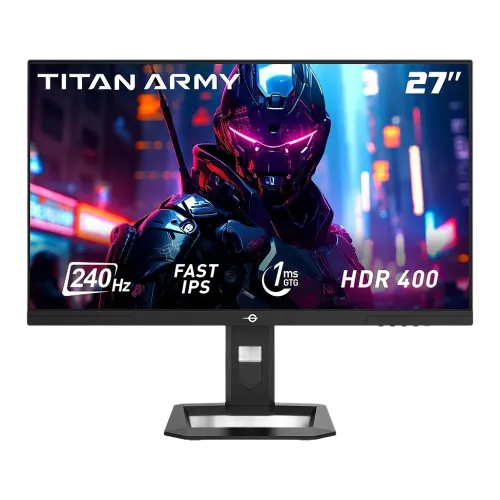
Titan Army P2710S overview
The Titan Army P2710S is a 27-inch QHD gaming monitor with a Fast IPS panel and 240Hz refresh rate. The manufacturer’s exact-model page lists 2560 × 1440 resolution, 1ms GtG, 95% DCI-P3 gamut, HDR400 support, Adaptive Sync, 2 × HDMI 2.0, 2 × DisplayPort 1.4 and an audio output. Its rotating stand supports height, tilt, swivel and pivot adjustments. This base P2710S is distinct from P2710S Plus and P2710S Pro models; those variants may have different refresh claims and specifications. For this model the listed 240Hz is the target refresh, and each input’s actual supported timing should be verified in the manual and graphics settings.
27-inch QHD display
The display measures 27 inches and has a native 2560 × 1440 QHD resolution with a 16:9 aspect ratio. At this size, QHD offers more detail and desktop area than Full HD, supporting games, document work, browser windows and editing timelines. Titan Army lists a pixel pitch of 0.2331mm and approximately 108 pixels per inch. Use native resolution in the computer settings for sharp text. Interface scaling can be adjusted independently if small text is difficult to read. QHD places more work on the graphics card than Full HD, especially when aiming for a high refresh rate in demanding games.
Fast IPS panel and viewing
Titan Army identifies a Fast IPS panel with an ELED backlight, non-glare surface and 178-degree horizontal and vertical viewing angles. IPS viewing can help preserve a consistent image when the viewer is slightly off-center. The manufacturer lists 1.07 billion colors with 8-bit plus FRC support. Actual color depth depends on the connected GPU, input, refresh rate and signal format; consult the manual timing table when using maximum refresh. The anti-glare treatment can reduce reflections but will not eliminate strong reflections in bright rooms. Individual panel uniformity and color accuracy can vary by unit and settings.
240Hz refresh rate and signal timing
The P2710S is listed at 240Hz. Titan Army’s product page confirms the maximum model refresh but the public product description does not clearly specify the maximum mode for each port. The manual should be used to verify the timing table for the regional unit. Connect a suitable source and cable, select 2560 × 1440 and choose a supported refresh in the graphics settings. If 240Hz is missing, check the input, cable and GPU output and connect directly rather than through an adapter. The monitor displays supplied frames; it does not make a game render at 240fps.
QHD gaming and computer requirements
QHD at 240Hz can provide sharp detail and frequent screen updates when a computer can deliver high frame rates. Competitive games may approach the monitor maximum with tuned graphics settings, while demanding games can run below it. Performance depends on the GPU, CPU, game engine, resolution scaling and visual settings. Adaptive Sync can help the screen follow variable frame output within a compatible range, but it does not increase rendering performance. Check your system’s QHD frame rate in the games you play and verify the exact port/cable timing before buying solely for 240fps.
Response time and motion clarity
Titan Army specifies 1ms gray-to-gray response time. This is a pixel-transition specification, not an input-lag value or guarantee that all transitions settle in one millisecond. Motion clarity also depends on refresh, frame rate, overdrive setting and image content. The available OSD response options should be compared in real games. If aggressive overdrive causes bright trails or inverse ghosting, reduce the level. Fast refresh can make motion appear smoother when the computer supplies frames, while actual transition behavior varies across colors and operating modes.
Brightness, contrast and HDR400
The manufacturer lists 400 nits for HDR, 1500:1 typical contrast and HDR400 support. Titan Army describes HDR400; the product material reviewed does not establish an independent VESA DisplayHDR certification record, so treat the “HDR400” wording as manufacturer support unless the supplied certification confirms otherwise. The listed 400-nit HDR figure should not be read as full-screen sustained brightness in every mode. HDR depends on compatible content, source settings and tone mapping. Compare HDR with SDR in the games or videos you use. Set ordinary SDR brightness to match the room rather than leaving it at maximum.
Color gamut and color accuracy
Titan Army lists 95% DCI-P3, 100% sRGB, 88% NTSC and 90% Adobe RGB. Color gamut describes the range of colors the display can reproduce; it does not establish factory calibration or color accuracy for an individual unit. For ordinary gaming and web use, the wide-gamut panel can deliver vivid colors. Color-managed applications and a calibrated profile are important for design, photography or print work. Check which color space and measurement standard the current manual uses before comparing the figures with another product. Avoid relying on gamut coverage alone as evidence of professional color precision.
Adaptive Sync and game modes
Titan Army lists FreeSync/Adaptive Sync for the P2710S. Variable refresh can reduce tearing and stutter when the graphics card and display operate within a compatible range. The product also lists scenario presets, FPS/RTS modes and Game+ functions. Enable synchronization in the monitor and graphics settings where required, and test a supported frame-rate range. Game modes can alter brightness, contrast and color; choose one that suits the game rather than assuming a preset is automatically accurate. The manufacturer page reviewed does not establish a separate NVIDIA G-SYNC certification, so do not treat an Adaptive Sync menu option as proof of certification.
Ports and connection planning
Titan Army lists two HDMI 2.0 inputs, two DisplayPort 1.4 inputs and one audio output. The public product page reviewed does not show a complete per-port refresh table, so check the exact P2710S manual before selecting a connection for maximum refresh, HDR or color depth. Use a bandwidth-capable cable and graphics output. Docks, KVM switches and adapters can restrict modes. The display supports multiple sources; select the active input through the OSD. Do not confuse P2710S ports and timing with P2710S Plus or Pro configurations, even when the model family looks similar.
Audio and speakers
Titan Army lists an audio output but does not list built-in speakers for the P2710S. Plan to use headphones or external speakers. If the computer sends audio over HDMI or DisplayPort, select the monitor as the playback device and route sound from the audio output to compatible equipment. Check computer output settings, monitor volume and cable selection if there is no sound. The manufacturer’s package contents reviewed list the monitor, stand, power cable and DisplayPort cable; a headset or speakers are not listed. Confirm the local box contents before purchase if any accessory is essential.
Ergonomic stand and adjustment
The P2710S rotating stand is one of its practical features. Titan Army lists 120mm height adjustment, tilt from -5 to +20 degrees, swivel ±25 degrees and pivot from -90 to +90 degrees. These adjustments help align the display to the seated user, reduce reflections and rotate supported applications to portrait orientation. Leave enough cable slack for the full movement range and ensure the screen does not hit a wall or adjacent monitor. Adjust the stand on a stable desk and follow the assembly instructions. The product also supports VESA mounting for compatible arms or brackets.
VESA mounting and placement
Titan Army specifies a 100 × 100mm VESA pattern. An arm or wall bracket must match that size and support the monitor’s weight. Follow the supplied manual for screw length and mounting sequence; incorrect hardware can damage the display. The manufacturer lists the body dimensions without stand as 614.3 × 366.8 × 57.2mm and with stand as 614.3 × 513.4 × 216mm. Measure the available desk depth and width, including the base and cable clearance. The stand’s height and pivot movement need extra free space when repositioning.
Eye comfort and surface finish
The monitor has hardware low-blue-light support and DC flicker-free technology according to Titan Army. The non-glare surface can reduce some reflections. Low-blue-light and reading modes may shift white balance warmer, so disable them when color judging. Comfort also depends on brightness, room lighting, text scale, viewing distance and breaks. Keep the screen away from direct reflections, set brightness for the room and use a comfortable posture during long sessions. These are display features and do not constitute medical claims.
Power, weight and package contents
Titan Army lists a 19V, 3.42A power supply, 36W typical consumption, 63W maximum, below 0.5W power-saving use and below 0.3W powered-off consumption. Net weight is about 5.05kg and gross weight about 6.3kg. The stated package size is 861 × 170 × 460mm. The product page lists one monitor, one stand, one power cable and one DisplayPort cable. Regional packages can vary, so compare delivered contents with the current packing list. Use the supplied or manufacturer-approved power adapter and keep its cable ventilated and clear of desk mechanisms.
PIP/PBP and productivity
Titan Army lists picture-in-picture and picture-by-picture support along with scenario modes. These functions can display more than one source or place a smaller source window over the main image, depending on input combinations and supported timing. The manual should confirm which port pairings and resolutions work simultaneously. PIP/PBP can help monitor a second computer or device while using the primary source, but it is not equivalent to two separate displays. Test the desired source combination before relying on it for work. Choose a mode that preserves readable text and does not obscure important game or application content.
Advantages and practical trade-offs
The P2710S pairs a 27-inch QHD Fast IPS screen with a 240Hz target refresh, 1ms GtG, Adaptive Sync, a wide color gamut and a rotating stand. It can suit PC gamers who want both QHD detail and high refresh, while the adjustable stand helps with desk ergonomics. Trade-offs include the graphics power required for QHD at 240Hz, HDR performance that should be judged against the manufacturer’s HDR400 claim, and connection timing that should be confirmed from the exact manual. The product page does not list integrated speakers. Choose the cable, GPU and game settings that fit the computer rather than assuming every setup can reach the maximum mode.
Warranty and Bangladesh purchase terms
Titan Army’s global product page does not establish warranty coverage for a Bangladesh serial or local seller. The existing catalog’s three-year wording needs confirmation with the seller, invoice and serial label. Ask whether coverage is manufacturer-authorized or seller-backed, the start date, pixel and panel policy, service location and exclusions. The manufacturer page lists a current international price and low stock for a selected ship-to region; neither establishes BiponiBD’s local price or availability. Check the live BiponiBD offer, delivery, return and warranty terms at checkout and keep the original invoice and serial information.
Setup and troubleshooting
Assemble the stand, connect the supplied power source and use a suitable HDMI or DisplayPort cable. Select native QHD resolution and choose a refresh supported by the exact port and source. If 240Hz is missing, consult the current manual’s input timing table, verify the graphics output and cable, update drivers and test a direct connection. Enable FreeSync/Adaptive Sync in the OSD and graphics settings if needed. If response overdrive causes artifacts, reduce the setting. For audio, use the computer’s HDMI/DisplayPort playback routing and connect external speakers or headphones to the monitor audio output.
Who should consider this monitor
The Titan Army P2710S suits users who want a 27-inch QHD display, Fast IPS viewing and a high-refresh PC gaming experience with a height-adjustable, pivoting stand. It can also support everyday work, video and multiple-source viewing. Buyers should have a capable graphics card and verify port timing before expecting QHD at 240Hz. If you need built-in speakers, USB-C video, a certified HDR tier or local warranty proof, confirm those features separately. Make sure the actual model label reads P2710S; do not substitute Plus or Pro data when evaluating the base model.
Product summary
Titan Army P2710S is a 27-inch flat QHD 2560 × 1440 Fast IPS gaming monitor with 240Hz refresh, 1ms GtG, 95% DCI-P3, HDR400 support and Adaptive Sync. The manufacturer lists two HDMI 2.0, two DisplayPort 1.4, audio out, PIP/PBP, low-blue-light support and a stand with 120mm height, tilt, swivel and pivot adjustments. Power use is listed at 36W typical and 63W maximum. Confirm exact input timing, local warranty, current offer and stock before purchase.