Pros
- QHD resolution with high refresh can suit fast PC gaming.
- Fast IPS, 95% DCI-P3 and 1ms GtG are listed for P2710S family.
- Stand supports height, tilt, swivel and pivot adjustments.
- Multiple HDMI and DisplayPort inputs support several sources.

All categories
 New condition
Monitors
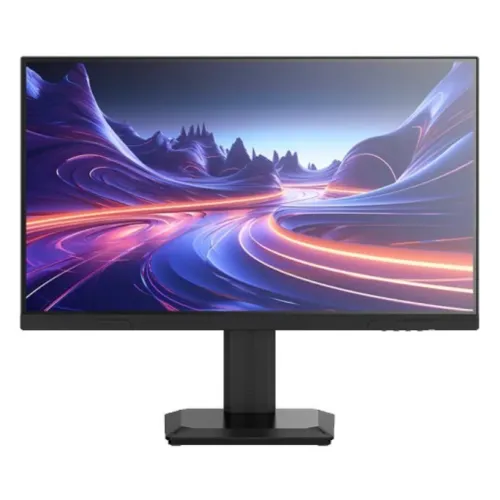
Titan Army · P2710S Plus 27-inch QHD 275Hz
27-inch QHD Fast IPS gaming monitor with 240Hz base refresh, 275Hz overclock claim, HDR400 and Adaptive Sync.
Price unavailable
Price range updating
No verified price is available yet. Store offers will appear when merchants publish them.
Compare store prices
No live offers for this variant
Offers will appear when merchants publish them.
Loading history…
Product story
Titan Army P2710S Plus is listed in this catalog as a 27-inch QHD gaming monitor with a Fast IPS panel and 275Hz maximum refresh. The manufacturer’s current global P2710S page describes the base P2710S at 240Hz, while a Titan Army China catalog entry identifies a P2710S 275Hz variant. Those sources indicate that the 275Hz figure should be treated as an overclocked or regional-variant mode, not as the base P2710S native rate. The catalog Plus variant has a four-way adjustable stand, QHD resolution, Adaptive Sync and HDR400 claims. Confirm the exact model label and local specification sheet before purchase, because P2710S, P2710S Plus and P2710S Pro are distinct names.
The catalog lists a 27-inch flat screen with 2560 × 1440 QHD resolution and a 16:9 aspect ratio. QHD provides more pixels than Full HD at the same screen size and can show more detail in games, documents and desktop applications. The listed pixel pitch is 0.2331mm, consistent with a 27-inch QHD panel. Set the operating system to native resolution for clear text and adjust scaling for comfortable reading. QHD at very high frame rates puts more work on the graphics card than Full HD, so matching 275 frames per second depends on the PC and game rather than the monitor alone.
Titan Army’s global P2710S page identifies a Fast IPS panel, a 1500:1 typical contrast ratio, 95% DCI-P3 coverage, 1.07 billion colors and a 1ms GtG claim for the P2710S family. The catalog P2710S Plus lists the same panel and 1500:1 contrast. Color gamut and accuracy are different measures; the product-family page describes 95% DCI-P3, while exact regional figures may differ. IPS viewing angles and a non-glare surface suit a gaming desk shared with productivity tasks. Actual color and uniformity vary by unit, picture mode and viewing conditions.
Titan Army’s current global P2710S specification identifies 240Hz as the base model refresh, and its official China product index lists a P2710S 275Hz model. The catalog SKU is the Plus variant and lists 275Hz. Treat 240Hz as the base/native model figure and 275Hz as the overclocked or variant-specific maximum until the exact Plus manual confirms its mode. Enable overclock only through a supported monitor setting and verify the signal in the graphics driver. A 275Hz display mode requires compatible GPU output, connection, cable and computer configuration. If the monitor blanks or flickers, return to the last stable timing.
At 2560 × 1440, the 275Hz maximum can benefit a fast gaming PC that sustains high frame rates. Competitive titles may approach the monitor’s maximum at reduced graphics settings, while demanding games will often render below it. The monitor refreshes the image at the selected mode; it does not generate game frames. Choose between image detail and frame rate based on the game and graphics card. Check the selected resolution and refresh in the operating system after enabling the overclock mode. Console output and adapters may have different limits and may not make use of the maximum PC refresh.
The catalog specifies 1ms GtG for the P2710S Plus, and the global P2710S page also lists 1ms GtG. Gray-to-gray transition time is not the same as MPRT, refresh rate or input lag. Motion clarity depends on the panel’s transitions, overdrive setting, frame rate and synchronization. If the monitor offers overdrive levels, compare them with actual gameplay; an aggressive mode can cause overshoot. The 240Hz/275Hz mode can reduce the time between refreshes, but the quality of motion still depends on the whole PC setup and the individual image transitions.
The catalog states HDR400 and lists 400-nit HDR brightness. The current Titan Army global product page identifies HDR400 support and 400 nits HDR for P2710S, while product-family data lists 350 nits SDR and 400 nits HDR. HDR400 is an entry-level VESA DisplayHDR tier where confirmed for the exact variant; check the certification and product label supplied with the Plus SKU. HDR format support does not guarantee local dimming. Use compatible HDR content and operating-system settings, and compare it with SDR if the image looks dim or washed out.
The catalog lists two HDMI 2.0 inputs, two DisplayPort 1.4 inputs and one audio output. Titan Army’s global P2710S page confirms two HDMI 2.0, two DP 1.4 and audio out for the P2710S model family. The exact 275Hz overclock timing depends on the Plus regional variant and selected port. Use a compatible cable and GPU output, connect directly to the graphics card where possible and verify the manual’s port-specific mode table before relying on QHD 275Hz over HDMI or DisplayPort. An adapter or dock can reduce available bandwidth.
Titan Army lists Adaptive Sync/FreeSync for the P2710S family. The catalog also says G-Sync support, but the manufacturer page reviewed describes Adaptive Sync rather than a specific NVIDIA certification. Variable refresh depends on the graphics card, driver, port, cable and operating range. Enable it in both the monitor OSD and graphics settings, then check operation at variable frame rates. Do not interpret an Adaptive Sync menu toggle as proof of separate G-SYNC certification. If the feature is unavailable, update drivers and test a direct connection.
The catalog describes a four-way stand with 120mm height adjustment, tilt from -5 to +20 degrees, swivel ±25 degrees and pivot from -90 to +90 degrees. Titan Army’s global P2710S page confirms a rotating stand with tilt, swivel, vertical pivot and height adjustment, and lists 100 × 100mm VESA compatibility. The exact adjustment range in Plus variant should be checked against its manual. Leave cable slack when rotating the display and mount only on a stable surface or an arm rated for the monitor. Adjust height and tilt to a comfortable seated position for longer sessions.
Titan Army’s P2710S family materials describe hardware-level low-blue-light support and DC flicker-free technology. The catalog lists non-glare surface treatment and low-blue-light support. A low-blue-light mode can alter color temperature; choose a neutral mode when color judgment matters. Reduce reflections, set brightness to suit the room, maintain a comfortable viewing distance and take breaks. Eye-care functions are display options and do not diagnose or treat eye conditions. Confirm whether the Plus regional unit includes a particular certification before relying on a certification claim.
Titan Army lists Game+ features, scenario presets and PIP/PBP split-screen support for the P2710S family. The global page mentions ten scenario modes and picture-in-picture/picture-by-picture. These functions can be useful when viewing two sources or switching between game and productivity presets. Available combinations may depend on input timing and firmware. The catalog does not establish that every source pair can run at the same resolution and refresh. Review the on-screen display and exact manual for supported PIP/PBP layouts, then select the input mode and picture preset that fits the task.
The catalog says no built-in speakers and lists one audio output. The global P2710S page also lists an audio out connection, but does not list internal speakers. Plan to use headphones or external speakers. Audio can be routed over HDMI or DisplayPort if the computer sends audio through that connection, and then passed to the monitor’s output. Select the correct sound device in the operating system. Do not assume that the monitor includes speakers or an audio cable unless the local package documentation confirms it.
The catalog lists a 19V, 3.42A adapter. Titan Army’s global P2710S page lists the same adapter rating, with typical consumption 36W and maximum 63W. The catalog dimensions and weight should be verified against the Plus variant label; the global page gives 614.3 × 513.4 × 216mm with stand, 5.05kg net and 6.3kg gross. Package contents may vary by region; the global page lists monitor, stand, power cable and DP cable. Confirm the local plug, adapter, cables and warranty documents before ordering. Use only the supplied or manufacturer-authorized power adapter.
The P2710S Plus combines a 27-inch QHD Fast IPS panel, 240Hz base P2710S family timing, a 275Hz overclocked or variant maximum, Adaptive Sync, HDR400 support, multiple digital inputs and an adjustable stand. It offers high refresh and QHD detail for PC gaming. Trade-offs include the graphics power needed for QHD at high frame rates, a 275Hz mode that requires overclock and exact-variant support, and 400-nit HDR brightness that should not be confused with premium HDR performance. The Plus version’s exact panel gamut, stand ranges, warranty and port timings should be checked on the local datasheet.
The current catalog lists a three-year warranty, but this review did not verify the local provider or serial-specific terms. Ask the seller whether the warranty is manufacturer-authorized or seller-backed, where service is performed, which dead-pixel policy applies and what exclusions or invoice requirements exist. Titan Army’s global store policies do not prove Bangladeshi coverage. Current BiponiBD price, stock, delivery and offer terms were not verified in this content pass. Confirm these details at checkout and retain the invoice and model/serial label.
Place the display on a stable desk, connect the supplied adapter and connect the GPU with a suitable DisplayPort or HDMI cable. Select the correct input, then set 2560 × 1440 and a stable supported refresh. If the exact Plus model exposes an overclock mode, enable it and choose 275Hz only after confirming source and cable support. If 275Hz disappears, the display blanks or artifacts appear, return to 240Hz and check the timing table, cable, GPU driver and selected input. Enable Adaptive Sync in both OSD and graphics settings if needed. Keep cables clear of the pivot and height mechanism.
Before purchase, confirm the rear label reads P2710S Plus and obtain its exact regional model sheet. Verify native 240Hz versus 275Hz overclock, resolution and port-specific timing, HDR400, Adaptive Sync, stand adjustment, VESA pattern, adapter, package and Bangladesh warranty. The global P2710S model page is not automatically identical to the Plus regional SKU, and P2710S Pro is another model. In summary, the catalog’s P2710S Plus is a 27-inch QHD Fast IPS monitor with an overclocked 275Hz claim, HDR400, Adaptive Sync, dual HDMI and DP inputs and an ergonomic stand. Match the overclock mode to a capable PC and exact-variant documentation.
Helpful answers
Product-specific answers maintained with the catalog information.
The P2710S family is listed at 240Hz; the Plus/China variant is advertised at 275Hz overclock. Verify the exact shipped SKU.
The catalog and Titan Army P2710S family page specify 2560 × 1440 QHD.
Titan Army lists HDR400 support for the P2710S family; confirm exact Plus certification and mode.
The catalog and global P2710S page list two HDMI 2.0, two DisplayPort 1.4 and an audio output.
Yes. Adaptive Sync/FreeSync is listed; this does not itself confirm separate G-SYNC certification.
Treat 275Hz as an overclocked/variant-specific maximum. The global base P2710S page lists 240Hz.
The catalog and global page do not list built-in speakers; an audio output is provided.
The catalog lists 120mm height, tilt -5°/+20°, swivel ±25° and pivot ±90°; confirm exact Plus manual.
Confirm local serial-specific provider, coverage period and exclusions with the seller in writing.
Customer community
Become a merchant
Join BiponiBD, publish accurate offers and start free.