Pros
- QHD resolution and 200Hz target detailed, smooth gaming.
- Mini LED local dimming can improve HDR contrast in supported content.
- Quantum Dot technology is intended to provide wide color coverage.
- 27-inch flat format fits common gaming desks.

All categories
 New condition
Monitors
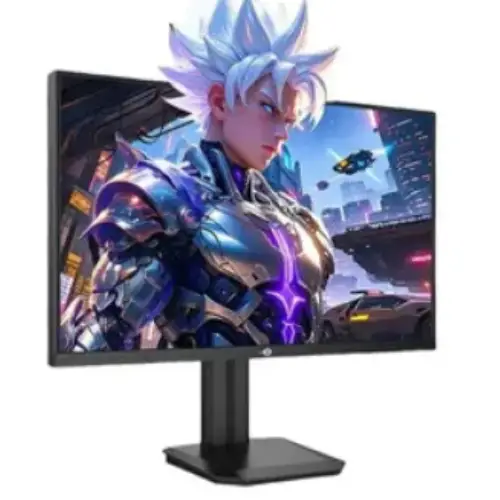
Titan Army · P275MR+ 27-inch QHD 200Hz QD Mini LED Fast IPS
27-inch QHD Fast IPS QD Mini LED monitor with 200Hz and 1152 dimming zones reported for the Plus edition.
Price unavailable
Price range updating
No verified price is available yet. Store offers will appear when merchants publish them.
Compare store prices
No live offers for this variant
Offers will appear when merchants publish them.
Loading history…
Product story
This listing is for Titan Army P275MR+ (Plus), a 27-inch QHD gaming monitor described by Bangladesh sellers as Fast IPS with Quantum Dot Mini LED, 200Hz and HDR1000. It must be distinguished from the similar P275MR without a plus, which regional listings identify as 180Hz with fewer local dimming zones. Titan Army’s public support site does not provide a readily accessible P275MR+ datasheet in the sources reviewed. Treat the numerical figures as regional seller claims pending confirmation from the unit label and manual.
Retail product pages identify a 2560 × 1440 QHD panel with a 16:9 aspect ratio. This resolution balances desktop detail and GPU demand at 27 inches. Set native resolution for crisp text and images, then tune scaling for readability. Check that the source device, cable, adapter and input support QHD at 200Hz. A dock can constrain the signal even when the monitor and GPU support a faster mode.
The P275MR+ is described as a Fast IPS display. IPS technology is intended to provide broad viewing and responsive transitions, while the Mini LED backlight adds local dimming zones behind the LCD. The zones do not make the panel self-emissive: bright objects can still create halos against dark backgrounds. The exact panel and measurements should be checked against the regional manual. Viewing angles, uniformity and pixel response can vary by unit.
Bangladesh and international listings for P275MR+ commonly identify up to 200Hz. Choose the native QHD mode and confirm 200Hz in operating-system and GPU settings. The supported maximum may depend on DisplayPort versus HDMI, cable bandwidth, firmware and source. Check the manual’s timing table rather than assuming every port supports every refresh. High refresh improves motion only when the computer produces enough frames; it cannot increase game rendering speed.
Retailers advertise 1ms response for P275MR+, but the measurement method and overdrive condition should be verified from the specific model manual. Do not treat 1ms as input lag or as a guarantee that every pixel transition completes in that time. Mini LED local dimming can also affect dark-scene appearance. Test the response settings at several frame rates and choose a mode without distracting overshoot or smearing.
The product is marketed with Quantum Dot color and wide-gamut coverage. Regional listings report around 99% DCI-P3, but exact coverage and measurement standard should be confirmed for the full P275MR+ SKU. A wide gamut describes color range, not calibrated accuracy. If using the monitor for photo, design or video work, verify factory calibration data and use a colorimeter and color-managed software. For everyday use, pick an appropriate sRGB or standard mode.
P275MR+ listings identify 1152 local dimming zones. Local dimming can raise HDR contrast by reducing backlight behind dark image areas while illuminating bright regions. The behavior depends on zone algorithm, scene content and setting. A small bright object on a dark background can produce a halo, and desktop UI may visibly change as content moves. Compare local dimming levels in games and normal desktop use and choose a mode that suits each.
Regional sellers advertise HDR1000 and some refer to DisplayHDR 1000. Confirm the certification for the exact P275MR+ model and region before treating it as certified. Peak brightness and sustained full-screen brightness are different measurements; a peak figure does not describe every scene. HDR also depends on Windows or console settings, source content and color mode. Enable HDR for compatible content and compare with SDR in desktop workflows where an HDR signal may look less natural.
A precise SDR brightness and native contrast value was not established in Titan Army documentation available for this review. Local listings may emphasize HDR peak numbers without clearly separating standard output from peak HDR brightness. Use the monitor’s picture controls to set comfortable brightness for the room. Mini LED local dimming affects perceived contrast, but LCD pixels do not turn off individually as on OLED. Confirm the exact test method before comparing published ratios.
Regional specifications commonly list HDMI and DisplayPort inputs, but the exact number and protocol version should be checked on the P275MR+ box and manual. Use the highest-bandwidth supported connection for QHD at 200Hz and verify the input timing table. If 200Hz is missing, connect directly to the GPU, check cable certification and update graphics drivers. Do not copy port counts from the non-plus P275MR or another Titan Army model.
Some retailer pages list an audio output, but the exact P275MR+ I/O configuration should be confirmed. Built-in speakers are not established by the reviewed specification sources, so plan external audio unless the unit documentation says otherwise. HDMI or DisplayPort may carry audio from the host; select the monitor as the playback device if using its audio output. Check the rear panel and OSD to understand which connectors are present.
Regional product descriptions may list height, tilt, swivel and pivot adjustments, but these movements and VESA pattern require confirmation from the exact P275MR+ manual. A Mini LED display may be heavier than a basic monitor, so check the arm’s weight range and mounting dimensions. Place the screen securely, keep its vents clear and use two people for mounting if needed. Avoid forcing the stand or placing pressure on the panel.
QHD at 200Hz can require a strong GPU, especially in demanding modern games. Esports titles may run at high frame rates with tuned quality settings, while visually intensive games may need a lower cap or reduced settings. Check the graphics card’s supported output and use variable refresh if confirmed for this model. The 200Hz label is most useful when the entire system maintains responsive frame pacing.
Regional product descriptions may mention Adaptive-Sync or FreeSync, but a manufacturer-confirmed certification was not found for this exact SKU. Verify the OSD and official or included manual before promising support. If VRR is available, enable it in both monitor and GPU settings and test within the supported range. Variable refresh can reduce tearing but will not improve GPU performance. Compatibility can vary by input, driver and frame rate.
The QHD workspace suits gaming, coding and multiple-window use. Mini LED HDR can benefit supported media and games, while local dimming may behave differently with static desktop elements. For accurate content creation, first confirm color gamut and calibration for this particular model. Use an SDR or sRGB preset where appropriate, disable excessive enhancement and confirm that HDR is configured correctly in the operating system. Do not assume HDR1000 makes the panel a reference display.
Start with the native QHD resolution, select the correct input and set a stable refresh. Explore local dimming, HDR and response options one at a time. Save separate presets if you use both HDR gaming and SDR office work. If the display flickers or blanks at 200Hz, lower refresh and check cable, source output and port. OSD menu names can vary with firmware and regional hardware. Consult the supplied guide for safe reset and update procedures.
The Plus edition’s 200Hz and 1152-zone claims are distinct from the base P275MR listing. Product information online can conflate both models, including HDR, brightness and color claims. HDR peak output does not describe sustained brightness, Mini LED can produce blooming, and 200Hz requires a capable system. Manufacturer documentation and exact regional port data were not verified, so use the seller’s own warranty and specification confirmation for the unit.
The Titan Army public support site does not establish warranty coverage for a specific Bangladesh serial. Ask the seller to confirm authorized channel, warranty duration, service location, panel/dead-pixel policy and invoice requirements. Match the P275MR+ model and serial across monitor, box and invoice. Confirm package contents, return terms and support for Mini LED defects before ordering. Keep purchase proof and test the display within the return period.
Mini LED panels should be protected from impact and pressure during transport. Use the original packaging or a padded cover and avoid placing heavy objects on the display. Power off before cleaning and follow the manufacturer’s instructions with a soft cloth. Do not spray liquid onto the screen. Keep vents open and route cables so that stand adjustments do not strain the ports. Check for pixel, backlight and uniformity issues after setup.
Before choosing P275MR+, verify that the label includes the plus sign, the monitor supports 200Hz over your intended input, the local dimming zone count matches the supplied documentation, and the HDR certification applies to that exact unit. Confirm refresh timing, VRR, port versions, stand, VESA, included cables and serial warranty. Ensure your GPU can render QHD at useful frame rates. These checks prevent data from the non-plus P275MR being applied to the P275MR+.
Helpful answers
Product-specific answers maintained with the catalog information.
Regional P275MR+ listings specify QHD 2560 × 1440 resolution.
Regional listings report up to 200Hz for the Plus model; verify the input timing table.
P275MR+ sources commonly report 1152 zones; confirm on the exact unit documentation.
No, the non-plus model is commonly listed at 180Hz with a different zone count.
Sellers advertise HDR1000; verify certification for the exact regional SKU.
Regional sellers describe a Fast IPS panel with Quantum Dot Mini LED backlight.
Verify VRR/Adaptive-Sync support in the model-specific OSD or manual.
Check the rear-panel layout and exact P275MR+ regional specification.
Confirm serial-specific Titan Army warranty and service details with the seller.
Customer community
Become a merchant
Join BiponiBD, publish accurate offers and start free.