Pros
- Keeps small cable ends within reach
- Two holders allow separate placement
- Multiple slots reduce loose cable clutter

All categories
 New condition
Computer Accessories
Ugreen · LP114
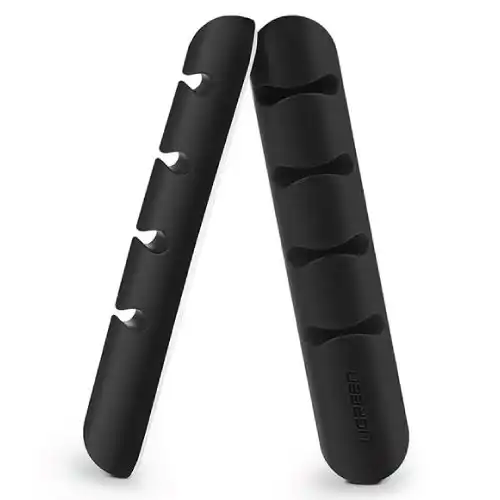
UGREEN LP114 (30762) is a two-piece adhesive cable organizer set with four slots per holder for cords up to approximately 5mm.
Approximate Market Price
BDT 350
Informational market estimate only; this is not a current Store offer.
Compare store prices
No live offers for this variant
BDT 350
Approximate Market Price
Informational market estimate only; this is not a current Store offer.
Loading history…
Product story
The UGREEN LP114 cable organizer, part number 30762, is listed as a two-piece set of small cable holders for desk and workspace cable management. Retail listings describe four slots per holder and support for cables up to about 5mm in diameter. The holders use an adhesive backing to keep compatible small cords parked near the work surface. This is an organizer accessory, not a cable, hub or charging device. Verify quantity, dimensions, material and adhesive details against the selected seller listing.
This listing is for two organizer holders under UGREEN model LP114 / part number 30762. Retailers sometimes call them cable clips, cable holders or desktop cable organizers. Those names describe the same general product form in the sources checked. Confirm the exact model number and two-piece quantity on the package; similarly named cable sleeves and long adhesive wire covers are different products and should not be confused with this LP114 set.
Retailer descriptions specify four slots on each holder and cables up to 5mm in diameter. The slots are intended to keep compatible thin cords separated and accessible, for example charging leads, mouse cables or headphone cords. Fit varies with cable jacket shape and flexibility. Do not stretch the slots or force a cable that is too thick, as that can deform the holder or reduce grip.
Ryans listing reports an organizer size of approximately 106 × 13mm. Check the product packaging for exact dimensions, since retailer descriptions are not perfectly consistent. Before attaching the holder, choose a location that leaves enough room for cable bends and connector reach. Keep it away from moving desk parts, hot surfaces, wet areas and locations where a cable could be snagged.
Retail listings variously describe the holder as silicone or silica gel and identify the LP114 as black. These material labels are seller-provided; the precise compound and finish are not established by the sources checked. If material composition, heat resistance or chemical compliance is important, request the manufacturer specification for part 30762 rather than relying on a general marketplace description.
The LP114 is described with an adhesive backing. For best contact, choose a clean, dry, smooth surface, remove dust and oil, and press the holder firmly according to package directions. Adhesion can be weaker on textured, porous, dusty or freshly treated surfaces. Allow adhesive to settle before loading cables. Avoid placing it on delicate paint, wallpaper or finishes that could be marked when adhesive is removed.
Retail descriptions mention common desk surfaces, but no complete tested surface list is confirmed. Surface coatings, temperature, humidity and cleaning products affect adhesion. The sources do not confirm that the adhesive is reusable or residue-free. Treat placement as semi-permanent unless the packaging says otherwise; test on a discreet spot when surface damage would matter.
Measure the outside diameter of each cable and compare it with the listed 5mm limit. Thin charging cords, headphone leads and mouse cables are typical candidates if they sit securely. Thick HDMI leads, mains power cords, stiff braided cables and multi-cable bundles may exceed the capacity. Never force cables into a narrow slot or use the holder to support a heavy cable under tension.
Install the two holders where frequently used cable ends can rest without falling behind the desk. Leave enough slack for device movement and avoid sharp bends near USB or audio connectors. Keep each cable in its own slot to reduce tangles. The holders guide loose leads; they do not replace proper strain relief or secure routing for heavy or hazardous wiring.
Wipe the holder with a soft, slightly damp cloth when needed and let it dry fully. Avoid solvents or abrasive cleaners unless the product instructions permit them. Periodically check the adhesive and remove dust around the base. If it loosens, unload the cables and replace or remount it following the manufacturer guidance rather than relying on a failing adhesive pad.
The two-piece set can keep small cable ends visible and separated, and four slots per holder offer several parking positions. The listed 5mm limit keeps it suited to thin cords rather than every cable type. Adhesive performance depends on surface preparation and may not suit rough or delicate finishes. Dimensions and material wording vary among seller pages and should be checked for the exact unit.
Choose the LP114 when you need two adhesive desktop cable holders for cords no thicker than approximately 5mm. Check the desk surface, the number of cables and the model/quantity shown by the seller. If you need to route thick cables, bundle a long run under a desk or reposition the clips frequently, select a product designed for that use and with verified attachment details.
Before ordering, confirm that the seller is supplying UGREEN LP114 / 30762 and includes two holders. Check the colour, dimension and adhesive description, as seller pages may change. Current price and stock vary by retailer and are not BiponiBD offers. Inspect the delivered set for damaged slots, contaminated adhesive or missing pieces before mounting.
It is a desktop cable-management set, model LP114 and part number 30762, sold as two cable organizer holders. It is for routing and parking cables within reach.
The listing identifies a 2-pack. Confirm the package quantity on the selected seller listing and on delivery.
Retail listings describe four cable slots per organizer, allowing several individual cords to be placed along the desk.
The holder is listed for cables up to about 5mm in diameter. Measure the cable and check that it sits securely without forcing it into a slot.
Retail listings describe silicone or silica gel. Exact material terminology varies; confirm the package if a specific material or allergy/compliance requirement matters.
Ryans listings show approximately 106 × 13mm. Dimensions can vary in retailer data; check the current listing or product packaging for exact measurements.
Retailer descriptions show an adhesive backing. Surface preparation and compatibility matter; clean and dry the surface first, and allow the adhesive to set as directed by the package.
Adhesive cable clips may lose grip if removed, repositioned or applied to dusty, textured or oily surfaces. The checked sources do not establish reusable adhesive, so treat it as a fixed mount unless packaging confirms otherwise.
Retailers describe use on common smooth surfaces, but no complete verified surface matrix is provided. Test an inconspicuous area and avoid delicate finishes that may be damaged by adhesive removal.
Only if the cable fits the listed 5mm limit and sits securely. Many power, HDMI and braided cables are thicker; do not force oversized cables into the slots.
Retailer product pages identify the LP114 version as black. Confirm colour on the seller listing because images and variants can change.
No cables are listed as included; the product is a holder set. Verify exact package contents with the seller.
Helpful answers
Product-specific answers maintained with the catalog information.
It is a desktop cable-management set, model LP114 and part number 30762, sold as two cable organizer holders. It is for routing and parking cables within reach.
The listing identifies a 2-pack. Confirm the package quantity on the selected seller listing and on delivery.
Retail listings describe four cable slots per organizer, allowing several individual cords to be placed along the desk.
The holder is listed for cables up to about 5mm in diameter. Measure the cable and check that it sits securely without forcing it into a slot.
Retail listings describe silicone or silica gel. Exact material terminology varies; confirm the package if a specific material or allergy/compliance requirement matters.
Ryans listings show approximately 106 × 13mm. Dimensions can vary in retailer data; check the current listing or product packaging for exact measurements.
Retailer descriptions show an adhesive backing. Surface preparation and compatibility matter; clean and dry the surface first, and allow the adhesive to set as directed by the package.
Adhesive cable clips may lose grip if removed, repositioned or applied to dusty, textured or oily surfaces. The checked sources do not establish reusable adhesive, so treat it as a fixed mount unless packaging confirms otherwise.
Retailers describe use on common smooth surfaces, but no complete verified surface matrix is provided. Test an inconspicuous area and avoid delicate finishes that may be damaged by adhesive removal.
Only if the cable fits the listed 5mm limit and sits securely. Many power, HDMI and braided cables are thicker; do not force oversized cables into the slots.
Retailer product pages identify the LP114 version as black. Confirm colour on the seller listing because images and variants can change.
No cables are listed as included; the product is a holder set. Verify exact package contents with the seller.
Customer community
Become a merchant
Join BiponiBD, publish accurate offers and start free.