Pros
- Connects a compatible USB-C data cable to a USB-B printer port
- Small converter can simplify a USB-C host connection
- No separate power adapter is listed as required for the converter itself

All categories
 New condition
Computer Accessories
Ugreen · US382 (20120)
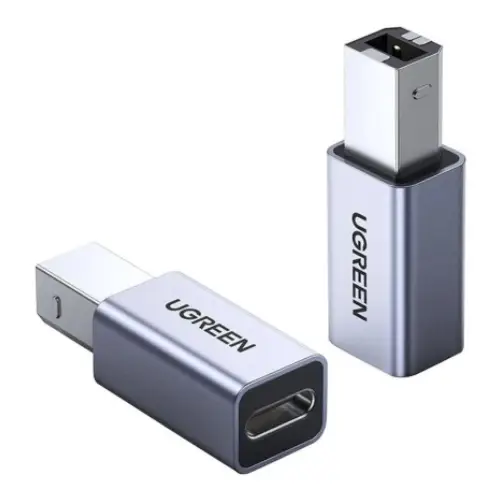
UGREEN US382 (20120) adapts a USB-C data cable to a USB-B peripheral port. USB 2.0 transfer is listed up to 480Mbps; cable sold separately.
Approximate Market Price
BDT 400
Informational market estimate only; this is not a current Store offer.
Compare store prices
No live offers for this variant
BDT 400
Approximate Market Price
Informational market estimate only; this is not a current Store offer.
Loading history…
Product story
UGREEN US382, part number 20120, is a connector adapter with a USB Type-B male plug and a USB Type-C female socket. It can connect a compatible USB-C cable to a peripheral with a USB-B device port, such as a printer, when the computer or other host supports USB data. Local listings specify USB 2.0 transfer up to 480Mbps, an aluminium case and an LED indicator. This small adapter is not a complete cable, charger or USB hub.
Insert the USB-B male plug into the USB-B socket on the printer or other peripheral. Connect a separate, compatible USB-C cable to the adapter’s female USB-C socket and then to the host device. The adapter itself has no USB-C male plug. Check that the cable, host, peripheral and software all support the desired data connection. A charging-only USB-C cable will not provide the required data path.
Star Tech, Ryans and other local listings specify USB 2.0 and up to 480Mbps. This is the maximum USB 2.0 signaling rate, not a guaranteed file-transfer speed. Real throughput depends on the host port, cable, peripheral, driver and workload. Any USB 3.x capability elsewhere in the chain will be limited by this USB 2.0 adapter. The product does not upgrade the printer to a faster interface.
The adapter can be useful when a USB-C computer or tablet must connect to a printer or other device with a USB-B port and a compatible USB-C data cable. Confirm the device’s port shape and its manufacturer’s supported connection method. Some printers require drivers or a specific host mode. This adapter does not enable network printing, install software or guarantee compatibility with every printer.
Use a USB-C cable that supports USB data rather than charging only. The host device’s USB-C port must support the relevant data function and operating system. Thunderbolt 3 ports may support USB data compatibility, but verify the host manual. A USB-C connector shape alone does not guarantee host mode or device support. If the printer is not detected, test with a known-working data cable and another USB-C host.
Retail listings describe an aluminium case and an LED indicator. The indicator can provide a visual cue when connected, but exact light behaviour or diagnostic meaning was not consistently specified. The housing description does not establish a drop, heat or water-resistance rating. Avoid leaving the adapter unsupported if the attached USB-C cable is heavy, and protect the printer port from side pressure.
The US382 is listed as a USB 2.0 data adapter. The reviewed sources do not establish USB-C Power Delivery, a charging-current rating, video output, audio support or a power supply. Do not use it as a charger or display converter. Power for the connected peripheral is determined by the host and device, and printers commonly require their own separate mains supply.
Connect the USB-B male end to the device, attach a data-capable USB-C cable to the adapter and connect the other cable end to the host. Install the peripheral’s driver if required and choose the correct device in system settings. If the connection fails, inspect the ports, try another known-working USB-C data cable and host port, and bypass unpowered hubs during diagnosis. Check the LED only as an indicator, not as proof that software setup is complete.
Hold the adapter housing when inserting or removing it and avoid twisting the USB-B plug in its socket. Support the attached cable to limit strain on the printer or adapter. Keep contacts clean and dry, avoid sharp bends and store the small converter where it will not be lost. Stop use if the housing, LED or connector is damaged or the adapter becomes unusually hot.
Confirm UGREEN US382/20120 and the USB-B male to USB-C female layout with the selected seller. A separate USB-C cable is needed and is not confirmed as included. Star Tech and PQS list a one-year warranty; warranty provider, service location and return terms may vary by retailer. Check those terms for the specific unit and retain the invoice. Other shops’ stock and prices do not verify a live BiponiBD offer.
US382 provides a compact USB-B-to-USB-C connection for compatible printer or peripheral setups using a separate data cable. Local sellers list an aluminium case, LED indicator and USB 2.0 transfer up to 480Mbps. It remains limited to USB 2.0, requires a separate USB-C cable and depends on host, cable, driver and peripheral support. Charging, USB-C PD and video features are not established.
UGREEN US382 model 20120 has a USB-B male plug and USB-C female socket. It connects a compatible USB-C data cable to a USB-B peripheral such as a printer. Retailers list USB 2.0 up to 480Mbps, an aluminium case and an LED indicator. A separate data-capable USB-C cable is required; charging and video functions are not verified.
Helpful answers
Product-specific answers maintained with the catalog information.
This adapter is UGREEN US382, part number 20120.
It has a USB Type-B male plug and a USB Type-C female socket.
Plug a separate data-capable USB-C cable into its female socket and connect that cable to a compatible host.
It can connect to a printer with a USB-B port when the host, cable and printer support USB data.
Retailers list USB 2.0 up to 480Mbps; actual transfer speed depends on all connected devices.
A USB-C cable is not confirmed as included; check the selected package.
No. The connection requires a USB-C cable that supports data transfer.
A charging-current or USB-C PD rating was not established for this adapter.
Video output is not specified; the US382 is listed as a USB 2.0 data adapter.
Retailers list an LED indicator and aluminium case, but do not consistently describe LED status meanings.
Some sellers list one year; confirm current coverage with the specific retailer.
Customer community
Become a merchant
Join BiponiBD, publish accurate offers and start free.