Pros
- Connects compatible USB-A hosts directly to Type-B printer ports
- Two-meter length supports flexible desk placement
- USB 3.0 speed and connector finish are documented by product listings

All categories
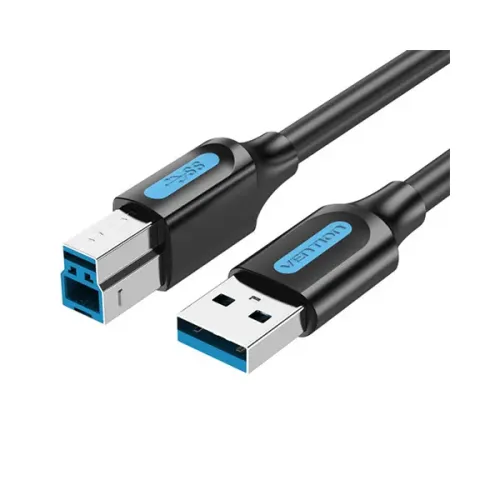 New condition
Computer Accessories
VENTION · COOBG 1.5m USB 3.0 Type-A to Type-B Printer Cable
Vention COOBG is a 1.5m USB-A male to USB-B male printer cable listed at USB 3.0 data transfer up to 5Gbps.
Approximate Market Price
BDT 390
Informational market estimate only; this is not a current Store offer.
Compare store prices
No live offers for this variant
BDT 390
Approximate Market Price
Informational market estimate only; this is not a current Store offer.
Loading history…
Product story
The Vention COOBG, model COOBG, is a 1.5-meter USB Type-A male-to-Type-B male cable. Product listings identify it as a USB 3.0 printer cable with data transfer up to 5Gbps and not specified connectors. The Type-A end connects to a compatible computer or host, while the Type-B end fits supported printers, scanners or similar equipment. It carries data between devices; it does not supply the printer’s main power or add wireless/network capability.
The COOBG has USB-A male at the host end and USB-B male at the peripheral end. Connect the USB-A plug to a compatible laptop, computer, tablet or other host and the Type-B plug to a printer or device with that port. The ends are not interchangeable. This cable is not USB-A-to-B and connects directly to a compatible USB Type-A host port. Check both device ports before ordering to avoid buying the wrong connector layout.
Vention and retailer listings describe USB 3.0 with a maximum rate up to 5Gbps. This is the theoretical USB 3.0 signaling limit, not guaranteed real-world file transfer speed. Multiple Bangladesh retailer listings identify the model as USB 3.0 with up to 5Gbps transfer. These are maximum interface rates; real throughput depends on the connected printer, host and workload. Actual throughput depends on the host, peripheral and workload.
The listed cable length is 1.5 meters. Measure the route between the host and printer and leave slack so the cable is not pulled taut. Avoid pinching it under furniture, tight bends at connector strain reliefs, sharp edges and heavy foot traffic. If the printer disconnects or is not detected at this length, test a shorter cable and direct host connection. The cable is not documented for outdoor, in-wall or permanent building installation.
Star Tech lists not specified connectors. This describes the connector finish; it does not guarantee improved printing quality or a particular service life. Vention country listings may describe additional shielding or cable construction, but such details are not consistently available across the reviewed COOBG sources. Exact conductor gauge, shielding layers, outer diameter, jacket material and certification report were not fully verified for this Bangladesh offer. Inspect the connector and package on delivery.
The USB-B end fits compatible printers and some scanners, audio interfaces or other peripherals, depending on their port and firmware. The host must have a compatible USB-A port and operating-system driver support. A connector that fits does not guarantee support for every printer feature, scanning application or host OS. Network printing and shared printer access require separate configuration and are not provided by this direct cable.
The cable itself is not a printer power supply. Many printers require their own AC power connection, and some peripherals may use USB bus power within limits defined by their host and device. The reviewed COOBG listings do not establish a current rating or a particular USB-A charging profile. Follow the peripheral maker’s power instructions and do not use the cable as a charger or infer Power Delivery support from the USB-A plug.
Connect the USB-A host end and Type-B peripheral end, then follow the printer or scanner maker’s setup steps. Install the correct driver if the operating system does not detect the device automatically. For first-time troubleshooting, connect directly without a hub or adapter. If the laptop’s USB-A port supports data but not the expected feature, check the port capabilities and device requirements; USB-A connector shape alone does not define all supported functions.
If the printer is not detected, check device power, reseat both connectors, try another compatible host port and verify the printer driver. Remove docks and hubs while isolating the issue. For low throughput, inspect host and peripheral USB modes; a USB 3.0 connection is limited by the slowest component and protocol overhead. If faults persist, test with a known-good cable of suitable length and ask the printer maker for supported cabling guidance.
Current warranty coverage depends on the selected seller and exact offer. Ask for the warranty period, service location and requirements for replacement or repair. Prices and stock on other websites do not confirm BiponiBD’s live offer. Check the package for COOBG/COOBG, USB-A-to-Type-B ends and 1.5m length, and retain the invoice for any service claim. Verify the connector type on both host and printer before purchase.
COOBG provides a two-meter USB-A-to-USB-B connection with USB 3.0 transfer up to 5Gbps and not specified connector finish listed. It can connect a compatible USB-A host to supported printer-class equipment without a separate USB-A adapter. The cable does not power the printer, and a reseller’s 5Gbps USB 3.0 claim conflicts with the product’s USB 3.0 listings. Confirm both ports and current seller terms.
Vention COOBG product COOBG is a 1.5m USB-A male-to-USB-B male cable. Product-specific listings describe USB 3.0 up to 5Gbps and not specified connectors. A reseller 5Gbps claim conflicts with the USB 3.0 descriptions and is unverified. It works only with compatible USB-A hosts and Type-B peripherals; printer power and drivers are separate. Confirm the current seller warranty.
Helpful answers
Product-specific answers maintained with the catalog information.
The model is Vention COOBG, model COOBG.
Product listings specify 1.5 meters.
USB Type-A male on one end and USB Type-B male on the other.
Model-specific sources describe USB 3.0.
Up to 5Gbps is listed for USB 3.0; actual throughput depends on both devices and workload.
It can connect a compatible printer with a USB Type-B port to a USB-A host that supports data.
No. The printer’s main power is separate; follow the printer maker’s instructions.
A reseller lists 5Gbps, but this conflicts with model-specific USB 3.0/5Gbps sources and is unverified.
Star Tech lists not specified connectors.
Confirm the current coverage and claim terms with the selected seller.
Customer community
Become a merchant
Join BiponiBD, publish accurate offers and start free.