Pros
- Five-meter length supports flexible placement of compatible USB printers
- Standard Type-A to Type-B connector layout for supported equipment
- USB 2.0 data rate is specified by multiple local retailers

All categories
 New condition
Computer Accessories
VENTION · COQBJ 5m USB 2.0 Printer Cable
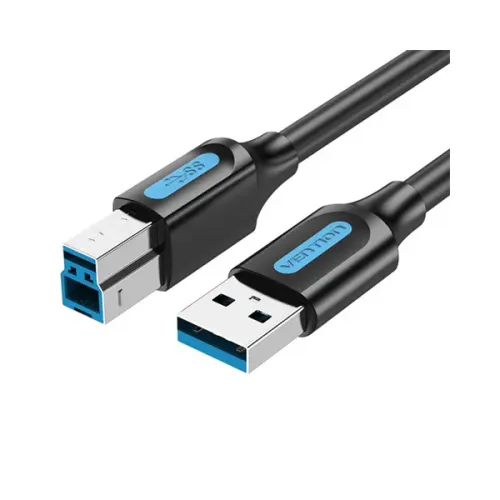
Vention COQBJ is a 5m USB 2.0 Type-A to Type-B cable for compatible printers, listed at 480Mbps and 2A. Confirm printer support and warranty.
Approximate Market Price
BDT 400
Informational market estimate only; this is not a current Store offer.
Compare store prices
No live offers for this variant
BDT 400
Approximate Market Price
Informational market estimate only; this is not a current Store offer.
Loading history…
Product story
The Vention COQBJ is a five-meter USB 2.0 cable listed with a Type-A host plug and Type-B printer plug. It is intended to connect compatible printers, scanners, fax machines or all-in-one devices to a computer. Local listings specify up to 480Mbps and a 2A rating; Star Tech and Global Brand describe tinned copper conductors. The cable does not supply printer power or guarantee that every printer supports USB connection over this length.
The cable has a USB Type-A plug for a compatible host and a USB Type-B plug for equipment with that printer-style port. Connect the A end to the computer and the B end to the printer or other supported device. It is not a Type-C cable and does not include a USB hub or converter. Check the device port shape before ordering; some newer printers use a different connector.
Product listings specify USB 2.0 with data transfer up to 480Mbps. This is the theoretical USB 2.0 signaling limit, not guaranteed file-copy throughput; protocol overhead, host ports and device capabilities affect actual performance. One marketplace listing claims 5Gbps, which conflicts with the model-specific USB 2.0 specifications and was not adopted. Treat this model as USB 2.0 unless the manufacturer package documents a different revision.
The listed length is 5 meters, which can place a printer farther from the computer than a short desk cable. Measure the route and leave slack so the cable is not stretched. Avoid routing it under chair wheels, across sharp edges or in high-traffic areas. USB connection reliability depends on the cable, host, printer and installation environment; if connection drops occur, test a shorter cable and a direct host port.
Star Tech lists a tinned copper conductor and Global Brand describes 24+28AWG, approximately 4.5mm outer diameter and a 2A rated current. WebDokan describes double shielding. These details are retailer-published and not all are consistently stated across sources; verify exact construction against the selected offer. The reviewed sources do not establish certification reports, connector plating, ferrite/magnetic ring design for every batch or a formal installation rating.
Some listings specify a 2A rated current, but that figure does not mean this cable powers a printer or supports every charging or power-delivery profile. USB Type-B printer cables primarily carry data and device-level USB power signaling; many printers use a separate mains supply. Do not use this cable as a charger or infer USB Power Delivery support. Follow the printer manufacturer’s power and connection instructions.
The cable may work with printers and other devices that provide a standard USB Type-B port and support USB connection. The host operating system may need the printer driver or manufacturer software. A USB plug fitting the port does not guarantee support for every printer feature, scanning workflow or operating system. For network-enabled devices, USB direct connection may not provide network printing or shared access unless configured by the host.
Turn on the printer and connect the cable to the computer and printer ports. Follow the printer manufacturer’s setup instructions; install the correct driver if the operating system does not detect the device automatically. Avoid pulling the cable while printing or scanning. Keep the cable’s connectors accessible and avoid force when inserting the Type-B plug, since similar-looking USB connectors are not interchangeable.
If the printer is not detected, confirm power, check both connectors, test another host port and reconnect after restarting the printer or computer. Verify the correct driver and selected printer in the operating system. Remove hubs or adapters during troubleshooting. If the device disconnects repeatedly over the 5m path, try a shorter cable or another port. A marketplace speed claim alone does not resolve a compatibility issue.
Global Brand advertises a one-year brand warranty, but coverage and service handling depend on the selected seller and current offer. Confirm whether claims are handled by the brand or retailer and what invoice is required. Retailer stock or prices do not establish the live BiponiBD offer. Verify the COQBJ model, USB-A to USB-B ends and 5m length on delivery; retain the purchase receipt and packaging.
COQBJ offers a listed five-meter reach, USB 2.0 Type-A-to-Type-B connection and up-to-480Mbps signaling for compatible printers. Retailer sources describe tinned copper, 2A current rating and shielding details, though not all construction data is consistent. It cannot power a printer, convert to USB-C or guarantee 5Gbps. Confirm the printer port and seller warranty before ordering.
Vention COQBJ is listed as a 5m USB 2.0 Type-A-to-Type-B printer cable. Retailers specify up to 480Mbps and 2A; a separate 5Gbps marketplace claim conflicts with USB 2.0 listings and is unverified. It may connect compatible printers and scanners that have a Type-B port. Printer power is separate. Confirm the selected seller’s warranty and exact cable specification.
Helpful answers
Product-specific answers maintained with the catalog information.
The model is Vention COQBJ.
Retail listings specify 5 meters.
The cable has a USB Type-A host end and a USB Type-B device end.
Model-specific product listings specify the USB 2.0 standard for this printer cable.
Up to 480Mbps is listed for USB 2.0; actual throughput depends on devices and use.
It can connect a compatible printer with a USB Type-B port; driver and OS support may be required.
No separate printer power is provided; follow the printer maker’s power instructions.
Retailers list 2A; this does not establish charging or USB-PD support.
A marketplace listing claims 5Gbps, but this conflicts with the model-specific USB 2.0/480Mbps listings and is unverified.
Global Brand lists one year; confirm current terms with the selected seller.
Customer community
Become a merchant
Join BiponiBD, publish accurate offers and start free.