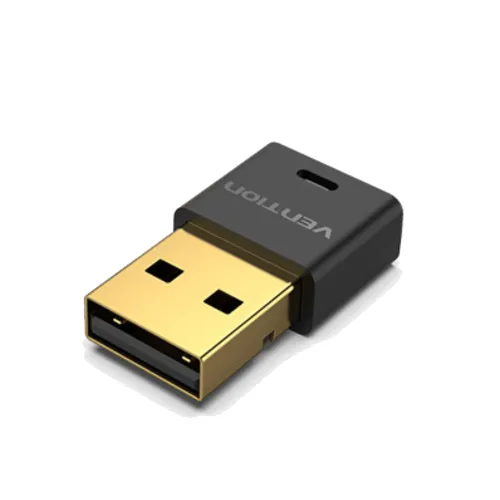
Vention NAFB0 USB Bluetooth 5.1 AptX Adapter
The Vention NAFB0 is a compact USB-A Bluetooth adapter for adding Bluetooth connectivity to a compatible computer. It is listed with Bluetooth 5.1, aptX audio support, a black ABS shell, a blue status indicator and a barrier-free range of up to 20 metres. Connect it to a computer’s USB port, install the appropriate Vention driver where required, and pair the computer with compatible Bluetooth audio or input devices.
Wireless audio and device connection
The NAFB0 is useful for a desktop or older laptop that lacks built-in Bluetooth, or when an existing adapter needs replacement. It can connect a compatible computer with Bluetooth speakers, headphones, keyboards, mice, printers, gamepads and other supported devices. aptX is a Bluetooth audio codec: the computer adapter and the paired headset or speaker both need compatible aptX support for that codec to be used. Otherwise, they may use another mutually supported Bluetooth audio codec.
Bluetooth version and range
The model is specified as Bluetooth 5.1. Vention and Bangladesh retailer materials list transmission up to 20 m in an unobstructed area. That is a best-case line-of-sight figure, not a guaranteed indoor distance: walls, nearby wireless equipment, USB-port placement and the paired device can shorten the practical range. For best reception, place the adapter where it is not shielded by a metal computer case or other obstacles.
Driver and operating-system support
Vention’s NAFB0 manual includes driver-installation steps and a driver CD in the package list. Vention also publishes a Bluetooth 5.1 adapter driver download for Windows, and NAFB0 listings specify Windows 7, 8, 8.1 and 10 support. A compatible Windows computer may need the correct driver and a restart before pairing. Support for newer Windows versions, macOS, Linux, game consoles and other USB hosts should be confirmed before purchase; a USB port alone does not guarantee driver compatibility. If the computer already has Bluetooth, avoid conflicting adapter drivers and follow the manual’s instructions for resolving conflicts.
Recorded specifications
- Brand / model: Vention NAFB0
- Product type: USB Bluetooth adapter / dongle
- Host interface: USB-A
- Bluetooth version: 5.1
- Audio profile / codec: aptX support is listed; codec use depends on the paired audio device
- Wireless range: Up to 20 m barrier-free (listed)
- Device connections: Retail sources differ between five and seven simultaneous devices; confirm the package specification
- Status indicator: Blue indicator light
- Housing: Black ABS (listed)
- Operating systems: Windows 7/8/8.1/10 listed; driver is required in the Vention manual
- Warranty: Star Tech lists one year; check coverage and service with the seller
Advantages
- Bluetooth 5.1 and aptX support can add compatible wireless audio and peripheral connections to a computer.
- The USB-A dongle is compact and requires no separate power supply.
- A blue indicator helps show adapter activity, and the adapter can be left connected to a desktop or laptop.
- The listed 20 m barrier-free range can provide more placement flexibility than a short wired connection.
Limitations and compatibility checks
- Driver installation is part of the documented setup; verify that the Vention NAFB0 driver supports your exact operating system before ordering.
- Actual range falls when walls, interference or device placement obstruct the signal.
- Retailer materials disagree on simultaneous-device capacity (five versus seven); do not rely on a higher figure without checking the included documentation.
- aptX audio quality is available only when the paired headphones or speaker also support a compatible aptX codec.
- USB-A is the host connection. A USB-C-only computer requires a suitable adapter, and the adapter’s driver must still support that computer.
Setup guidance
- Check the computer’s operating system and download the NAFB0 / Bluetooth 5.1 driver from Vention’s support page when needed.
- Install the driver as instructed and restart the computer if the setup guide requests it.
- Insert the NAFB0 into a USB-A port, open Bluetooth settings and place the target device into pairing mode.
- Choose the paired device in the operating system. For aptX audio, confirm aptX is supported and selected at both ends.
If pairing fails, check that the target accessory is not connected to another host, confirm the correct Vention driver, try another USB port and follow the manual’s advice for any conflict with built-in Bluetooth. Keep a copy of the original driver package if the included CD cannot be used with your computer.
Price, availability and warranty
Bangladesh retailer listings reviewed for the NAFB0 ranged from ৳650 to ৳750. Prices, stock and promotions can change; this market reference is not a live BiponiBD Store offer. Star Tech lists a one-year warranty, but the selected seller’s invoice and terms determine service coverage. Confirm stock, current price, compatibility, return conditions and warranty provider before checkout.
Source and specification note
Model, Bluetooth 5.1, aptX, 20 m barrier-free range, indicator, ABS shell, Windows support, warranty and local pricing were checked against the Vention NAFB0 instruction manual, Vention’s driver download page and exact-model Bangladesh retailer listings. The manual lists a driver CD and asks users to install a driver. Simultaneous-device counts differ across retailer sources, so the exact count is not guaranteed here.