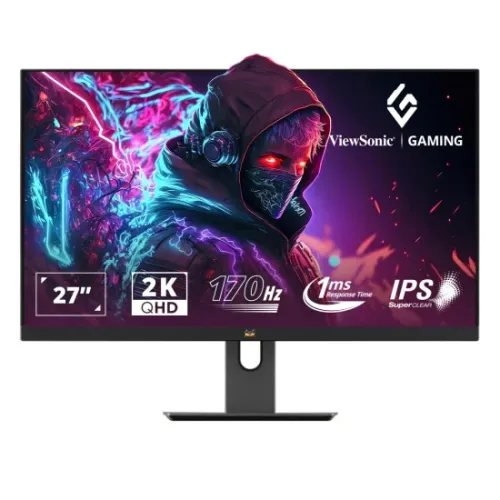
ViewSonic Omni VX2758A-2K-PRO-2 overview
The ViewSonic Omni VX2758A-2K-PRO-2 is a 27-inch QHD IPS gaming monitor with 2560 × 1440 resolution, a 16:9 matte display and up to 185Hz refresh according to ViewSonic’s current India specification. It lists 1ms MPRT, HDR10, FreeSync, 300 cd/m² typical brightness, 95% DCI-P3 coverage, height adjustment and a pivoting stand. The exact model has two HDMI 2.0 inputs and one DisplayPort. The manufacturer’s current 185Hz figure updates this product record’s older 170Hz name/spec.
Exact model and refresh-rate clarification
The full model is VX2758A-2K-PRO-2. ViewSonic’s current India page and regional product sheet list a 27-inch QHD IPS monitor with 185Hz maximum refresh. This differs from the existing BiponiBD title and imported attributes that say 170Hz, so this update corrects the stated rate to 185Hz using the current manufacturer information. The model is distinct from VX2758A-2K-PRO, PRO-3 and PRO-4 variants. Preserve the full suffix when checking the carton and invoice.
27-inch IPS display and QHD resolution
The monitor has a 27-inch IPS panel with a native 2560 × 1440 QHD resolution and 16:9 aspect ratio. At this size, QHD offers more desktop detail than Full HD while keeping graphics demands below 4K. The matte surface has anti-glare treatment and 3H hard coating. Room lighting, distance and operating-system scaling still influence comfort. ViewSonic lists a 0.233mm pixel pitch and 178° horizontal and vertical viewing angles.
185Hz refresh and 1ms MPRT
ViewSonic’s current India specification lists 185Hz maximum refresh, while earlier material for this model has circulated with 170Hz. This content uses the current manufacturer page and notes the source discrepancy for buyers to verify on the exact regional unit. ViewSonic also lists 1ms MPRT, a motion-picture response measurement that differs from gray-to-gray pixel response. Actual refresh depends on source hardware, input, cable and settings; select the supported mode in the operating system.
FreeSync and input-dependent VRR
The product specification lists FreeSync. ViewSonic’s product information specifies two HDMI 2.0 inputs and one DisplayPort 1.4 input. The exact variable refresh range and highest compatible mode can depend on input, resolution and region; use the manual and on-screen signal information for the supplied unit. Enable FreeSync in the monitor menu and compatible graphics driver. Variable refresh can reduce tearing and uneven motion when the frame rate changes, but does not increase the GPU’s performance.
Brightness, contrast and HDR10
ViewSonic lists typical brightness of 300 cd/m², static contrast of 1,000:1 and HDR10 support. A separate dynamic contrast figure is a processing-based specification and should not be compared directly with native contrast. HDR appearance depends on the source, content mastering, display settings and room conditions. HDR10 compatibility allows supported content signals, but does not guarantee a particular certified HDR tier or identical performance in every scene.
Color gamut and bit depth
The current India specification lists DCI-P3 at 95% coverage, NTSC at 97% size and sRGB at 137% size, along with 8-bit true color and 16.7 million colors. These are gamut and bit-depth specifications, not a promise of professional factory calibration. Choose appropriate picture modes for games, video or general work. For color-critical production, use a calibrated display profile and color-managed software and verify the exact panel’s measured behavior.
HDMI 2.0 and DisplayPort 1.4
ViewSonic lists two HDMI 2.0 ports with HDCP 2.2 and one DisplayPort 1.4 input. The manufacturer’s global material may vary in port branding and mode details by market, so check the labels on the delivered unit and its regional manual. Use a cable suitable for QHD at the desired refresh and confirm that the graphics card supports the mode. A console may have refresh limits different from a gaming PC.
Ergonomic stand and VESA mount
The catalog and manufacturer materials identify height adjustment up to 150mm, tilt, swivel and 90° pivot, with a 100 × 100mm VESA pattern. ViewSonic’s public product data describes the monitor as ergonomically adjustable; verify pivot and swivel range for the regional SKU in its manual. Before fitting an arm, check weight capacity, mounting screw fit and desk strength. Allow space for rotation and cable routing, especially when switching between portrait and landscape orientation.
Eye-care features and backlight life
ViewSonic lists software-based Low Blue Light, flicker-free technology and a minimum backlight life of 30,000 hours. Eye-care functions may help adjust display behavior, but do not replace breaks, suitable room lighting or comfortable brightness. Backlight-life figures are manufacturer estimates and not a guarantee that a specific component will last for that duration. Use the on-screen modes that remain comfortable for the task and confirm settings after changing inputs.
Audio output and speakers
The official product information lists a 3.5mm audio output. It does not list built-in speakers for the VX2758A-2K-PRO-2; confirm the delivered regional model’s manual before expecting monitor audio. Use a headset, external speaker system or the computer’s own audio output. If audio is sent over HDMI or DisplayPort, select the correct output device and check the source volume. The 3.5mm port can route compatible audio to external equipment.
Dimensions, weight and power
ViewSonic’s global product information lists approximate physical dimensions of 614 × 424.32–574.32 × 214mm with stand and 614 × 366 × 47mm without stand, and net weights around 6.3kg with stand and 4.5kg without. The monitor uses an internal power supply and accepts AC 100–240V. Consumption varies by mode and region. Check the rear label for the exact power rating and ensure the desk or mount can safely support the unit.
Package contents and regional warranty
The ViewSonic product sheet lists the VX2758A-2K-PRO-2, power cable, DisplayPort 1.4 cable and quick-start guide. Included items may vary by market. ViewSonic cautions that warranty offered differs from market to market, so a global manufacturer page does not confirm Bangladesh coverage. Ask the seller for written warranty length, service center, dead-pixel policy, return period and invoice for the serial-numbered unit. Keep the carton and product labels.
Who may prefer this monitor
The VX2758A-2K-PRO-2 can suit a PC gamer seeking a 27-inch QHD IPS display with a high refresh rate and an adjustable stand. Its resolution also supports day-to-day desktop use and multimedia viewing. Check the exact refresh supported by your source and cable, especially because older listings state 170Hz while current ViewSonic India material says 185Hz. If you need built-in speakers, USB-C charging or a specific warranty, confirm those items before purchase; they are not established by the listed core ports.
Frequently asked questions
What is the resolution? 2560 × 1440 QHD. What is the screen size? 27 inches. What refresh rate is listed now? ViewSonic India lists up to 185Hz; older listing data says 170Hz, so verify the unit. What panel type? IPS. Does it support HDR? HDR10 is listed. Is FreeSync supported? Yes. Which ports? Two HDMI 2.0 and one DisplayPort 1.4 on the India page. Does it have USB-C? The official page reviewed lists no USB-C. Are speakers built in? They are not listed. What Bangladesh warranty applies? Confirm with the seller.