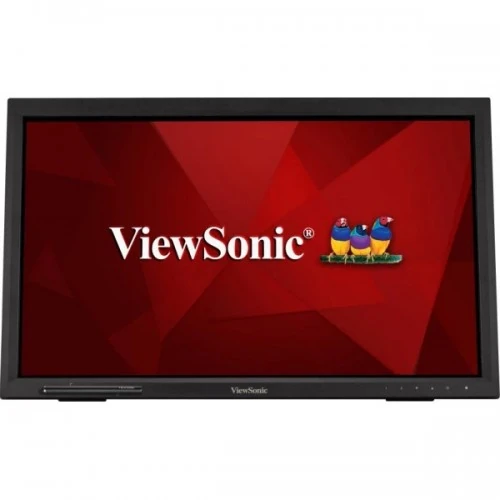
ViewSonic TD2223 overview
ViewSonic TD2223 is a 22-inch-class interactive monitor with a 21.5-inch viewable area, Full HD resolution and a 10-point infrared touchscreen. ViewSonic’s current product sheet describes a VA panel, 1920 × 1080 resolution, 75Hz refresh, 250 cd/m² typical brightness, 3000:1 typical static contrast and a scratch-resistant 7H glass surface. Touch works with fingers, stylus and gloves, and the stand tilts back up to 40 degrees. Inputs include HDMI, DVI-D, VGA, USB, audio in and audio out. The product can suit point-of-sale, learning, kiosk and general desktop tasks where direct touch interaction is useful.
22-inch class and Full HD resolution
The product is marketed as a 22-inch display, with a 21.5-inch viewable diagonal. Its native resolution is 1920 × 1080 Full HD in a 16:9 aspect ratio. Full HD is widely supported by computers and business applications, while the 21.5-inch size keeps interface elements and touch targets relatively accessible. Set the connected computer to 1920 × 1080 for native pixel mapping. Touch accuracy and text size also depend on operating-system scaling and application design. For wall or counter installation, measure the visible display and bezel area rather than using only the 22-inch product-class label.
Infrared 10-point multi-touch
The TD2223 uses infrared touch technology that detects up to 10 simultaneous contact points. Unlike some touch layers that rely on capacitive sensing through the screen surface, IR touch detects interruption of an infrared grid around the display. ViewSonic says the screen can be used with fingers, a stylus and gloves. Multi-touch supports common gestures such as tap, pinch and swipe when the host operating system and application support them. The monitor does not include a computer or operating system; touch input must connect to a compatible PC through the USB upstream cable. Confirm supported OS and application behavior before deploying it as a kiosk or POS terminal.
Touch compatibility and calibration
The video cable carries the picture, while a separate USB upstream connection is needed for touch data. Connect the monitor’s USB-B upstream port to the computer and its USB-A downstream ports can serve attached devices when supported. Windows 10/11 are listed as certified, while macOS is tested and may require ViewSonic vTouch software for touch functionality depending on device and OS version. Linux, Chrome OS and other hosts should be tested with the actual deployment image. If touches land on the wrong screen in a multi-monitor setup, use the operating system’s touch calibration and screen-identification tools. Do not assume that every HDMI connection automatically enables touch.
VA panel and viewing
ViewSonic lists VA panel technology and 178-degree horizontal and vertical viewing angles. The product sheet specifies a 3000:1 typical static contrast ratio, which can support deeper dark tones than many conventional IPS panels. The display is LED backlit and lists 16.7 million colors with true 8-bit color support. Viewing-angle values are manufacturer specifications; they do not mean image brightness and color remain identical at every position. The stand is designed for interactive use and a user may approach the display from above or the side, so test legibility from the actual installation positions.
Brightness, color and gamut
The official product sheet lists 250 cd/m² typical brightness, 3000:1 typical static contrast, NTSC 72% typical gamut and sRGB 104% typical gamut size. These color-space figures describe gamut size rather than a factory calibration report. The display is suitable for general interactive and business content, but color-critical photo or print work requires an individual calibration workflow. Set brightness for the room and installation distance. In a bright retail environment, reflections and viewing angle can affect readability even when the brightness specification is met. Confirm the current sheet for the exact TD2223 regional revision if color coverage is important.
75Hz refresh and response
ViewSonic specifies a maximum 75Hz refresh rate and 6.5ms typical GtG response time, including overdrive. These specifications suit general desktop and touch use rather than high-refresh competitive gaming. The refresh rate describes how often the display can update; response time describes pixel transitions. They are not measures of touch latency or application responsiveness. Touch interaction also depends on USB connection, host processing and software. If the cursor or touch feedback seems delayed, test the USB upstream connection, host system and application as well as the video mode. Set a supported refresh in the operating system.
7H scratch-resistant glass surface
The touch surface uses a 2mm cover glass with 7H hardness and a glossy hard coating according to ViewSonic. This is intended to resist scratches from routine touch use better than an unprotected display surface. It does not make the glass unbreakable or immune to scratches from abrasive tools, sand or sharp objects. Use a soft microfiber cloth and a cleaning method approved in the manual. Avoid pressing with excessive force, spraying liquid directly onto the screen or using harsh solvents. A glossy touch surface can reflect light, so consider lighting placement when installing the monitor in a public area.
Adjustable tilt and installation
ViewSonic describes an adjustable back tilt of up to 40 degrees so the screen can be angled for direct interaction. The standard stand is designed to support an inclined touch surface; the official product page does not list height, swivel or pivot adjustment. A 100 × 100mm VESA pattern supports compatible wall or arm mounting. Choose a support that can handle touch pressure without wobbling and use the prescribed screws. For counter use, secure the stand and route cables so touch gestures do not shift the display. Check the installation manual for the supported tilt positions and clearance behind the screen.
Video inputs and ports
The manufacturer lists one HDMI 1.4, one DVI-D and one VGA input. It also lists one USB-B upstream and two USB-A downstream ports, a 3.5mm audio input, a 3.5mm audio output and AC power input. HDMI, DVI and VGA let the display connect to newer and legacy computers; VGA is analog and may require image adjustment for best clarity. Touch requires the USB data connection in addition to video. The USB-A ports are downstream peripheral connections and should not be mistaken for independent video inputs. Select the source from the on-screen menu.
Audio and integrated speakers
ViewSonic specifies two internal 2W speakers and both 3.5mm audio input and output. Integrated speakers can provide basic sound for interactive lessons, information kiosks and video playback without separate equipment. Their compact 2W rating is intended for basic listening rather than high-volume public address. Audio routing depends on the selected source and how its sound is connected. For HDMI, the computer may send digital audio to the monitor; for DVI or VGA, use the audio input or a separate output path as needed. Check the OSD volume and source playback device if sound is missing.
USB hub and peripheral connections
The TD2223 has one USB-B upstream and two USB-A downstream USB 2.0 ports. Connect the upstream port to the host computer to enable supported downstream peripherals and touch data. The USB-A ports may be useful for a keyboard, mouse or compatible device, but they are not a high-speed USB 3 hub. Performance depends on the host, cable and attached peripheral. Use the USB touch connection even if the picture is connected over HDMI. If touch or peripherals are not detected, check USB cabling, host device recognition and operating-system settings. Safely eject storage devices through the host operating system.
Power and energy
The monitor uses internal power and accepts AC 100–240V at 50/60Hz. ViewSonic lists typical power consumption around 20W in the datasheet, with power-saving and off-mode figures specified by region. Actual consumption changes with brightness, audio level, USB peripherals and operating state. Connect to a suitable grounded outlet and keep the power cable clear of moving stand parts. Turn off and unplug the display before cleaning or moving it. Follow the supplied manual for operating temperature and humidity limits, especially in a kiosk or countertop installation.
Dimensions, weight and VESA
ViewSonic lists dimensions of approximately 490 × 347 × 218mm with the stand in the product sheet, and about 490 × 300 × 58mm without the stand. Net weight is around 4.5kg with stand; verify the exact regional datasheet for the current unit because specifications can vary. The product supports a 100 × 100mm VESA mounting pattern. The stand’s base, cables and touch angle require additional counter depth. Measure the installation opening and ensure the mounting surface can withstand repeated touch interaction without flexing. Use a VESA bracket rated for the monitor and follow the screw-depth instructions.
OSD controls and display settings
The monitor includes physical on-screen display controls for input, image, color, audio and setup. Use the OSD to select HDMI, DVI or VGA and adjust brightness, contrast and volume. For touch, calibrate the host and confirm that the correct screen is assigned in multi-display configurations. A neutral picture preset is a useful starting point for business content. If a setting causes washed-out colors or poor readability, restore the prior mode. ViewSonic’s product materials also mention vTouch software for selected Mac hosts; software availability and compatibility can change, so confirm supported operating-system versions before installation.
Advantages for business and interactive use
The TD2223’s strongest use case is direct touch interaction on a desktop-sized Full HD screen. Ten-point IR input can support shared gestures, gloves and stylus use, while 7H glass helps withstand routine contact. HDMI, DVI-D and VGA support varied host computers; the USB upstream connection carries touch data. Integrated speakers, a tilt stand and VESA mounting offer deployment flexibility. The monitor can suit retail, education, reception, control panels or assisted desktop workflows when the host software supports touch. It remains a display peripheral and does not include a POS computer, kiosk enclosure or application.
Limitations and deployment checks
The TD2223 is a 75Hz Full HD display with a 6.5ms typical response, not a high-refresh gaming monitor. The glossy glass surface can reflect lights, and the stand’s movement is tilt-focused. Touch requires a USB data connection and compatible operating system; a video cable alone is not enough. The current product sheet identifies the panel as VA and 10-point IR touch, whereas the existing catalog incorrectly lists TN panel and lacks the touch specification. Verify the exact regional suffix (TD2223 vs TD2223-2), included USB cable, software support, VESA size and warranty before installing it in a customer-facing environment.
Warranty and Bangladesh purchase terms
ViewSonic’s global product page does not establish a warranty for an individual Bangladesh serial. The existing catalog’s two-year warranty claim should be confirmed with the local seller and service provider. Ask whether support is authorized or seller-backed, when coverage begins, what touchscreen and glass damage is excluded, how touch defects are handled and what invoice is required. Current BiponiBD price, stock, delivery, payment and return terms can change independently of the technical datasheet. Confirm those details at checkout and retain the serial label and invoice. Physical screen damage and misuse may be excluded, so check the written local terms before public deployment.
Setup and troubleshooting
Place the monitor on a stable counter or attach a suitable VESA mount. Connect power and a video cable, then connect USB-B upstream to the computer for touch and downstream USB functions. Select the matching video input and set 1920 × 1080. Calibrate touch in the operating system, identify the correct display and test all ten-point gestures in the target application. If touch does not work, test another USB port/cable and verify the host recognizes the touch device. If image quality is soft over VGA, check native resolution and analog clock/phase controls. Adjust stand tilt and room lighting to reduce reflections.
Who should choose TD2223
Choose the TD2223 when an interactive 10-point touch display is more important than gaming refresh or high-resolution creative work. It can support POS terminals, classroom activities, reception kiosks, assisted browsing and shared control panels when connected to compatible software. Users need to plan for USB upstream, video, touch calibration and application support. For a standard desktop without touch requirements, a non-touch monitor may cost less and have a matte surface or more modern connectivity. Confirm the regional model suffix, PC operating system, included cables, mounting and local warranty before ordering.
Product summary
ViewSonic TD2223 is a 22-inch-class, 21.5-inch-viewable Full HD VA touch monitor with 10-point infrared input, 75Hz refresh, 250 cd/m² typical brightness, 3000:1 contrast and 7H scratch-resistant glass. It accepts HDMI 1.4, DVI-D and VGA video and provides USB-B upstream, two USB-A downstream, audio in/out and 2W × 2 speakers. The stand tilts up to 40 degrees and 100 × 100mm VESA mounting is listed. Confirm TD2223 regional suffix, touch compatibility, package contents and serial-specific Bangladesh warranty before purchase.