Pros
- Responsive multi-touch supports gestures and collaborative software.
- Dual-hinge stand provides flexible interaction angles.
- USB-C can simplify compatible laptop connections.
- IPS panel suits shared viewing and office use.

All categories
 New condition
Monitors
ViewSonic · TD2455
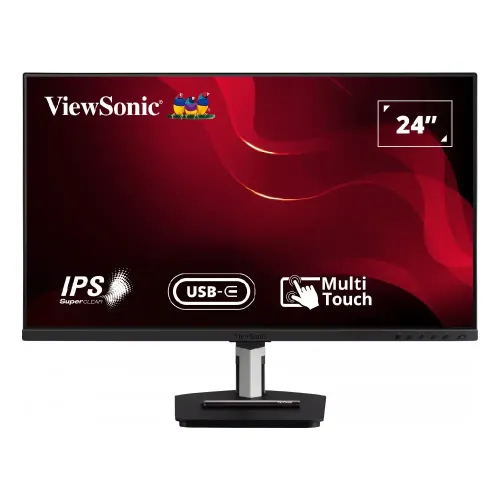
23.8-inch Full HD IPS touch monitor with 10-point capacitive input, USB-C and flexible dual-hinge stand.
Price unavailable
Price range updating
No verified price is available yet. Store offers will appear when merchants publish them.
Compare store prices
No live offers for this variant
Offers will appear when merchants publish them.
Loading history…
Product story
ViewSonic TD2455 is a 23.8-inch Full HD touch monitor designed for interactive work, collaboration and education. ViewSonic identifies an IPS display, 10-point projected capacitive touch, USB-C connectivity and a dual-hinge ergonomic stand. This content is specific to TD2455; verify regional package contents and local service terms before buying. Refer to the current TD2455 guide and regional datasheet for exact installation details. Model capability depends on the source device, software, cable and firmware. Confirm current price, stock, package contents and local warranty separately with the Bangladesh seller.
Check that the model label reads TD2455. Related ViewSonic TD touch displays use different screen sizes, panel technologies, touch surfaces and connectors. The manufacturer page and TD2455 datasheet are authoritative for the model features listed here. Match the product serial and SKU on the invoice. Refer to the current TD2455 guide and regional datasheet for exact installation details. Model capability depends on the source device, software, cable and firmware. Confirm current price, stock, package contents and local warranty separately with the Bangladesh seller.
The viewable display measures 23.8 inches diagonally and uses 1920 × 1080 Full HD resolution in a 16:9 format. ViewSonic lists an IPS panel with broad viewing angles. This size can suit a desk, counter or classroom station. Full HD is suitable for common office content but provides less detail than QHD. Refer to the current TD2455 guide and regional datasheet for exact installation details. Model capability depends on the source device, software, cable and firmware. Confirm current price, stock, package contents and local warranty separately with the Bangladesh seller.
ViewSonic specifies 10-point projected capacitive touch. Multiple simultaneous points can support gestures and collaborative interaction when the connected computer and application support them. Touch input requires the appropriate USB connection and operating-system driver support. The screen does not turn unsupported software into a multi-touch application. Refer to the current TD2455 guide and regional datasheet for exact installation details. Model capability depends on the source device, software, cable and firmware. Confirm current price, stock, package contents and local warranty separately with the Bangladesh seller.
TD2455 uses in-cell touch technology, integrating touch sensing into the display stack. The datasheet describes touch response for hands-on interaction, and the package may include a passive stylus depending on regional contents. Verify included pen and replacement tip with the local seller. A passive stylus does not provide pressure sensitivity unless specified. Refer to the current TD2455 guide and regional datasheet for exact installation details. Model capability depends on the source device, software, cable and firmware. Confirm current price, stock, package contents and local warranty separately with the Bangladesh seller.
USB-C provides video and data connectivity, with product materials describing power delivery for compatible host devices. Check the exact regional specification for charging wattage and cable requirements before expecting a laptop to operate from one cable. A laptop may still require its own adapter under heavy workload. Refer to the current TD2455 guide and regional datasheet for exact installation details. Model capability depends on the source device, software, cable and firmware. Confirm current price, stock, package contents and local warranty separately with the Bangladesh seller.
The TD2455 offers DisplayPort and HDMI video connections plus a USB hub. The datasheet lists USB-C upstream and USB-A/USB-B connections, but port versions and counts should be checked against the exact regional product sheet. Touch requires the USB data path; video alone through HDMI or DP will not carry touch input. Refer to the current TD2455 guide and regional datasheet for exact installation details. Model capability depends on the source device, software, cable and firmware. Confirm current price, stock, package contents and local warranty separately with the Bangladesh seller.
Touch compatibility depends on the host operating system, drivers and connection setup. ViewSonic lists support across common desktop environments; verify the current compatibility statement for the OS version in use. Connect both video and USB touch paths as instructed. Test gestures and calibration before mounting the monitor in a public-facing setup. Refer to the current TD2455 guide and regional datasheet for exact installation details. Model capability depends on the source device, software, cable and firmware. Confirm current price, stock, package contents and local warranty separately with the Bangladesh seller.
The TD2455 has a dual-hinge ergonomic stand that can adjust for different working positions, including a near-flat touch angle. Confirm range and locking steps in the user guide. Keep the base stable when pressing the screen, especially in a low-angle position. The stand design helps interactive work but does not change panel specifications. Refer to the current TD2455 guide and regional datasheet for exact installation details. Model capability depends on the source device, software, cable and firmware. Confirm current price, stock, package contents and local warranty separately with the Bangladesh seller.
The monitor can be used in horizontal or vertical orientations where the stand and application allow it. Rotate the operating system display when switching orientation and verify touch mapping follows the image. Collaboration software, kiosk applications and classroom tools may have their own orientation and multi-user limits. Refer to the current TD2455 guide and regional datasheet for exact installation details. Model capability depends on the source device, software, cable and firmware. Confirm current price, stock, package contents and local warranty separately with the Bangladesh seller.
Built-in speakers are listed for this product, useful for basic calls and media. They are compact monitor speakers and may not replace dedicated audio equipment in a larger room. Headphone output and host audio routing depend on the selected video connection and system sound settings. Refer to the current TD2455 guide and regional datasheet for exact installation details. Model capability depends on the source device, software, cable and firmware. Confirm current price, stock, package contents and local warranty separately with the Bangladesh seller.
IPS viewing angles support shared viewing around a desk, while the manufacturer datasheet provides brightness and color information for the exact model. This is a general touch monitor, not a high-refresh gaming display. For color-critical work, verify gamut and calibration data; do not assume touch capability guarantees color accuracy. Refer to the current TD2455 guide and regional datasheet for exact installation details. Model capability depends on the source device, software, cable and firmware. Confirm current price, stock, package contents and local warranty separately with the Bangladesh seller.
For a PC, connect video through USB-C, DisplayPort or HDMI, then connect the required USB touch path where applicable. Install current graphics and touch drivers, select native 1920 × 1080 and test edge alignment. Use OS touch calibration if points do not align accurately. Secure cables before placing the screen in a kiosk. Refer to the current TD2455 guide and regional datasheet for exact installation details. Model capability depends on the source device, software, cable and firmware. Confirm current price, stock, package contents and local warranty separately with the Bangladesh seller.
A 23.8-inch touch panel can suit reception desks, classrooms, point-of-information stations and collaborative office tasks. Evaluate the software workflow, screen angle, cable routing and cleaning needs. Public touch installations need a stable stand, accessible controls and a plan for user interaction and device security. Refer to the current TD2455 guide and regional datasheet for exact installation details. Model capability depends on the source device, software, cable and firmware. Confirm current price, stock, package contents and local warranty separately with the Bangladesh seller.
Touch performance can be affected by moisture, gloves, surface contamination and operating-system scaling. Use the recommended finger or passive stylus, keep the panel clean and recalibrate after changing resolution or orientation. Ten touch points describes simultaneous contacts, not guaranteed accuracy in every application or environment. Refer to the current TD2455 guide and regional datasheet for exact installation details. Model capability depends on the source device, software, cable and firmware. Confirm current price, stock, package contents and local warranty separately with the Bangladesh seller.
The TD2455 supports standard VESA mounting according to product documentation. Confirm exact pattern, screw depth and monitor weight before using an arm. Leave access to side and rear ports and plan for USB touch cable routing. If mounted vertically or at a low angle, secure the fixture for repeated touch pressure. Refer to the current TD2455 guide and regional datasheet for exact installation details. Model capability depends on the source device, software, cable and firmware. Confirm current price, stock, package contents and local warranty separately with the Bangladesh seller.
Clean the screen with a soft microfiber cloth and avoid harsh solvents or direct spray. Power down before cleaning and keep liquids away from openings. Inspect touch response across the full panel, stand joints, USB ports, speakers and included stylus on delivery. Retain packaging and invoice until return checks are complete. Refer to the current TD2455 guide and regional datasheet for exact installation details. Model capability depends on the source device, software, cable and firmware. Confirm current price, stock, package contents and local warranty separately with the Bangladesh seller.
Strengths include an IPS touch surface, 10-point input, flexible dual-hinge stand and USB-C workflow. Trade-offs include Full HD resolution, need for USB touch data connection in some setups and dependence on software compatibility. Confirm charging wattage, included accessories and exact regional ports before selecting it for a kiosk or classroom. Refer to the current TD2455 guide and regional datasheet for exact installation details. Model capability depends on the source device, software, cable and firmware. Confirm current price, stock, package contents and local warranty separately with the Bangladesh seller.
Before purchase in Bangladesh, confirm current stock and price, included stylus/cables, delivery, return terms and the serial-specific warranty provider and service location. The prior catalog warranty value is not proof of local coverage. Ask the seller to confirm exact TD2455 model and invoice serial details in writing. Refer to the current TD2455 guide and regional datasheet for exact installation details. Model capability depends on the source device, software, cable and firmware. Confirm current price, stock, package contents and local warranty separately with the Bangladesh seller.
ViewSonic TD2455 is a 23.8-inch 1920 × 1080 IPS monitor with 10-point projected capacitive touch and USB-C. Use the data connection as required for touch input. Check the regional datasheet for ports, power delivery, stand adjustments and package contents, and confirm local warranty with the seller. Refer to the current TD2455 guide and regional datasheet for exact installation details. Model capability depends on the source device, software, cable and firmware. Confirm current price, stock, package contents and local warranty separately with the Bangladesh seller.
Helpful answers
Product-specific answers maintained with the catalog information.
It has a 23.8-inch viewable IPS panel with 1920 × 1080 Full HD resolution.
ViewSonic specifies 10-point projected capacitive multi-touch input.
HDMI carries video; connect the required USB data cable for touch control.
Yes, ViewSonic lists USB-C; check regional power-delivery details and host compatibility.
A passive touch pen is listed in some package contents; confirm the local box contents.
The dual-hinge stand supports flexible positions; check the guide for safe range and setup.
Compatibility depends on OS, drivers and current ViewSonic support documentation.
VESA mounting is listed; verify exact pattern and screws in the TD2455 manual.
Confirm the serial-specific provider, coverage term and service location with the seller.
Customer community
Become a merchant
Join BiponiBD, publish accurate offers and start free.