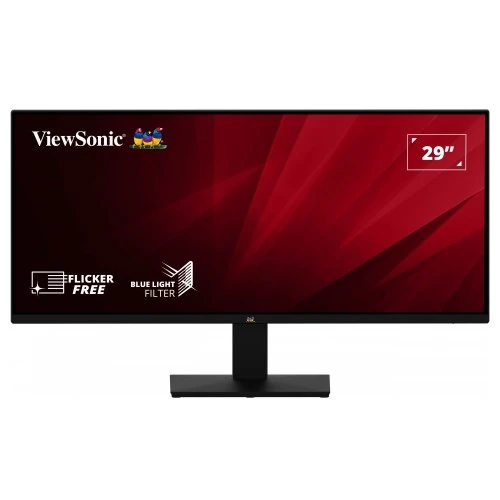
ViewSonic VA2932-MHD overview
The ViewSonic VA2932-MHD is a flat 29-inch-class ultrawide desktop monitor with a 21:9 aspect ratio, 2560 × 1080 WFHD resolution and an IPS-type panel. ViewSonic positions it for broader desktop workspace, allowing compatible applications to sit side by side across a wide canvas. The official global specification sheet lists Adaptive Sync up to 75Hz, two HDMI 1.4 inputs, one DisplayPort, internal 2W × 2 speakers, a 3.5mm audio output and 100 × 100mm VESA mounting. This page uses manufacturer information and does not treat it as confirmation of a particular BiponiBD price, stock status or Bangladesh warranty.
29-inch ultrawide screen and 21:9 ratio
The screen has a 29-inch diagonal class and a 28.7-inch viewable area, according to ViewSonic. Its 21:9 shape is wider than a conventional 16:9 screen and can show two documents or application panels next to each other with less overlap. The physical display area is approximately 672.8 × 283.8mm in the manufacturer documentation. A wide ratio is useful for supported timelines, spreadsheets, editing interfaces and panoramic media, but it does not replace multiple independent displays for every workflow. Check your desk width and viewing distance before purchase; an ultrawide monitor takes more horizontal space than a similarly sized 16:9 model.
WFHD 2560 × 1080 resolution
ViewSonic lists a native resolution of 2560 × 1080 pixels, commonly described as WFHD or ultrawide Full HD. This gives a 21:9 desktop canvas with more horizontal pixels than 1920 × 1080 while retaining the same 1080-pixel vertical dimension. Set the operating system to 2560 × 1080 for the intended image proportions and clarity. The manufacturer lists 2560 × 1080 at 60Hz as recommended and supports the same resolution at 75Hz. Lower resolutions can work, but scaling may appear softer and older games or devices may add side bars or stretch the image depending on their configuration.
IPS panel and viewing angles
The global product sheet describes ViewSonic SuperClear IPS technology, with 178-degree horizontal and vertical viewing angles. The official technical specification calls the panel IPS type, active matrix, color a-Si TFT LCD. IPS is suited to viewing from varied seating positions and can make a wide desktop easier to share. The stated angles are manufacturer specifications; they do not imply that brightness or color is perfectly unchanged from every position. The monitor uses a flat LED-backlit panel with 16.7 million colors and a typical 1000:1 static contrast ratio. Room light, picture mode, source settings and panel variation affect the perceived result.
Refresh rate and Adaptive Sync
ViewSonic lists 75Hz refresh and Adaptive Sync with a variable refresh range of 48–75Hz in its technical material. A 75Hz mode can update more often than a standard 60Hz mode when the computer supplies matching frames. Adaptive Sync can help align updates with a compatible graphics card and reduce tearing or stutter while the frame rate varies within the supported range. It does not make the graphics card render faster. Enable a supported mode in the display and driver settings, then check that the selected resolution and refresh are active. The exact behavior can depend on GPU, driver, cable, port and application.
Gaming suitability and frame rates
The VA2932-MHD is an ultrawide general-use model with a 75Hz maximum listed refresh, not a high-refresh competitive gaming monitor. Its broad 21:9 view can make supported games feel more expansive, while Adaptive Sync can help with frame-rate variation in compatible setups. A game must support ultrawide resolutions to fill the screen correctly; unsupported games may use side bars, crop content or require settings changes. Graphics performance at 2560 × 1080 depends on the PC and visual quality settings. Buyers prioritizing very high refresh or esports response should compare the 75Hz maximum and 4ms typical GtG response with their specific requirements.
Response time and motion handling
ViewSonic specifies 4ms typical gray-to-gray response time. Gray-to-gray response describes pixel transitions and is separate from refresh rate, input lag and overall motion clarity. A 75Hz refresh means the monitor can present up to 75 updates per second in a supported mode; pixel transition behavior affects how quickly color changes settle between updates. Actual appearance depends on content, selected mode, frame rate and panel characteristics. The product sheet does not advertise a one-millisecond mode for this model, so the 4ms typical specification is used here. For fast-moving scenes, evaluate the real display mode and avoid assuming that a single response-time figure describes every transition.
Brightness, contrast and HDR10
The global product sheet lists 250 cd/m² typical brightness, 1000:1 typical static contrast and HDR10 signal support. HDR10 support means the monitor accepts compatible HDR content; it does not by itself establish a VESA DisplayHDR certification, local dimming or a premium HDR brightness level. The reviewed sources list the 250-nit typical brightness figure and do not describe a local-dimming backlight. Compare HDR and SDR output with the content and room lighting you use. If HDR looks subdued or inaccurate for a particular source, adjust operating-system settings or use SDR. Contrast and brightness values are nominal specifications, not a guarantee of identical measurements on each unit.
Color gamut and color work
ViewSonic lists NTSC 85% and sRGB 120% typical “size” color-space figures. Gamut size and gamut coverage are different measures, and these values are not a factory calibration report. A broad sRGB size figure does not alone prove accurate reproduction or complete coverage for professional work. For web, office and everyday media use, the monitor’s color controls and source profile still influence the image. For print, video grading or other color-critical tasks, seek independent calibration measurements and a suitable color-management workflow. The manufacturer states a 3H hard coating and anti-glare surface treatment with 25% haze.
Ports and signal compatibility
The monitor includes two HDMI 1.4 inputs, one DisplayPort input, one 3.5mm audio output and an internal AC power connection. The technical specification lists HDMI 1.4 and DisplayPort 1.2 signal timing, with vertical frequency up to 75Hz; the global sales sheet elsewhere labels the connector as DisplayPort 1.4. This manufacturer document discrepancy means the exact DP revision should be checked in the current regional manual if a specific bandwidth requirement matters. For 2560 × 1080 at 75Hz, use a compatible source, cable and port. Docks, converters and KVM devices can limit modes, so connect directly during initial setup if the desired resolution is unavailable.
Dual HDMI and multiple computers
Two HDMI inputs let the display remain connected to more than one HDMI source, such as a work laptop and a media device. The monitor’s on-screen menu can select the input; it does not automatically guarantee fast switching or act as a USB hub. A separate DisplayPort connection provides another digital source. Check the connected device’s maximum ultrawide output resolution and refresh rate. Some laptops require a USB-C-to-DisplayPort adapter or dock, and those components must support the target timing. HDMI version and source capability are especially relevant when troubleshooting 2560 × 1080 at 75Hz. Use a certified, suitable cable and the correct input selection.
Speakers and audio connections
ViewSonic lists two internal 2W speakers and a 3.5mm audio output. The speakers can provide basic sound for notifications, calls, lessons and casual videos without adding desk speakers. They are small integrated speakers and are not specified as a high-power entertainment system. Audio can be sent over HDMI or DisplayPort when the computer selects the monitor as its output device. The 3.5mm output can connect compatible headphones or external audio equipment; verify the source routing and volume controls. If audio is missing, check the operating system playback device, the monitor’s audio menu, the active source and cable.
Ergonomics and stand adjustment
The manufacturer specification lists tilt from -5 to +20 degrees. It does not list height, swivel or pivot adjustment for the standard stand, so this listing describes tilt only. Adjust the screen angle to reduce reflections and position the display at a comfortable distance. A monitor arm can offer additional movement if it supports the screen’s 100 × 100mm VESA pattern and weight. Confirm the required screws and installation instructions in the manual before mounting. Because the display is wide, check that a desk arm can safely support the panel’s horizontal span and that the monitor will not collide with a wall when tilted.
VESA mount, size and weight
VA2932-MHD supports a 100 × 100mm VESA mounting pattern. ViewSonic lists physical dimensions of about 689 × 408 × 185mm with stand and net weight around 4.3kg; without the stand, the body is about 689 × 309 × 48mm and 3.7kg. These values support desk and arm planning, but confirm the exact revision and included mount hardware before installation. Use a bracket rated above the display’s weight and follow the prescribed fastener depth. The 21:9 width may need a broader desk or arm clearance than a smaller standard-ratio display. Secure cables with enough slack for any planned tilt adjustment.
Eye comfort and screen finish
The product sheet lists software-based Low Blue Light and Flicker-Free features. It also identifies anti-glare treatment and a 3H hard coating. These features can help manage reflections and provide display options for long work sessions, but comfort varies with room lighting, brightness, font size and viewing distance. A low-blue-light setting may make whites appear warmer and may not suit color evaluation. Set brightness to match the room, avoid a bright window directly behind the user and take regular breaks. The manufacturer describes these as display features; they are not medical claims or a substitute for an ergonomic workspace.
Power use and operating conditions
The VA2932-MHD has an internal power supply and accepts AC 100–240V, 50/60Hz according to the technical specifications. The global sheet lists 27W typical consumption, 30W maximum and 0.5W standby; eco modes are also provided. Actual energy use changes with brightness, audio level, selected mode and connected activity. The technical manual lists an operating temperature range of 0–40°C and non-condensing humidity limits; keep the monitor ventilated and away from moisture or excessive heat. Use the supplied compatible power lead and a properly grounded outlet. Turn off and unplug the unit safely before cleaning or moving it.
On-screen controls and picture modes
The monitor’s on-screen display includes input selection, audio adjustment, ViewMode, color adjustment, manual image adjustment and setup menus. These controls can be used to choose the connected source, adjust volume and change picture behavior for different tasks. The names and available adjustments may depend on firmware or regional packaging. Start with native resolution and a neutral image mode, then change brightness and color only as needed. If a picture setting makes text or skin tones look unusual, restore the prior setting or use reset options described in the manual. Save or note any preferred settings before changing several controls.
Advantages for work and media
The 29-inch ultrawide canvas is the model’s main productivity advantage: it can keep multiple windows visible side by side and provide extra width for timelines and long documents. IPS viewing angles, QHD-like horizontal pixel count, 75Hz Adaptive Sync, built-in speakers and multiple HDMI inputs make it versatile for office, study and home media. The 100 × 100mm VESA pattern enables an optional arm or wall mount. HDR10 signal support, anti-glare coating and eye-comfort features add flexibility, while buyers should align expectations with the listed 250-nit typical brightness, 75Hz maximum refresh and 4ms typical GtG response.
Trade-offs and buyer checks
This is a 2560 × 1080 ultrawide display with 1080 vertical pixels, not a 1440p ultrawide. Its refresh ceiling is 75Hz and response specification is 4ms typical GtG, so users seeking high-refresh competitive play should choose according to those limits. The stand specification reviewed lists tilt but not height adjustment, swivel or pivot. The current ViewSonic global product sheet and technical manual describe different DisplayPort revision numbers, so verify current documentation if that detail matters. Confirm that games and applications support 21:9, that the source can output 2560 × 1080 at the chosen refresh, and that the desk can accommodate the monitor’s width.
Warranty and Bangladesh purchase terms
The reviewed official ViewSonic global specification sheet notes that warranty offered may differ by market and does not establish coverage for an individual Bangladesh sale. The existing catalog’s “3 Years Warranty” text should therefore be confirmed with the seller and the local authorized service channel. Ask whether coverage is manufacturer or seller-backed, when it begins, which panel and backlight issues are covered, where service is performed and what invoice or serial-label proof is required. Price, stock, delivery charges and return terms can change independently of the manufacturer datasheet. Check the current live offer and keep the purchase invoice and product serial information.
Setup and troubleshooting
Connect power, then connect an HDMI 1.4 or DisplayPort source and select that input in the on-screen menu. In the operating system, choose 2560 × 1080 and select 75Hz if the computer, port and cable expose it. If the image appears stretched, set the correct aspect ratio in the source or monitor. If 75Hz is missing, test another direct cable, update the graphics driver and check that an adapter or dock is not restricting the signal. For audio, select the monitor as the source playback device. If Adaptive Sync is unavailable, confirm driver support and enable the feature in both the display and graphics settings where applicable.
Who should choose this monitor
Consider the VA2932-MHD if a wide 21:9 workspace, IPS viewing angles, straightforward 75Hz operation, multiple digital inputs and integrated speakers fit your daily use. It is a practical format for office documents, study, browsing, wide timelines and compatible media. It may be less suitable if your work requires a tall 1440-pixel display, if your games do not handle 21:9 well, or if you need a high refresh rate above 75Hz. Before ordering, verify the laptop or desktop can output 2560 × 1080 at the intended refresh and check the desk dimensions. Choose a different model if its panel height, color calibration or stand movement is a firm requirement.
Product summary
ViewSonic VA2932-MHD is a 29-inch-class, 21:9 WFHD 2560 × 1080 IPS monitor with 75Hz Adaptive Sync, HDR10 signal support, 250 cd/m² typical brightness, 4ms typical GtG response, two HDMI 1.4 inputs, DisplayPort, audio output and 2W × 2 speakers. It supports 100 × 100mm VESA mounting and tilt adjustment. It is designed around a wide everyday workspace rather than very high refresh competitive gaming. Verify local warranty, exact DisplayPort revision, 21:9 application compatibility and live seller offer details before purchase.