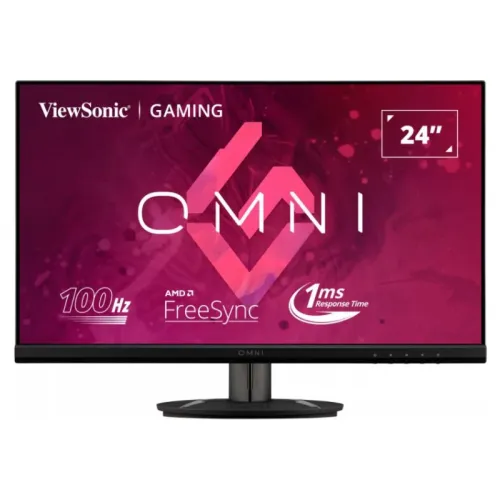
ViewSonic VX2416 23.8-inch Full HD IPS monitor
The ViewSonic VX2416 is a 24-inch class IPS Full HD monitor with 100Hz refresh, 1ms MPRT, AMD FreeSync, HDMI 1.4, DisplayPort 1.2, 3.5mm audio out and dual 2W speakers. ViewSonic documentation specifies 23.8 inches of viewable area, 250 cd/m² typical brightness, 1300:1 contrast and tilt-only adjustment. Local price and serial-specific warranty must be confirmed with the seller.
A compact Full HD IPS monitor
ViewSonic VX2416 is a 24-inch class monitor with 23.8 inches of viewable screen, 1920 × 1080 resolution and an IPS panel. The 16:9 layout works with common desktop applications, streaming video and games. The pixel pitch is 0.2745mm. Its anti-glare surface and stated 178-degree viewing angles suit ordinary desk placement, while the panel still looks best when viewed near its intended position.
Full HD is easier for many PCs to drive at 100 frames per second than a higher-resolution display, but it provides less workspace and fine detail than QHD. At a typical desk distance, text scaling and application zoom can improve readability. If you work with detailed diagrams or large spreadsheets, compare resolution and screen area against your main workload before buying.
100Hz refresh over HDMI and DisplayPort
ViewSonic specifies 100Hz maximum refresh with Full HD 100Hz modes supported. The official specifications list HDMI 1.4 and DisplayPort 1.2 inputs; both support the stated vertical range up to 100Hz. Use a suitable cable and select 1920 × 1080 at 100Hz in operating-system display settings. Adapters, docks and source-device limits can prevent the highest mode from appearing.
A 100Hz refresh can make scrolling and supported game motion look smoother than 60Hz. It does not cause a game to render more frames than the computer can produce. Frame rate depends on the graphics card, processor, game and settings. Check both the system display menu and the game configuration, then confirm that the selected rate remains stable after sleep and wake.
Understanding 1ms MPRT
The 1ms figure is MPRT, or motion picture response time. It is not the same as a grey-to-grey pixel transition measurement, and it does not promise that every pixel change completes in one millisecond. Motion clarity also depends on refresh rate, frame pacing, overdrive behaviour, game frame rate and the content itself. Treat the figure as a defined product claim rather than a guarantee of zero blur.
Use picture or response options that look comfortable in the games you play. If an aggressive mode creates visible trails or flicker, return to a less intense setting. A stable 100Hz signal and consistent frame delivery can matter more than changing settings to chase a single response number. Independent test results for the exact model can help compare motion performance.
Brightness, contrast and colour
ViewSonic lists 250 cd/m² typical brightness and 1300:1 typical contrast. Its product specification lists 16.7 million colours, 8-bit support using 6-bit plus FRC, 104% sRGB area and 72% NTSC area. Gamut area is not colour accuracy: it does not establish calibration, uniformity or consistency between units. For colour-critical work, use a calibrated display and appropriate measurement workflow.
Set brightness to suit room lighting and place the screen to reduce direct reflections. Low Blue Light and ViewMode choices can change how the image looks. Select a comfortable mode for general use and check colour-sensitive content in a neutral preset. No medical benefit or professional calibration result is claimed for this monitor.
FreeSync, Flicker-Free and Low Blue Light
AMD FreeSync synchronizes compatible source and display timing to reduce tearing within a supported operating range. ViewSonic lists FreeSync as a feature. Enable it in the graphics driver and display settings when supported, and check the connected input. The feature does not raise the frame rate generated by the computer and may not be available with every source or cable arrangement.
ViewSonic lists Flicker-Free technology and a software Low Blue Light mode. These features can support comfortable viewing, but they cannot guarantee that long sessions prevent fatigue. Use readable scaling, a suitable viewing distance and regular breaks. If a low-blue-light preset shifts colours, choose a milder setting for tasks where colour appearance matters.
Ports, speakers and sound
The VX2416 includes one HDMI 1.4 input, one DisplayPort 1.2 input and one 3.5mm audio output. It also has two integrated speakers rated at 2W each. The speakers are useful for notifications, calls and casual videos, while headphones or external speakers may provide fuller sound. ViewSonic notes regional warranty and package contents can vary; check the exact unit and included cables.
HDMI and DisplayPort can carry compatible digital audio from a computer. If sound does not play, select the monitor as the audio output on the source device and check application volume. The 3.5mm audio out can connect headphones or powered speakers. Do not confuse this output with a microphone input or USB hub; those functions are not listed.
Stand, VESA and desk placement
The included stand tilts from -5° to +20°. ViewSonic does not list height, swivel or pivot adjustment. The 100 × 100mm VESA pattern supports a compatible arm or wall bracket. A Kensington lock slot is listed for shared spaces. Follow the manual for mounting screws and safe installation, and check that the arm supports the monitor’s weight.
The monitor is approximately 540 × 391 × 218mm with stand and around 3.5kg. Measure desk space and allow cable clearance behind the screen. Because the stand does not raise the panel, a riser or VESA arm can help align the display with eye level. Keep HDMI, DisplayPort, audio and power cables slack enough to accommodate tilt.
PC, laptop and console connections
For a PC, connect HDMI or DisplayPort directly to the graphics output and select 1920 × 1080 at 100Hz. If the mode is missing, check the cable, adapter, dock, graphics driver and source output specifications. A laptop’s connector may have its own refresh limits. Test a direct connection before troubleshooting a dock or converter.
A console can use HDMI if its output supports the desired mode. The console and game determine whether 100Hz is available; the monitor’s capability alone does not ensure it. If you use multiple devices, the single HDMI and single DisplayPort inputs can keep one of each connected, then you can switch input through the on-screen menu.
Power, care and troubleshooting
ViewSonic lists an external adapter with AC 100–240V, 50/60Hz input. Typical consumption is about 18W, with standby at 0.5W; power use varies by settings. Use the supplied adapter or one authorized for the exact monitor. Keep cables tidy, ventilation unobstructed and the monitor away from liquids or excessive heat.
Turn off the display before cleaning and follow the user guide. Use a soft cloth and do not spray liquid directly onto the panel or press hard. If the screen has no signal, verify input selection and cable seating. If refresh is limited, select the supported Full HD mode and remove adapters during diagnosis. Report persistent faults within the retailer’s return or warranty window.
Bangladesh price and warranty checks
Monarch IT displayed ৳19,400 cash price and ৳20,758 regular price with in-stock status when checked. These values are a retailer snapshot and may change. Confirm the current stock, delivery charge, final payment price and model code before ordering. The page showed no customer reviews at the time of review, and its price does not represent a BiponiBD offer.
ViewSonic states warranty may vary from market to market. Local sellers may advertise three-year coverage, but eligibility depends on the product serial, importer and written service terms. Ask who handles service, what the dead-pixel threshold is, and whether on-site service or replacement applies. Keep the invoice and serial details with the warranty documents.
Who should consider the VX2416
The VX2416 may suit a buyer looking for a compact Full HD IPS monitor with 100Hz, FreeSync and basic integrated speakers. HDMI and DisplayPort inputs, a headphone/audio output, VESA mounting and Kensington lock broaden practical use. It can serve mixed office and casual gaming setups when Full HD resolution and a tilt-only stand meet the user’s needs.
Consider a QHD model if you prioritize fine detail or a larger workspace, or a monitor with height adjustment if ergonomic positioning matters. Dedicated speakers may be preferable for music or room-filling sound. Compare local warranty, return policy and verified availability alongside refresh rate and price. The exact serial and market terms should be confirmed with the seller.
Frequently asked questions
What is the actual screen size?
The product is marketed as 24 inches, while ViewSonic lists 23.8 inches of viewable diagonal. It uses a 1920 × 1080 IPS panel.
What refresh rate does VX2416 support?
ViewSonic lists 100Hz maximum and supports Full HD 100Hz over HDMI 1.4 and DisplayPort 1.2. Select a compatible mode on the connected device.
What does 1ms MPRT mean?
MPRT is a motion-picture response measure, not a guarantee that every pixel transition completes in 1ms. ViewSonic specifies MPRT for this model.
How many ports are available?
ViewSonic lists one HDMI 1.4, one DisplayPort 1.2 and a 3.5mm audio output.
Does the VX2416 have speakers?
Yes. The official specifications list two integrated 2W speakers. They suit basic system sound; headphones or external speakers can connect through the audio output.
Does it support AMD FreeSync?
Yes. ViewSonic lists AMD FreeSync. Use a compatible graphics source, driver and supported connection mode.
Can I use a VESA arm?
The monitor supports a 100 × 100mm VESA mounting pattern. Follow the unit manual for screw fit and mount rating.
Does the included stand adjust height?
ViewSonic lists tilt from -5° to +20°. Height adjustment, swivel and pivot are not listed.
What are brightness and colour specs?
ViewSonic lists 250 cd/m² typical brightness, 1300:1 typical contrast, 16.7M colours, 104% sRGB area and 72% NTSC area. These gamut values do not guarantee calibration accuracy.
What is the Bangladesh price and warranty?
Monarch IT listed ৳19,400 cash and ৳20,758 regular and showed in-stock at review time. Availability can change; confirm current price and serial-specific warranty. This is not a BiponiBD offer.