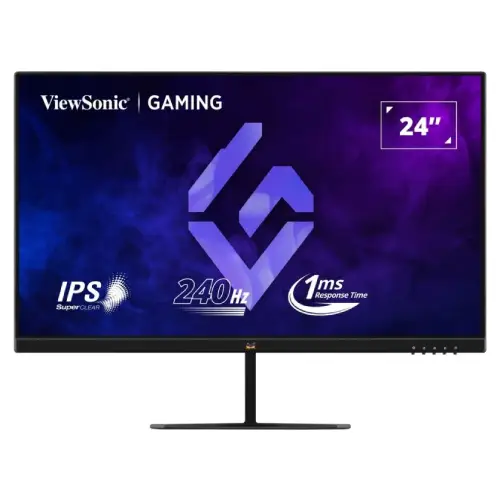
ViewSonic VX2479A-HD-PRO 23.8-inch Full HD 240Hz IPS gaming monitor
The ViewSonic VX2479A-HD-PRO is a 24-inch class IPS display with a 23.8-inch viewable area, Full HD resolution and 240Hz refresh. It supports 1ms MPRT, HDR10 input, FreeSync and G-Sync compatibility, two HDMI 1.4 ports, DisplayPort 1.4, audio out and 100 × 100mm VESA mounting. ViewSonic lists no internal speakers and a tilt-only stand. Local price, stock and serial warranty need seller confirmation.
Full HD IPS gaming display
ViewSonic VX2479A-HD-PRO is a flat 24-inch class gaming monitor with a 23.8-inch viewable area, IPS technology and 1920 × 1080 Full HD resolution. The 16:9 format works with common desktop applications, games and video. IPS viewing angles are specified at 178 degrees horizontally and vertically. A 3H hard-coated anti-glare surface can reduce reflections but does not make the screen immune to bright light.
Full HD can help a gaming PC reach higher frame rates than a more demanding QHD mode, but it offers less desktop detail and workspace. At a typical desk distance, text size and scaling can be adjusted in the operating system. If fine typography, large spreadsheets or detailed creative work matter most, compare a QHD screen before choosing a high-refresh Full HD panel.
240Hz refresh and real system performance
ViewSonic lists 240Hz maximum refresh and a 48–240Hz vertical input range. At compatible source settings, the monitor can update the picture up to 240 times per second. That does not force a game to render 240 frames per second. The CPU, graphics card, game engine and quality settings determine the actual frame rate and frame pacing.
Connect a gaming PC directly to the monitor, select 1920 × 1080 and choose 240Hz in advanced display settings. Then check the game’s own display mode. If 240Hz is missing, check the source output, selected input, cable, adapter or dock and graphics driver. Use the ViewSonic user guide’s supported timing information and revert if the signal is unstable.
HDMI and DisplayPort connections
The official ViewSonic specification lists two HDMI 1.4 inputs, one DisplayPort 1.4 and one 3.5mm audio output. The product page describes 240Hz gaming and compatible inputs. A computer and console can remain attached to separate inputs and users can switch the active source through the OSD. Check that the connected device and cable support the required Full HD refresh rate.
The included package contents can include a DisplayPort cable, power adapter, AC cable and quick-start guide, but ViewSonic notes that warranty and regional package details may vary. Verify accessories in the local carton. Avoid unverified adapters while troubleshooting refresh issues; a direct connection helps establish whether a cable or dock is limiting the mode.
Understanding 1ms MPRT
ViewSonic specifies 1ms MPRT. Motion Picture Response Time describes how long a moving image persists; it is not identical to a grey-to-grey pixel transition test. It does not guarantee that every colour transition completes in one millisecond or that all motion blur disappears. Refresh rate, frame pacing, response tuning and source frame rate also affect perceived clarity.
Use the monitor’s picture settings with the games you play. Motion-blur reduction or aggressive response settings can change brightness or create visible artifacts. If moving edges show unwanted trails, choose a less aggressive mode. A stable high frame rate and sensible overdrive are usually more useful than relying on one headline response number.
FreeSync, G-Sync Compatible and HDR10
ViewSonic lists FreeSync and G-Sync compatibility. Variable refresh can reduce tearing when the GPU, driver and monitor configuration support it. Enable the feature in the driver and OSD if needed, and confirm the input and supported range. Compatibility does not mean every GPU/source offers the same behaviour or that the technology increases the frame rate generated by a game.
HDR10 input support is listed, but typical brightness is 250 cd/m². HDR signal acceptance alone does not establish high peak brightness, local dimming or premium HDR impact. Results vary by content and configuration. For ordinary desktop and gaming use, compare SDR and HDR modes on the actual source and choose the one that gives a comfortable, consistent image.
Brightness, contrast, colour and eye comfort
The official page specifies 250 cd/m² typical brightness, 1000:1 static contrast and 80M:1 dynamic contrast. It lists 16.7 million colours, 8-bit support using 6-bit plus FRC, 72% NTSC area and 102% sRGB area. Gamut percentages do not prove calibration accuracy or uniformity. Use calibrated equipment for colour-critical work rather than inferring colour accuracy from a coverage figure.
ViewSonic Eye ProTech combines flicker-free operation and a software blue-light filter. These features can support comfortable viewing but cannot guarantee that long sessions prevent fatigue. Set brightness for room lighting, avoid strong reflections, use readable scaling and take breaks. A blue-light mode may change image colour, so check the effect before using it for colour-sensitive tasks.
Audio, speakers and OSD controls
ViewSonic lists no internal speakers and includes a 3.5mm audio output. Connect headphones or powered speakers to the monitor jack or directly to the computer/console. HDMI and DisplayPort can carry digital audio from compatible sources; select the right output on the connected device if audio is silent. The monitor is not a USB hub and the 3.5mm port is not a microphone input.
The on-screen display includes input selection, audio adjustment, ViewMode, colour adjustment, manual image settings and setup options. Use those menus to choose a source and set comfortable image behaviour. OSD controls cannot compensate for a low frame rate or unsupported signal. Keep your preferred settings simple and document them if you use multiple computers.
Tilt, VESA and desk placement
The stand tilts from -5° to +20°. ViewSonic does not list height adjustment, swivel or pivot. The monitor supports 100 × 100mm VESA mounting and has a Kensington lock slot. Use a compatible bracket with the correct screw size and load rating. Since the stand does not raise the screen, a riser or VESA arm may help position the top edge near eye level.
ViewSonic lists dimensions around 541.86 × 411.6 × 180mm with stand and 541.86 × 323 × 43.5mm without stand. Net weight is approximately 3.2kg with stand and 2.8kg without. Measure desk depth and leave room for cable bends and the external power adapter. Keep the mounting surface stable before adjusting tilt.
PC, console and laptop compatibility
ViewSonic lists PS5 and Xbox Series X|S compatibility guidance. Consoles commonly use 120Hz modes in supported titles, while the 240Hz ceiling is primarily useful with a compatible gaming PC. The console, game and cable determine available modes. Check the manufacturer’s compatibility instructions rather than assuming a console will output 240Hz.
A laptop can use HDMI or DisplayPort through a supported USB-C/DP adapter if its graphics output allows it, but adapters may limit refresh. Connect the monitor directly first, verify Full HD and selected refresh, then introduce docks and converters one at a time. Adaptive Sync behaviour also depends on the source GPU and driver.
Power, care and troubleshooting
The monitor uses an external adapter with AC 100–240V input. ViewSonic lists 26W typical, 28W maximum and 0.5W standby; eco modes use less. Use the supplied or authorized adapter for the exact model. Keep ventilation clear and protect the monitor from liquids, excessive heat and direct sunlight. Package accessories and warranty terms may vary by market.
Turn off the monitor before cleaning and follow the user guide. Use a soft cloth; do not spray liquid onto the panel or press hard against it. If there is no image, check power, input selection and cable seating. If the refresh mode is limited, confirm source support, driver, cable and input timing. Report faults within the seller return window.
Bangladesh price, stock and warranty
Monarch IT showed ৳22,700 and in-stock status when checked. Star Tech displayed “To be announced” and out of stock, illustrating that stock and prices differ by seller and date. These are market observations, not a BiponiBD offer. Contact the retailer to confirm final cash/card price, delivery fee, inventory location and expected dispatch before ordering.
ViewSonic says warranty can vary by market. A local seller’s warranty badge does not establish serial eligibility or service conditions. Ask for the written warranty provider, registration process, dead-pixel threshold, return window and service location. Keep the carton, serial and invoice. Do not assume that another country’s support page or warranty duration automatically applies to a Bangladesh serial.
Who should consider this monitor
Consider the VX2479A-HD-PRO if you want a Full HD IPS display with a high 240Hz ceiling, two HDMI inputs, DisplayPort, audio out and Adaptive Sync. It may suit competitive PC play and mixed gaming/office use when Full HD detail and a tilt-only stand meet your needs. VESA and console guidance can help with flexible desk setups.
A QHD display may suit users who prioritize text detail or workspace, while a height-adjustable monitor may better fit an ergonomic desk. Dedicated speakers may be preferable for room-filling audio. Compare the actual GPU frame rates, local warranty and current seller stock alongside refresh numbers before purchase.
Frequently asked questions
What is the screen size?
ViewSonic markets the display as 24 inches and lists 23.8 inches of viewable area, with 1920 × 1080 Full HD resolution.
Does it support 240Hz?
Yes. ViewSonic lists 240Hz maximum and 48–240Hz vertical input frequency. The PC, cable and selected input mode must support 1920 × 1080 at that refresh.
What does 1ms MPRT mean?
It is a motion-picture response-time measure. It is not the same as a guaranteed grey-to-grey pixel transition for every colour and setting.
Which video ports are available?
ViewSonic lists two HDMI 1.4 inputs and one DisplayPort 1.4 input. Its product page describes the ports and refresh capability.
Does this monitor have built-in speakers?
No built-in speakers are listed by ViewSonic. The monitor has a 3.5mm audio output for headphones or powered speakers.
Does it support FreeSync and G-Sync?
ViewSonic lists AMD FreeSync and NVIDIA G-Sync compatibility. Operation depends on graphics hardware, driver, cable and configuration.
Does HDR10 guarantee high HDR brightness?
HDR10 input support is listed. The typical brightness is 250 cd/m²; HDR input support alone does not guarantee high peak brightness or premium HDR performance.
Can I VESA-mount it?
Yes. ViewSonic specifies a 100 × 100mm VESA pattern. Confirm the correct screw fit and arm capacity in the user guide.
Does the stand adjust in height?
No height, swivel or pivot adjustment is listed. The stand tilts from -5° to +20°.
What are current Bangladesh price and warranty?
Monarch IT showed ৳22,700 and in-stock when reviewed, while Star Tech showed out-of-stock. Confirm current price, stock and written serial warranty; neither page is a BiponiBD offer.