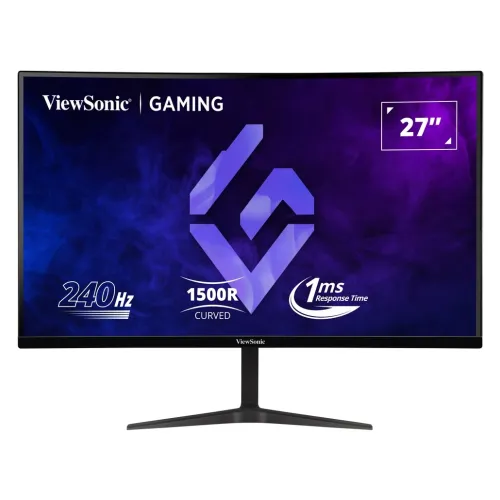
ViewSonic VX2719-PC-MHD overview
ViewSonic VX2719-PC-MHD is a 27-inch curved Full HD gaming monitor with a VA panel, 1920 × 1080 resolution and 240Hz maximum refresh. The manufacturer documentation identifies model VS18190, 1500R curvature, 250 cd/m² typical brightness, 4000:1 native contrast, 1ms MPRT and Adaptive Sync. It includes two HDMI inputs, DisplayPort, a 3.5mm audio output and two built-in 2W speakers. The high refresh mode is supported at Full HD over HDMI and DisplayPort according to ViewSonic’s timing table. Use a compatible graphics card and cable, and confirm that the local package and warranty match the Bangladesh seller’s offer.
27-inch Full HD screen and 1500R curve
The screen measures 27 inches diagonally with a native 1920 × 1080 resolution and 16:9 aspect ratio. ViewSonic lists a full-scan display area of 597.888 × 336.312mm and 0.3114mm horizontal and vertical pixel pitch. The 1500R curvature wraps the screen gently around the viewer, which can make a large desktop feel cohesive when seated centrally. Full HD resolution is widely supported, although its pixel density is lower than QHD at the same diagonal. Set a comfortable viewing distance and consider system scaling if text appears small.
VA panel, contrast and image characteristics
The monitor uses a VA panel and ViewSonic’s European datasheet lists a native 4000:1 contrast ratio, 250 cd/m² typical brightness and 178-degree horizontal/vertical viewing angles. The contrast figure can support darker blacks than many IPS displays in suitable settings, while the curved layout is designed for an immersive, centered viewing position. ViewSonic lists an anti-glare surface with 25% haze and 3H hard coating. The panel’s appearance varies with viewing position, room lighting and selected image mode. Avoid comparing dynamic contrast values directly with native contrast.
240Hz refresh and supported timing
ViewSonic’s specification table lists 1920 × 1080 at 240Hz as the recommended timing and lists HDMI 1, HDMI 2 and DisplayPort vertical sync ranges up to 240Hz. The manual cautions users not to set unsupported timings above the documented modes. For the maximum refresh, use a compatible source and cable, select 1920 × 1080 at 240Hz in the operating system and check the monitor’s on-screen information. A monitor’s refresh capability does not guarantee that a game will render 240 frames per second. Graphics hardware, game settings, drivers, cable and adapter determine actual frame rate and mode availability.
Motion response and 1ms MPRT
ViewSonic specifies 1ms MPRT, a motion-picture response measurement. MPRT is not the same as gray-to-gray pixel transition time, input lag or refresh rate. The effect of motion-reduction options can depend on image mode and may change brightness. Motion clarity also depends on frame rate, pixel behavior, overdrive and synchronization. Try the available response settings with the games you play; if bright trails, overshoot or reduced brightness are distracting, return to a less aggressive setting. Do not interpret the 1ms figure as a guaranteed pixel transition in every scene.
Adaptive Sync and tear reduction
ViewSonic lists Adaptive Sync for the exact VX2719-PC-MHD model. Compatible variable refresh can synchronize the display with fluctuating graphics output and reduce tearing within the supported range. The manufacturer timing page gives a 48–240Hz vertical frequency range for HDMI and DisplayPort inputs but this alone does not describe every VRR condition or guarantee compatibility with each GPU. Configure the feature in both the monitor menu and graphics driver, and check the driver and cable if the option is unavailable. Adaptive Sync should not be described as a separate G-SYNC certification unless that exact certification is documented.
HDR10 and brightness expectations
The catalog and ViewSonic’s regional datasheet identify HDR10 support, while typical brightness is listed at 250 cd/m². HDR10 format support does not by itself establish VESA DisplayHDR certification or high peak brightness. The manufacturer documents native contrast at 4000:1, with a dynamic contrast figure listed separately. HDR appearance depends on content, source, operating system, connection and monitor mode. Use compatible HDR content and compare with SDR output; do not assume that an HDR10 label means the monitor has local dimming or certified HDR peak performance.
Color gamut, color depth and presets
The catalog’s specification record lists 72% NTSC typical gamut and 8-bit output using 6-bit plus FRC, with 16.7 million colors. The official European datasheet confirms 16.7 million colors and the exact model, while the marketing specs summarized in the source highlight gaming features rather than a factory calibration result. Gamut area is not the same as color accuracy. For color-sensitive work, request measured unit-specific evidence and use a calibrated color-managed workflow. For gaming and media, use a ViewMode preset that fits the content and personal preference.
HDMI and DisplayPort connections
The monitor has two HDMI inputs and one DisplayPort input; ViewSonic’s German datasheet specifies HDMI 2.0 and DisplayPort 1.2. The official manual’s timing table lists Full HD up to 240Hz on HDMI 1, HDMI 2 and DisplayPort. Use a certified cable appropriate to the device and input. A dock, adapter, console or older graphics output may not support 240Hz even when the monitor does. Connect directly to the discrete graphics output when required by the computer, then choose the active input in the OSD. The monitor also provides a 3.5mm audio out for compatible headphones or speakers.
Built-in speakers and audio output
ViewSonic’s regional datasheet lists two built-in 2W speakers and one 3.5mm audio output. The speakers can support basic desktop audio, video and calls; they are not a substitute for larger external speakers where richer sound or higher volume is needed. Select the monitor as the system audio output when the source sends sound over HDMI or DisplayPort. The headphone jack can connect compatible wired audio equipment. Audio behavior depends on the source device, selected input and operating-system settings.
Stand, tilt and VESA installation
The product record lists tilt from approximately -5 to +20 degrees. ViewSonic’s manual lists 75 × 75mm wall-mount dimensions. The source does not list a height-adjustable, swivel or pivot stand for this specific model; plan the desk height and viewing angle accordingly. Use the stand on a stable surface and confirm the VESA screw and monitor-arm load requirements before mounting. Leave room behind the curved panel for cables and the stand footprint. If you need substantial height or pivot adjustment, verify accessory compatibility before ordering.
Eye comfort and screen surface
The catalog lists flicker-free operation and a low-blue-light filter. ViewSonic documentation for the model includes eye-care features in regional materials; exact certification can vary by regional page. The matte anti-glare finish can reduce reflections, but direct light sources may still affect visibility. Adjust brightness for the room and take regular breaks. A low-blue-light picture mode can change color temperature, so choose another preset for color-critical work. Eye-care features are comfort options, not medical treatment or a guarantee against fatigue.
Power, dimensions and operating conditions
ViewSonic lists an external AC/DC adapter with AC 100–240V, 50/60Hz input. Typical consumption is 31W without audio and 33W at 50% audio in the official manual; off-mode is at or below 0.3W. Physical dimensions are 610.5 × 474.7 × 224.7mm and physical weight 3.9kg in the manual. The datasheet gives a 12V external adapter and typical 31W use. Operate within the stated 0–40°C and 20–90% non-condensing humidity range. Use only the original or an authorized adapter with the required rating.
Gaming use and PC compatibility
The 240Hz Full HD mode suits a gaming PC capable of producing very high frame rates at 1920 × 1080. Many games will run below 240fps depending on the graphics card, game engine and visual settings. For competitive titles, lowering some graphics options can raise frame rate; for visually detailed games, prioritize image quality if preferred. Confirm that the GPU output supports the desired timing, especially when connecting through a dock or adapter. Consoles may use lower refresh rates or different supported modes. Adaptive Sync can help with changing frame rates when the source supports the feature.
Advantages and practical trade-offs
The VX2719-PC-MHD combines a 27-inch 1500R curved VA panel, 240Hz Full HD timing, 4000:1 native contrast, Adaptive Sync, HDR10, two HDMI inputs, DisplayPort and built-in 2W speakers. The key trade-offs are Full HD pixel density at 27 inches, 250-nit typical brightness and a stand whose documented adjustment is limited compared with height-adjustable office monitors. HDR10 does not establish VESA DisplayHDR certification. Confirm the exact local model, warranty and cable package, and ensure that the graphics card can deliver the intended refresh.
Warranty and Bangladesh purchase details
The current catalog lists a three-year warranty, while ViewSonic’s German datasheet specifies two-year pick-up, repair and return terms for that market. Regional warranty policies differ, so neither statement proves Bangladesh serial eligibility. Ask the local seller to confirm the exact serial-specific warranty, service location, duration, panel exclusions, dead-pixel policy and invoice requirements in writing. Current BiponiBD price, stock, delivery fee and promotional offer were not independently confirmed during this content review. Keep the invoice and serial number for service requests.
Setup and troubleshooting
Place the monitor on a stable surface, connect the supplied power adapter and connect HDMI or DisplayPort directly to the graphics source. Select the correct input in the OSD. Set 1920 × 1080 and select 240Hz if the source and cable support it. Enable Adaptive Sync in the monitor and graphics settings if desired. If 240Hz is unavailable, check the graphics output, cable, adapter, driver and display mode. If the screen loses signal or flickers, return temporarily to a supported lower refresh and test another input. Route cables so they do not pull when the monitor is tilted.
Buyer checklist and summary
Confirm the exact VX2719-PC-MHD model, 1500R curve, Full HD resolution, 240Hz mode, HDMI/DisplayPort version, Adaptive Sync, audio and local warranty before ordering. Check whether the box includes a DisplayPort cable, adapter and regional plug. Ensure that the graphics card and games can make use of high frame rates at Full HD. ViewSonic VX2719-PC-MHD is a 27-inch curved VA gaming monitor with 240Hz, 1ms MPRT, HDR10, Adaptive Sync, two 2W speakers and multiple digital inputs. It is a fit for users prioritizing high refresh and curved immersion over QHD resolution.