Pros
- QHD resolution and high refresh support detailed, fluid PC gaming.
- Fast IPS panel with FreeSync Premium and Adaptive-Sync.
- Integrated 2W speakers for basic audio.
- Three digital video inputs support multiple devices.

All categories
 New condition
Monitors
ViewSonic · VX2728-2K
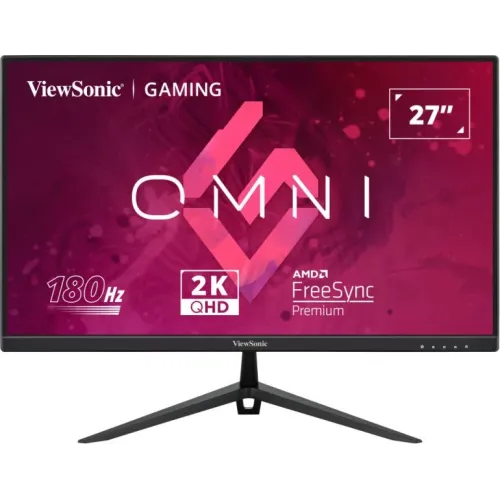
27-inch QHD Fast IPS monitor with up to 180Hz via DisplayPort, HDMI up to 144Hz at QHD, FreeSync Premium and two 2W speakers.
Price unavailable
Price range updating
No verified price is available yet. Store offers will appear when merchants publish them.
Compare store prices
No live offers for this variant
Offers will appear when merchants publish them.
Loading history…
Product story
The ViewSonic VX2728-2K is a 27-inch flat QHD gaming monitor with a Fast IPS panel and up to 180Hz refresh over DisplayPort. ViewSonic lists HDMI refresh up to 144Hz at QHD, so the input and cable affect the maximum mode. The product includes two HDMI 2.0 inputs, one DisplayPort input, 3.5mm audio out and two 2W speakers. Check the exact VX2728-2K model code; similar ViewSonic models can have different stands, ports and ergonomics.
The 27-inch display uses a native 2560 × 1440 resolution in a 16:9 aspect ratio. QHD shows more detail and provides more workspace than Full HD at the same diagonal size. It also requires more graphics processing to reach high frame rates. ViewSonic’s datasheet specifies an IPS LCD with a 0.233mm pixel pitch and a 596.74 × 335.66mm viewable area. Set the operating system to the native resolution for the sharpest text and interface rendering.
ViewSonic describes the VX2728-2K as a Fast IPS display. The datasheet lists 178-degree horizontal and vertical viewing angles and 1000:1 typical static contrast. IPS technology supports broad viewing angles, though contrast and uniformity vary with the environment and unit. The display has a flat anti-glare surface with hard coating. These specifications do not certify professional calibration; use a calibrated display for color-critical work.
The official datasheet lists 180Hz as the maximum refresh and shows DisplayPort vertical timing up to 180Hz. HDMI vertical frequency is listed up to 144Hz. The ViewSonic specifications page recommends 165Hz over DP and 144Hz over HDMI at QHD, while listing 180Hz as a supported DP mode. This means 180Hz may require the correct DP mode/cable/settings. Check the product manual and GPU output, and select the refresh in the operating system after connecting.
ViewSonic lists 0.5ms MPRT. MPRT describes motion-picture response and is not the same measurement as GtG pixel response. A low response-time label does not guarantee every pixel transition or scene appears artifact-free. Fast motion settings may change perceived brightness or create overdrive artifacts. Compare modes in real games, and use a setting that balances clarity and comfort. High refresh only helps when the source produces and sends frames at a matching rate.
The product supports AMD FreeSync Premium and VESA Adaptive-Sync according to ViewSonic’s datasheet. Variable refresh can reduce tearing when a compatible graphics card’s frame output changes. The feature depends on GPU, driver, cable, selected input and supported refresh range. Enable the monitor feature and configure VRR in the graphics control panel. Do not assume identical certification or behavior on every console; check the console and regional model documentation.
ViewSonic lists HDR10 signal support. HDR playback requires compatible source content, application and system configuration. HDR10 support does not by itself establish VESA DisplayHDR certification, local dimming or a particular peak brightness. The datasheet lists 250cd/m² typical brightness, which is relevant when setting expectations for HDR impact. Use SDR mode for content that is not authored for HDR, and adjust brightness for room conditions.
The datasheet lists DCI-P3 coverage of 90%, NTSC size 93% and sRGB size 131%, with 10-bit color support through 8-bit plus FRC. Gamut coverage and gamut size are different reporting terms; do not compare them as if they were the same percentage. Actual colors depend on preset, source format and calibration. For photo or video work, calibrate the monitor and verify output on other devices rather than relying only on marketing figures.
The VX2728-2K includes two HDMI 2.0 inputs, one DisplayPort input and one 3.5mm audio output. ViewSonic’s datasheet identifies DisplayPort 1.4. HDMI is useful for consoles and secondary devices, while DisplayPort provides access to the higher QHD refresh modes. Select the correct monitor input and use a cable rated for the signal. The official datasheet does not list USB-C or a USB hub, so do not treat the monitor as a one-cable laptop dock.
ViewSonic specifies two integrated 2W speakers and a 3.5mm audio output. The speakers can provide basic sound for desktop use, system alerts or video calls, but they are small monitor speakers and should not be confused with dedicated speakers or a headset. The headphone output can serve a wired audio device, subject to the source and monitor audio settings. Confirm the connected system sends audio over HDMI or DisplayPort.
The datasheet for VX2728-2K lists tilt adjustment from approximately -5 to +20 degrees. It does not list height adjustment, swivel or pivot for this exact model. Some online product data appears to mix details from the related VX2728J-2K, which has different ergonomic features. Verify the model suffix on the carton and stand. If more height adjustment is needed, use a stable riser or a compatible mount rather than assuming the included stand raises or rotates.
The VX2728-2K is listed with a 100 × 100mm VESA mount pattern. Check the arm’s load rating and screw length before installation. The stand and chassis differ from the more ergonomic VX2728J-2K variant, so confirm which model is being delivered. Leave cable clearance behind the display, support the frame during mounting and retain the stand hardware. Incorrect screws or unsupported installation can damage the monitor.
A 27-inch QHD screen usually works best when positioned directly in front of the user at a comfortable viewing distance. Keep the top of the visible image near eye level and avoid strong reflections on the anti-glare surface. Since this model’s official datasheet lists tilt only, plan desk height or a riser if the screen needs to sit higher. Keep ventilation clear and route HDMI, DP and power cables without tension.
QHD at 180Hz can be demanding for a graphics card, especially in modern games. The monitor can display high refresh, but the PC must render enough frames and the selected connection must support the mode. Competitive titles may reach high frame rates at adjusted settings; demanding single-player games may need reduced visual settings. Configure resolution and refresh first, then adjust VRR and response settings. A monitor’s refresh number does not increase the GPU’s rendering performance.
Two HDMI inputs let users connect more than one HDMI source without swapping cables. At QHD, HDMI is listed up to 144Hz by ViewSonic’s signal specifications; actual console modes depend on the console and game. Consoles may use lower refresh rates or a 16:9 mode depending on their output options. Check the source’s supported resolution, refresh, HDR and audio settings, and verify them in the monitor’s information menu.
QHD provides room for documents, browser tabs, spreadsheets and side-by-side windows. Fast IPS viewing angles can help when looking at the screen from different positions. The 27-inch size and flat panel fit general desktop work, study and media use. Color-sensitive tasks require calibration because the datasheet’s coverage figures do not guarantee factory accuracy. If the height is not right, adjust the desk or add a stable riser because height adjustment is not listed for VX2728-2K.
ViewSonic lists software-based Low Blue Light and flicker-free operation. These features may suit some users, but comfort depends on brightness, room lighting, viewing distance and work habits. The screen’s coating should be cleaned with a soft microfiber cloth following the manual. Avoid abrasive cleaners, pressure on the LCD, and spraying liquid directly onto the panel. Disconnect power before cleaning the housing and keep the adapter and ventilation openings unobstructed.
The datasheet lists an external power adapter, typical consumption around 31W, maximum consumption 35W and standby 0.3W. Package contents include the VX2728-2K, power cord, DisplayPort cable, AC/DC adapter and quick-start guide, though ViewSonic notes warranty and package details can differ by market. Confirm the local plug, cable and warranty documents with the seller. Use the ViewSonic adapter or an authorized equivalent with matching ratings.
The VX2728-2K must be distinguished from VX2728J-2K. Official documentation for VX2728-2K lists tilt adjustment only, while the J variant includes a more adjustable stand. Similarly, port-specific maximum refresh differs: DP reaches up to 180Hz while HDMI is listed up to 144Hz at QHD. Use the exact model’s datasheet and rear label, not specifications copied from a related model. Warranty terms and accessories can vary by country.
The catalog currently contains a three-year warranty claim, but ViewSonic states warranty can vary by market and the local serial has not been checked. Ask the seller to confirm the official warranty provider, period, service location, dead-pixel policy and proof-of-purchase requirements. Confirm current price, stock, delivery fee, return terms and promotions before ordering. On delivery, inspect the panel, test both HDMI and DP, verify 1440p refresh options and test speakers, audio output and stand stability.
This ViewSonic model suits users seeking a 27-inch QHD Fast IPS screen, high refresh, adaptive sync and basic integrated speakers. It can support gaming, general work and media, with DisplayPort required for the highest listed QHD refresh. It may not suit buyers who need USB-C docking, a height-adjustable stand, premium HDR brightness or confirmed 180Hz over HDMI. Verify the exact suffix, local warranty and source compatibility before purchase.
Helpful answers
Product-specific answers maintained with the catalog information.
VX2728-2K is a 27-inch 2560 × 1440 QHD display.
ViewSonic lists 180Hz via DisplayPort. Its datasheet lists HDMI up to 144Hz at QHD.
ViewSonic specifies a Fast IPS panel.
Yes, ViewSonic lists AMD FreeSync Premium and VESA Adaptive-Sync.
The datasheet lists HDR10 signal support; this does not itself mean local dimming or DisplayHDR certification.
Yes, ViewSonic lists two 2W speakers and a 3.5mm audio output.
For VX2728-2K, the official datasheet lists tilt only. Do not confuse it with VX2728J-2K.
ViewSonic lists 100 × 100mm VESA compatibility.
Confirm the serial-specific local warranty and service terms with the seller.
Customer community
Become a merchant
Join BiponiBD, publish accurate offers and start free.