Verified model overview
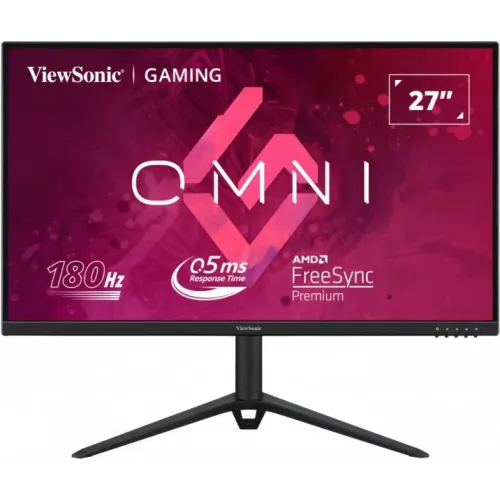
The ViewSonic VX2728J is a 27-inch Full HD IPS gaming monitor. ViewSonic lists 1920 × 1080 resolution, up to 180Hz input support, 0.5ms MPRT, 250 cd/m² brightness and a 1000:1 static contrast ratio. The product page identifies AMD FreeSync Premium and NVIDIA G-Sync compatibility, HDR10 content support, two 2W speakers and a height-adjustable ergonomic stand. Connections include two HDMI 1.4, DisplayPort and a 3.5mm audio output. The official technical manual recommends 165Hz while listing 180Hz as a supported timing; check the connection and mode.
27-inch Full HD display
The 27-inch IPS screen has native 1920 × 1080 Full HD resolution and a 16:9 aspect ratio. ViewSonic lists a pixel pitch of 0.311mm and a recommended native mode of 1920 × 1080 at 165Hz, while its timing list includes 180Hz. Full HD is easier to render at high frame rates than QHD on many gaming PCs, though text and fine detail are less dense on a 27-inch panel. Use the native resolution and adjust operating-system scaling for comfortable reading.
IPS panel and viewing angles
ViewSonic specifies an IPS active-matrix panel with 178-degree horizontal and vertical viewing angles. This can help maintain a consistent view when sitting off-center or sharing the screen. Static contrast is listed at 1000:1, which is typical for many IPS monitors; perceived black levels depend on room lighting and settings. The panel uses an anti-glare surface with Haze 25% and hard coating 3H. Position the screen to reduce reflections, and do not infer professional color calibration from its panel type alone.
165Hz recommended and 180Hz supported
The manual recommends 1920 × 1080 at 165Hz and lists 180Hz among supported timings. ViewSonic’s product marketing identifies 180Hz refresh. These statements describe a recommended mode and the maximum supported input timing; source, cable, connection and graphics driver affect the selectable mode. Start at 165Hz for the manual’s recommended timing. If selecting 180Hz, verify stable operation and check for artifacts. A high refresh rate only appears smooth when the source can supply corresponding frames.
Response time and MPRT
ViewSonic lists 0.5ms MPRT and 2.5ms typical gray-to-gray response. MPRT and GtG are different measures; neither states input lag or guarantees every transition at the same speed. MPRT settings can affect brightness and motion appearance, so compare them with the standard mode in actual games. If moving objects show overshoot or flicker, reduce response enhancement. A smaller response number is not automatically the best setting for every scene or refresh rate.
FreeSync Premium and G-Sync compatibility
ViewSonic lists AMD FreeSync Premium and NVIDIA G-Sync compatibility. Adaptive refresh can coordinate supported display timing with a compatible GPU to help reduce tearing and stutter. Confirm the graphics card, driver, connection and variable-refresh range for the system. Variable sync does not increase frame rendering speed. Enable the matching option in the graphics software and monitor settings, then test stability. If flicker appears, compare another refresh mode or disable variable sync to identify the cause.
HDR10 content support
ViewSonic lists HDR10 content support. The product page does not list a VESA DisplayHDR certification tier for this model. HDR10 signal support means compatible HDR sources can be received, but it does not guarantee local dimming or a particular certified peak brightness. The monitor’s specified brightness is 250 cd/m². Appearance depends on content, system settings and room light; compare HDR and SDR with familiar material and select the more balanced image.
Color and bit depth
The product page lists 16.7 million colors and 8-bit color support using a 6-bit panel plus FRC. It specifies no color-gamut coverage percentage in the technical specifications surfaced here. Color accuracy depends on the individual panel, preset, source and calibration. For gaming and general use, choose a natural image mode. For design or photo work, calibrate the monitor and use color-managed software rather than assuming a gamut or factory-accuracy value that ViewSonic has not published for this page.
HDMI, DisplayPort and audio
The VX2728J has two HDMI 1.4 inputs, one DisplayPort input and a 3.5mm audio output. The official manual lists supported video timings by input and recommends 165Hz at native resolution, with 180Hz included in the timing list. Use a suitable cable and connect directly to the graphics output when diagnosing missing modes. The audio jack supports headphones or powered speakers. Confirm the correct playback device in the operating system if monitor audio is selected.
Built-in stereo speakers
ViewSonic lists two integrated 2W speakers. They can provide convenient audio for desktop use, calls and casual gaming without external speakers, although small monitor speakers may not match a headset or dedicated audio system for bass and volume. Check operating-system playback selection and the monitor’s audio settings if no sound plays. The 3.5mm audio output can connect compatible headphones or speakers. The listing’s speaker information should be read as 2W per speaker, not 2W total.
Ergonomic stand
The stand supports approximately 130mm of height adjustment, 30-degree swivel, 90-degree rotation in either direction and tilt from about -5 to +20 degrees. This gives more setup flexibility than a basic tilt-only stand. Adjust screen height for a comfortable eye line and use pivot for portrait workflows when needed. Keep cables slack through the stand’s range and ensure the base remains stable. The manual and product page are the references for the exact movement and supported orientations.
VESA mounting and desk fit
ViewSonic lists a 100 × 100mm VESA mount, a Kensington lock slot and dimensions around 615 × 438–568 × 207mm with stand. The monitor weighs approximately 4.7kg with stand and 3.7kg without stand. Measure desk width, depth, cable clearance and stand height before installation. For a monitor arm, verify load capacity, VESA pattern and screw length, then support the display while mounting. The 27-inch panel’s 16:9 shape is easier to fit than a wide ultrawide but still needs sufficient viewing distance.
Power and consumption
The monitor uses an external power supply and accepts AC 100–240V at 50–60Hz. ViewSonic lists 32W typical consumption, 36W maximum, 23W in Eco Conserve mode, 27W in Eco optimized mode and 0.3W standby. Actual consumption varies with brightness and operating mode. Use the supplied power cable and adapter for the exact regional package, keep the adapter ventilated and use a properly grounded outlet. Disconnect power before moving or cleaning the screen.
Gaming tools and on-screen menu
The VX2728J on-screen display includes input selection, audio adjustment, ViewMode, color adjustment, manual image adjustment and setup controls. ViewSonic advertises fast gaming, variable sync and HDR10 content support. Use the OSD to select input, adjust brightness and configure picture behavior. Settings can trade brightness against motion clarity or color appearance; compare them with a neutral preset. The monitor improves the display of game output but does not change game performance, graphics quality or network latency.
Eye comfort and screen care
The anti-glare surface and ergonomic adjustment can help tailor viewing to a desk environment. ViewSonic’s listed specifications for this model should be checked for any regional eye-comfort claims; avoid assuming additional certifications that are not shown. Comfort depends on brightness, ambient light, screen distance, text size and breaks. Clean with a soft appropriate cloth and keep liquids away from the panel and controls. A well-positioned screen and readable scaling can be as important as the display’s technical features.
Strengths and trade-offs
The VX2728J combines Full HD IPS, up to 180Hz supported timing, FreeSync Premium, G-Sync compatibility, an adjustable stand and built-in stereo speakers. Full HD can be practical for high frame rates, but 27-inch pixel density is lower than QHD. ViewSonic’s manual recommends 165Hz while listing 180Hz as supported, so verify the source and connection. HDR10 content support is listed without a VESA DisplayHDR tier. Local warranty and regional service need confirmation for the serial sold in Bangladesh.
Bangladesh warranty and seller terms
ViewSonic’s US product page lists a three-year limited warranty for parts, labor and backlight under its regional terms. That does not establish Bangladesh serial coverage. Ask the seller to confirm local warranty eligibility, start date, authorized service channel and panel defect conditions for the exact serial. Check the product label to distinguish VX2728J from VX2728J-2K, a different QHD model. Verify current price, stock, delivery, returns and payment at checkout and retain the invoice.
Setup and troubleshooting
Connect the external power supply and use HDMI or DisplayPort. Set 1920 × 1080 and first try the manual’s recommended 165Hz mode; verify the cable and GPU if 180Hz does not appear. Choose the correct input and install a suitable graphics driver. Enable FreeSync or G-Sync compatibility where supported if tearing occurs. For sound, select the monitor output or use the 3.5mm jack. Adjust height, tilt, swivel or pivot while leaving enough cable slack.
Who should consider the VX2728J
The ViewSonic VX2728J can suit a gamer seeking a 27-inch Full HD IPS screen with high refresh, adaptive sync, built-in speakers and an ergonomic stand. Full HD can make it easier to reach high frame rates than QHD, though image detail is lower at this size. Confirm whether 165Hz recommended or 180Hz supported fits the source configuration. Check that the exact model is VX2728J rather than VX2728J-2K, and confirm Bangladesh warranty before purchase.
Specification summary
ViewSonic VX2728J: 27-inch IPS LED, 1920 × 1080 Full HD, 16:9, 165Hz recommended / 180Hz supported timing, 0.5ms MPRT and 2.5ms typical GtG, 250 cd/m², 1000:1 static contrast, 16.7M colors, HDR10 content support. FreeSync Premium and G-Sync compatibility. Ports: 2 × HDMI 1.4, DisplayPort, 3.5mm audio out; integrated speakers 2 × 2W. Stand: 130mm lift, swivel, pivot and tilt; VESA 100 × 100mm. Verify local warranty.