Pros
- QHD and 240Hz provide a responsive PC gaming combination.
- USB-C 65W supports compatible laptop video and charging.
- Adaptive sync supports compatible AMD and NVIDIA setups.
- HDMI 2.1, DP, built-in speakers and ergonomic stand add flexibility.

All categories
 New condition
Monitors
ViewSonic · XG2736-2K
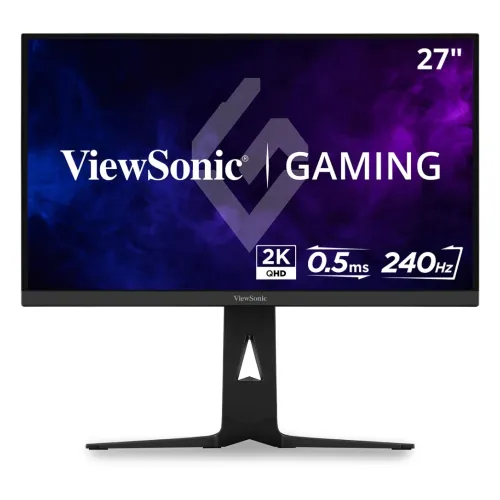
27-inch QHD 240Hz IPS gaming monitor with FreeSync Premium, USB-C 65W and HDMI 2.1.
Price unavailable
Price range updating
No verified price is available yet. Store offers will appear when merchants publish them.
Compare store prices
No live offers for this variant
Offers will appear when merchants publish them.
Loading history…
Product story
The ViewSonic XG2736-2K is a 27-inch 16:9 QHD IPS gaming monitor with 2560 × 1440 resolution and a 240Hz refresh rate. ViewSonic lists 0.5ms MPRT, 2ms typical GTG, AMD FreeSync Premium, NVIDIA G-Sync Compatible, USB-C with 65W charging, two HDMI 2.1 inputs, DisplayPort, and built-in speakers. It combines high refresh with a USB-C laptop connection. Refer to ViewSonic’s regional XG2736-2K manual and specification for exact setup and ergonomic ranges. Available signal modes depend on the host, cable, selected input and settings. Local stock, package, price, return terms and warranty require seller confirmation.
Confirm the model code XG2736-2K on the label and invoice. The suffix “2K” refers to the QHD 2560 × 1440 category, not a 4K UHD display. ViewSonic pages may describe it as a 1440p or QHD monitor. Check the regional warranty and included cable set, which can vary by market. Refer to ViewSonic’s regional XG2736-2K manual and specification for exact setup and ergonomic ranges. Available signal modes depend on the host, cable, selected input and settings. Local stock, package, price, return terms and warranty require seller confirmation.
The 27-inch display has a native QHD resolution of 2560 × 1440 and a 16:9 aspect ratio. QHD provides more workspace and detail than Full HD while requiring less GPU power than 4K. Use native resolution for sharp text and images. High refresh at QHD still requires a capable graphics card and correct signal settings. Refer to ViewSonic’s regional XG2736-2K manual and specification for exact setup and ergonomic ranges. Available signal modes depend on the host, cable, selected input and settings. Local stock, package, price, return terms and warranty require seller confirmation.
ViewSonic specifies an IPS panel with 1000:1 static contrast, 300 cd/m² brightness and 178-degree horizontal and vertical viewing angles. The anti-glare 3H coating helps reduce reflections. IPS supports broad viewing angles, but black levels and panel uniformity depend on the room, settings and individual screen. Refer to ViewSonic’s regional XG2736-2K manual and specification for exact setup and ergonomic ranges. Available signal modes depend on the host, cable, selected input and settings. Local stock, package, price, return terms and warranty require seller confirmation.
The monitor supports up to 240Hz over DisplayPort and USB-C according to the listed vertical frequency range; HDMI is listed up to 144Hz. Response time is 0.5ms MPRT and 2ms typical GTG. These measures describe different behavior and are not a guarantee that all transitions complete at the minimum time. Choose refresh and response options based on actual motion quality. Refer to ViewSonic’s regional XG2736-2K manual and specification for exact setup and ergonomic ranges. Available signal modes depend on the host, cable, selected input and settings. Local stock, package, price, return terms and warranty require seller confirmation.
ViewSonic lists AMD FreeSync Premium and NVIDIA G-Sync Compatible adaptive sync. Variable refresh can help reduce tearing when paired with compatible graphics hardware and supported frame rates. Enable the feature in both display and driver settings, then verify the expected range. Adaptive sync does not increase the GPU’s frame output. Refer to ViewSonic’s regional XG2736-2K manual and specification for exact setup and ergonomic ranges. Available signal modes depend on the host, cable, selected input and settings. Local stock, package, price, return terms and warranty require seller confirmation.
USB-C supports DisplayPort Alt Mode and up to 65W Power Delivery, carrying video and charging a compatible laptop over one cable. Confirm the host USB-C port supports display output and that 65W meets the computer’s power requirement. High-performance laptops may need their own adapter during demanding use. Refer to ViewSonic’s regional XG2736-2K manual and specification for exact setup and ergonomic ranges. Available signal modes depend on the host, cable, selected input and settings. Local stock, package, price, return terms and warranty require seller confirmation.
The monitor offers two HDMI 2.1 inputs, one DisplayPort input and one USB-C input. The product page lists HDMI vertical refresh up to 144Hz and DisplayPort/USB-C up to 240Hz. Choose DisplayPort or USB-C for the full 240Hz mode. Check cable capability, GPU output, input selection and OSD if the desired refresh is unavailable. Refer to ViewSonic’s regional XG2736-2K manual and specification for exact setup and ergonomic ranges. Available signal modes depend on the host, cable, selected input and settings. Local stock, package, price, return terms and warranty require seller confirmation.
Two built-in 2W speakers and a 3.5mm audio output are listed. Integrated speakers provide convenient basic sound for gaming and calls, while headphones or external speakers may deliver better clarity or volume. Select the monitor as the audio output device when using HDMI or DisplayPort. Refer to ViewSonic’s regional XG2736-2K manual and specification for exact setup and ergonomic ranges. Available signal modes depend on the host, cable, selected input and settings. Local stock, package, price, return terms and warranty require seller confirmation.
The OSD provides input selection, audio adjustment, ViewMode, color adjustment, manual image settings and setup controls. Physical buttons navigate the menu. Use the appropriate preset for gaming or general display work and check response/overdrive settings for artifacts. Software utilities may vary by region and should be downloaded from ViewSonic’s official support page. Refer to ViewSonic’s regional XG2736-2K manual and specification for exact setup and ergonomic ranges. Available signal modes depend on the host, cable, selected input and settings. Local stock, package, price, return terms and warranty require seller confirmation.
The ergonomic stand supports tilt, swivel and height adjustment, with maximum height adjustment listed as 130mm in product data. A 75 × 75mm VESA pattern and Kensington lock slot are specified. Check the installation guide for exact movement ranges and use an arm compatible with the monitor weight and mounting screws. Refer to ViewSonic’s regional XG2736-2K manual and specification for exact setup and ergonomic ranges. Available signal modes depend on the host, cable, selected input and settings. Local stock, package, price, return terms and warranty require seller confirmation.
ViewSonic lists typical power consumption at 29W, maximum at 33W, and 100–240V AC, 50–60Hz input using an external power supply. Standby is listed at 0.3W. Keep the adapter ventilated and use the supplied power cable. Confirm package dimensions and physical clearance for the stand before placing on a desk. Refer to ViewSonic’s regional XG2736-2K manual and specification for exact setup and ergonomic ranges. Available signal modes depend on the host, cable, selected input and settings. Local stock, package, price, return terms and warranty require seller confirmation.
For 240Hz gaming, connect via DisplayPort or a compatible USB-C output, choose 2560 × 1440 and set 240Hz in the graphics panel. HDMI is specified up to 144Hz at its listed signal range. If 240Hz does not appear, check graphics output capability, cable, selected input, OS refresh setting and driver configuration. Refer to ViewSonic’s regional XG2736-2K manual and specification for exact setup and ergonomic ranges. Available signal modes depend on the host, cable, selected input and settings. Local stock, package, price, return terms and warranty require seller confirmation.
The monitor supports compatible PCs, Macs, laptops, PlayStation, Xbox, Switch and Steam Deck through its HDMI, DisplayPort and USB-C connections. Console output will depend on device limits and game modes; consoles do not use the monitor’s full 240Hz PC refresh. Verify the detected resolution and rate after connecting. Refer to ViewSonic’s regional XG2736-2K manual and specification for exact setup and ergonomic ranges. Available signal modes depend on the host, cable, selected input and settings. Local stock, package, price, return terms and warranty require seller confirmation.
Advantages include QHD resolution, 240Hz DisplayPort/USB-C refresh, adaptive sync, USB-C 65W, HDMI 2.1 and adjustable stand. Trade-offs include HDMI refresh up to 144Hz, modest 300-nit brightness and 1000:1 contrast, and the need for a GPU capable of high frame rates. USB-C 65W may not fully power every laptop. Refer to ViewSonic’s regional XG2736-2K manual and specification for exact setup and ergonomic ranges. Available signal modes depend on the host, cable, selected input and settings. Local stock, package, price, return terms and warranty require seller confirmation.
Flicker-Free and a blue-light filter are listed. These features can support display comfort but may change image color, and they do not prevent all eye strain. Adjust brightness for ambient light, use comfortable viewing distance and take breaks during long sessions. Refer to ViewSonic’s regional XG2736-2K manual and specification for exact setup and ergonomic ranges. Available signal modes depend on the host, cable, selected input and settings. Local stock, package, price, return terms and warranty require seller confirmation.
On delivery, inspect the panel, stand, external adapter, power cable, HDMI/DP/USB-C cables and serial label. Keep packaging and invoice through the return period. Avoid pressing on the panel and clean it with a soft microfiber cloth. Check seller policy for dead pixels and document any damage before accepting the item. Refer to ViewSonic’s regional XG2736-2K manual and specification for exact setup and ergonomic ranges. Available signal modes depend on the host, cable, selected input and settings. Local stock, package, price, return terms and warranty require seller confirmation.
Before purchase in Bangladesh, confirm current price and stock, exact XG2736-2K model, new or open-box condition, regional package cables, dead-pixel and return terms, delivery and serial-specific ViewSonic warranty provider and duration. Do not infer Bangladesh service from a US listing. Ask the seller to state warranty terms on the invoice. Refer to ViewSonic’s regional XG2736-2K manual and specification for exact setup and ergonomic ranges. Available signal modes depend on the host, cable, selected input and settings. Local stock, package, price, return terms and warranty require seller confirmation.
ViewSonic XG2736-2K is a 27-inch 2560 × 1440 IPS monitor with 240Hz, 0.5ms MPRT, FreeSync Premium, G-Sync Compatible and USB-C 65W. DisplayPort/USB-C support up to 240Hz; HDMI up to 144Hz. Confirm the exact local package and serial warranty before buying. Refer to ViewSonic’s regional XG2736-2K manual and specification for exact setup and ergonomic ranges. Available signal modes depend on the host, cable, selected input and settings. Local stock, package, price, return terms and warranty require seller confirmation.
Use QHD native resolution for clear desktop work and select refresh mode based on the source and connection. This model is designed for high-refresh PC play but also connects to compatible consoles and laptops. Match graphics hardware to the 240Hz target and verify that your intended game supports the required frame rate. Refer to ViewSonic’s regional XG2736-2K manual and specification for exact setup and ergonomic ranges. Available signal modes depend on the host, cable, selected input and settings. Local stock, package, price, return terms and warranty require seller confirmation.
Helpful answers
Product-specific answers maintained with the catalog information.
The XG2736-2K uses QHD 2560 × 1440 resolution.
Yes, ViewSonic lists up to 240Hz through DisplayPort and USB-C.
ViewSonic lists HDMI vertical refresh up to 144Hz.
Yes, compatible USB-C devices can receive up to 65W Power Delivery.
ViewSonic lists AMD FreeSync Premium and NVIDIA G-Sync Compatible.
It lists 0.5ms MPRT and 2ms typical GTG, which are different measures.
Yes, two 2W speakers and a 3.5mm audio output are listed.
The monitor lists a 75 × 75mm VESA mounting pattern.
Confirm the serial-specific local ViewSonic provider, term and service in writing.
Customer community
Become a merchant
Join BiponiBD, publish accurate offers and start free.