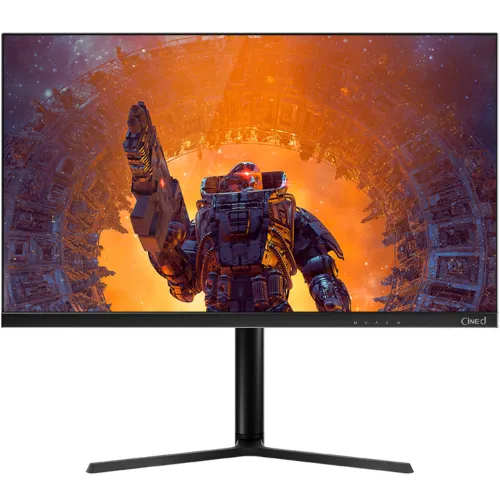
Walton CiNEd WD27GI06 overview
The Walton CiNEd WD27GI06 is a 27-inch QHD gaming and general-purpose monitor built around an IPS panel. Walton’s Bangladesh product page identifies the exact model, its QHD 2560 × 1440 resolution, 165Hz over DisplayPort, 144Hz over HDMI, 350 cd/m² brightness, 1ms overdrive response specification, two DisplayPort inputs, two HDMI inputs and integrated 2W × 2 speakers. Walton’s leaflet additionally describes Adaptive Sync support, HDR, a 3-side frameless design and a 75 × 75mm VESA mount. This review uses those manufacturer sources; it does not infer live BiponiBD inventory, price or local seller service terms from Walton’s listing.
27-inch QHD workspace
The 27-inch, 68.58cm screen uses a 16:9 aspect ratio and native QHD resolution of 2560 × 1440 pixels. At this size, QHD gives a more detailed desktop than 1920 × 1080 Full HD and provides useful space for side-by-side windows, spreadsheets, timelines and browser tabs. For the clearest image, choose the native resolution in the computer’s display settings. Text size and application scaling can be increased independently if the extra desktop space makes interface elements feel small. The 27-inch diagonal is measured across the visible display area; desk depth and viewing distance still affect comfort.
IPS panel and viewing
Walton identifies an IPS panel and a 178-degree horizontal and vertical viewing angle. IPS technology is useful when the screen is viewed from a seated position that is not perfectly centered or when a second person is looking at the display. Viewing angle figures describe the manufacturer’s stated range and do not mean brightness and color are identical at every angle. The display is LED backlit and has a flat screen. Walton’s product page lists a 1000:1 contrast ratio and 16.7 million colors. Room lighting, selected picture mode, individual panel variation and source content influence the image that a buyer sees.
Refresh rate by connection
Refresh rate depends on the input used: Walton lists up to 165Hz through DisplayPort and up to 144Hz through HDMI. The HDMI input therefore should not be assumed to provide the same maximum refresh as DisplayPort. Use a suitable cable and a graphics output that supports the selected QHD timing, then select the refresh rate in the operating system or graphics control panel. If the target mode is missing, check the input, cable, graphics driver and monitor signal menu. The monitor’s refresh capability does not create extra game frames; the computer must render them. The 165Hz figure is a maximum listed mode, not a promise that every device or adapter will support it.
QHD gaming and computer requirements
QHD at a high refresh rate asks more of a gaming computer than Full HD at the same settings. The WD27GI06 can show a compatible signal up to the port-specific limits listed by Walton, while the graphics card and game determine the actual frame rate. Competitive games may reach high frame rates with tuned quality settings; demanding new games may need reduced detail or may run below the monitor’s maximum. A lower frame rate can still display correctly, and variable refresh can help align screen updates when supported and configured. Check the GPU’s QHD output capabilities and the game’s performance before buying specifically to achieve 165 frames per second.
Response time and overdrive
Walton lists a 1ms response time with the “OD” qualifier, meaning an overdrive mode is involved. Overdrive changes pixel transitions; the figure should not be read as a universal input-lag measurement or as a guarantee that every transition finishes in one millisecond without artifacts. Actual motion appearance depends on the chosen overdrive level, refresh rate, frame rate, panel sample and game. If a fast mode introduces bright trails or inverse ghosting, try a less aggressive setting and compare real moving scenes. Response time, refresh rate, input latency and motion clarity describe related but different parts of the display experience.
Color reproduction and gamut evidence
The exact-model Walton leaflet advertises NTSC 93% and Adobe RGB 95%. The Walton Bangladesh product specification page has a conflicting table presentation: it lists “Color Gamut 85% NTSC” and separately shows NTSC 93% and Adobe RGB 95% under “Display Surface.” Because the official sources do not align cleanly, this listing records the brochure’s figures while explicitly flagging gamut for confirmation against the shipped WD27GI06 packaging or current datasheet. The product page lists 16.7 million colors. These coverage figures describe gamut coverage, not factory calibration or guaranteed color accuracy. For color-critical design or print work, request calibration and measurement information rather than treating gamut coverage as proof of accuracy.
HDR support and realistic expectations
Walton lists HDR as supported for the WD27GI06 and its leaflet also identifies HDR support. The reviewed manufacturer sources do not establish a VESA DisplayHDR certification tier or a local-dimming system for this model, so neither is claimed here. HDR playback requires compatible content, operating-system or console settings, a supported connection and correct source configuration. Brightness, contrast and tone mapping affect the result; HDR support by itself does not guarantee a particular HDR impact. Compare the HDR setting with SDR in the content you actually use, and turn it off when the image looks less natural or the source workflow does not benefit.
Adaptive Sync, FreeSync and G-SYNC Compatible
Walton’s official leaflet states that AMD FreeSync is supported and identifies the product as NVIDIA G-SYNC Compatible. The product page groups Free Sync and G-Sync as supported. Variable refresh can reduce tearing when the monitor, graphics card, driver, input and frame rate operate within a compatible range. Enable the feature in the monitor menu and graphics software where required, and confirm that the driver detects the display correctly. This is compatibility wording from Walton’s brochure; buyers should still check the current GPU support list and the exact connection they intend to use. Adaptive synchronization does not increase the game’s rendering speed.
Ports and connected devices
Walton specifies two DisplayPort inputs, two HDMI inputs, an audio output and DC input. The product page does not give HDMI or DisplayPort version numbers in the specification reviewed, so this description does not invent port revisions. DisplayPort is the manufacturer-listed path for 165Hz; HDMI is listed for up to 144Hz. A desktop PC, laptop, console or second computer may connect if its output supports the monitor’s resolution and desired refresh. Docks, adapters, KVM switches and long or low-quality cables can alter available modes. Connect directly to the source first when troubleshooting, select the matching monitor input, and verify resolution and refresh after connection.
Built-in speakers and audio output
Walton lists two integrated speakers rated at 2W each (2W × 2). They can provide basic sound for system alerts, video calls and casual viewing without placing separate speakers on the desk. The manufacturer’s specification does not make them a substitute for a dedicated audio system where fuller bass, higher volume or detailed listening is important. The monitor also lists an audio output. Audio routing depends on the connected computer or console and its selected playback device. If no sound is heard, check the source’s audio output selection, the monitor volume and mute settings, and whether audio is being sent over the active HDMI or DisplayPort connection.
Stand, ergonomics and security
Walton states that the stand supports tilt from -5 degrees to +15 degrees, height adjustment, swivel and pivot. Exact height travel, swivel range and pivot-angle values are not supplied in the manufacturer pages reviewed, so they are not guessed. A height-adjustable stand can help align the screen with the user’s eye level; tilt can reduce awkward reflections, and pivot can suit portrait documents when the source rotates the image. The product also lists a Kensington lock feature. Adjust the display on a stable surface, leave slack in cables before swiveling or pivoting, and confirm the mechanism range in the supplied manual before planning a tight desk layout.
VESA installation and desk setup
The Walton leaflet lists a 75 × 75mm VESA mount. Confirm that the exact display and stand package includes the required mounting hardware, and use a wall bracket or arm rated for the screen’s weight and mounting pattern. Keep ventilation openings clear and follow the manual’s screw length and installation instructions; unsuitable screws can damage a display. Route power and signal cables so they do not pull when the screen is raised, swiveled or rotated. The manufacturer specifies a 27-inch display and a net weight of about 5.35kg with a stated ±5% tolerance; include the mount’s own rating and safety margin in any desk-arm decision.
Brightness, eye-care and surface
Walton lists 350 cd/m² brightness, low-blue-light support and flicker-free operation. Brightness should be set for the room rather than left at maximum by default. Reducing glare, positioning the screen away from direct reflections, and taking regular breaks can make long sessions more comfortable. Low-blue-light settings may shift the image toward warmer colors, so a neutral mode may be preferable when judging color. Walton lists the screen as 3-side frameless; its product page’s “display surface” field is difficult to interpret because it is mixed with gamut figures, so an anti-glare finish is not asserted as a confirmed specification in this description.
Power, adapter and consumption
The product page specifies a 12V, 4A adapter, AC input of 100–240V and maximum power consumption of 48W. It lists 0.5W standby power. Use the supplied manufacturer-approved adapter and check the rating label before replacement; a connector that physically fits may still have an unsuitable electrical rating or polarity. Keep the adapter ventilated and avoid pinching its cable behind the desk. Real energy use varies with brightness, selected mode, connected devices and whether the display is active or sleeping. Disconnect power safely before cleaning or moving the monitor, and follow Walton’s manual for operating conditions.
Dimensions, weight and package checks
Walton’s page lists net weight as 5.35kg ±5% and gross package weight as 7.35kg ±5%. These values help with transport and desk planning, but they do not provide every outer dimension needed to measure a shelf opening. Measure the actual stand footprint, screen width and height from the current manual or product in hand if the available space is tight. The official pages reviewed do not provide a definitive box-content checklist. Before accepting delivery, compare the package contents with the included packing list and inspect the display, stand, power adapter, cables and warranty papers. Keep the serial label and purchase invoice for support.
Advantages for the intended buyer
The WD27GI06 combines QHD resolution with a high refresh rate for PC gaming, an IPS panel, a 350 cd/m² brightness specification, Adaptive Sync and HDR support. Its DisplayPort input is listed up to 165Hz and HDMI up to 144Hz, and it offers two of each video input for multiple sources. Integrated 2W × 2 speakers, a height-adjustable stand with several movement directions, 75 × 75mm VESA mounting and eye-comfort functions add everyday flexibility. These features may suit a desk used for games, study and general productivity. Confirm the port and refresh requirements of the actual computer before selecting a cable or connection plan.
Trade-offs and details to verify
The maximum refresh differs between DisplayPort and HDMI, so buyers relying on 165Hz should plan to use a supported DisplayPort connection. QHD at high frame rates may require a capable graphics card. The official product page and leaflet do not present color gamut consistently; confirm the figure for the shipped unit if it matters to a creative workflow. Walton lists HDR support but the sources reviewed do not establish a certification tier. Built-in 2W speakers are basic, and the exact stand travel ranges, box contents and model dimensions were not established. These are practical points to verify, not evidence that the monitor is defective or that the features are absent.
Manufacturer warranty and Bangladesh service
Walton’s Bangladesh page describes component-specific coverage: three years for the main motherboard, two years for the panel, one year for the adapter or power-supply board, and three years for other spare parts and service, followed by payable service after three years until end of life. The page also states exclusions and reserves the right to change warranty terms; its panel term includes a date-specific note. The existing BiponiBD record’s short warranty wording is not itself proof of the warranty attached to a particular sale. Ask the seller to confirm the WD27GI06 serial’s current coverage, start date, service location, exclusions and invoice requirements in writing.
Setup checklist and troubleshooting
After placement, connect the supplied adapter and one video cable directly to the source, then select the matching input. Set 2560 × 1440 and choose a refresh rate supported by that port and computer: Walton lists 165Hz for DisplayPort and 144Hz for HDMI. If the desired mode is unavailable, confirm the cable and source output, update the graphics driver, remove intermediary adapters for diagnosis and check the display settings again. Enable Adaptive Sync at both ends if appropriate. For audio, select the display as the playback output and check its volume. For an unstable high-refresh image, lower the refresh temporarily and test another known-good cable before restoring the highest supported mode.
Who should consider it
This model is worth considering for a user who wants a 27-inch QHD display, smoother PC motion than a standard 60Hz screen, an adjustable stand and several video inputs. It can also serve mixed gaming, coursework, office and media use. A buyer whose priority is competitive gaming should verify the DisplayPort path and graphics-card frame rates. A buyer focused on professional color should obtain current color-gamut and calibration evidence because Walton’s official product page and leaflet present gamut information inconsistently. A buyer who needs strong built-in audio, premium HDR performance or a precisely specified stand travel range should compare those requirements with the supplied documentation before ordering.
Purchase summary
Walton CiNEd WD27GI06 is an exact-model 27-inch QHD IPS monitor with a 165Hz DisplayPort maximum and a 144Hz HDMI maximum, a 1ms overdrive claim, 350 cd/m² brightness, Adaptive Sync, HDR support, two HDMI and two DisplayPort inputs, 2W × 2 speakers and an adjustable stand. The manufacturer leaflet lists FreeSync and NVIDIA G-SYNC Compatible support and 75 × 75mm VESA mounting. Confirm color-gamut details, current serial-specific warranty, box contents and the connection mode needed for your computer. Price, stock and delivery for this BiponiBD offer must be checked on the live product page at purchase time.