Pros
- Compact connection adapter for compatible USB-A hosts and USB-C cables.
- WiWU lists charging and data use for the product family.
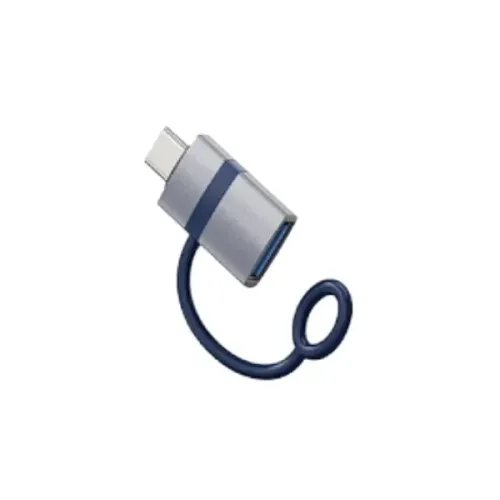
- Aluminum-alloy shell and silicone lanyard are described by manufacturer.

All categories
 New condition
Computer Accessories
Wiwu · Wi-C052 A-C USB-A to USB-C Adapter
WiWU Wi-C052 A-C USB-A male to USB-C female adapter. WiWU lists PD/data support for specific models; verify exact variant, charging profile and local warranty.
Approximate Market Price
BDT 350
Informational market estimate only; this is not a current Store offer.
Compare store prices
No live offers for this variant
BDT 350
Approximate Market Price
Informational market estimate only; this is not a current Store offer.
Loading history…
Product story
The WiWU Wi-C052 A-C is listed by Bangladesh retailers as a compact adapter for connecting a USB-C cable or compatible peripheral to a USB-A port. Retail listings identify the A-C variant as USB-A male to USB-C female; the Wi-C052 family also has other connector variants, so verify the A-C suffix and exact plugs before ordering. WiWU’s official family page describes charging and data functions, aluminum-alloy shell and silicone lanyard, but gives several specifications as model-dependent rather than exact A-C figures.
For the A-C variant, the USB-A male plug connects to a USB-A host or charger and the USB-C female socket accepts a USB-C male cable or peripheral plug. Do not confuse it with the C-A or C-L variants that may share the broader Wi-C052 family code. Retail pages also use inconsistent naming such as “USB male to Type-C female”; check product photos, package label and exact seller SKU to confirm which end is male or female.
WiWU’s official family listing describes PD fast-charge support and says specific models can reach up to 27W. It does not establish that every Wi-C052 variant or every connected device will deliver that power. USB Power Delivery requires a compatible source, adapter implementation, cable and receiving device to negotiate a supported profile. Verify the exact A-C variant’s supported protocols with the seller; do not treat 27W as a universal output rating or assume all USB-A ports support USB-C PD.
Charging current depends on the USB-A source port, connected USB-C cable and device. An adapter can provide a connector change but cannot upgrade a standard USB-A source into a full USB-C PD charger by itself. Legacy USB-A ports and proprietary fast-charge standards vary. Use the charger and cable recommended for the device and check the output label. Stop using the adapter if it becomes unusually hot, loose or damaged.
WiWU describes data transmission and computer expansion for the Wi-C052 family, including connecting peripherals such as flash drives, keyboards and mice to compatible devices. However, its page mixes USB 3.0 and USB 3.2 support across unspecified variants and does not give a confirmed data rate for the A-C configuration. Actual behavior depends on host port, cable, peripheral and adapter revision. Do not assume 5Gbps, 10Gbps, OTG, or operation with every phone without exact variant confirmation.
The USB-A male plug requires a host with a USB-A receptacle, such as a compatible laptop, desktop or charger. The USB-C female socket accepts a USB-C cable or plug. For a phone or tablet to access storage or input devices, its host/OTG behavior and operating system must support the peripheral. USB-C port presence alone is not enough to guarantee OTG or data functions. This adapter does not add HDMI video, Ethernet, multiple ports or independent power.
WiWU’s official family page describes an aluminum-alloy shell and silicone lanyard design. These features can help keep a small adapter attached to a cable or key ring, but the exact accessories and finish should be checked for the A-C variant offered locally. The sources do not establish water resistance or a tested durability rating. Keep the USB-C socket clean, and avoid side-loading a cable that could stress the adapter or host port.
Confirm that the selected model is Wi-C052 A-C, insert the USB-A male end into a suitable host port, and connect a USB-C cable or peripheral to the female socket. For data, use a data-capable cable and approve device prompts. For charging, verify source output and device input requirements. If the attached device is not recognized, test the cable and peripheral directly on another host, check OTG settings, and verify the adapter’s connector orientation.
If charging is slow, compare the USB-A source rating with the device’s supported charging profile; a high-wattage wall charger does not guarantee that a legacy USB-A port will deliver that power. If a peripheral is not detected, verify host-mode support and use a data-capable cable. Insert and remove the adapter straight, without force. Avoid attaching heavy equipment that may bend the USB-A plug or damage the device port.
WiWU says the product family is backed by an official quality-assurance program, but specific service terms depend on distributor agreements and regional arrangements. A Bangladesh retailer may advertise a local warranty; confirm duration, replacement process, invoice requirement, exclusions and return period. Verify whether the offer contains one adapter and the lanyard. The Wi-C052 family includes other variants, so check the precise A-C connector version before payment.
The WiWU Wi-C052 A-C can bridge a USB-A host and a compatible USB-C cable or accessory in a compact form. The official family information describes charging/data functions, an aluminum-alloy shell and lanyard, while retailers identify the A-C variant’s connector configuration. Exact PD wattage and USB data generation are not confirmed for every family variant. Confirm the part suffix, cable direction, host capability and local warranty before purchase.
What is the model? WiWU Wi-C052 A-C. What connectors should the A-C version have? Retailer listings identify USB-A male to USB-C female; verify the exact product image and label. Is this the same as Wi-C052 C-A? No, connector direction differs; the family includes multiple variants. Does it support PD charging? WiWU lists PD for specific models, but exact A-C power profiles require confirmation. Is 27W guaranteed? No, WiWU presents up to 27W for specific models only. What data speed does it support? An exact A-C data rate was not verified; the family page refers to USB 3.0/3.2 for specific models. Can it connect a flash drive? It may if the host supports the required data/OTG function and the connection is compatible. Does it output video? Video was not listed for the A-C adapter. What materials are listed? WiWU describes aluminum alloy and a silicone lanyard for the family. What warranty applies in Bangladesh? Confirm the selected seller’s local coverage.
Helpful answers
Product-specific answers maintained with the catalog information.
It is listed as Wi-C052 A-C.
Local retailers identify USB-A male to USB-C female; check the exact seller product and packaging.
No, the connector direction differs; Wi-C052 is a family with multiple variants.
WiWU describes PD support for specific family models; confirm the exact A-C power profile.
No, WiWU lists up to 27W for specific models, not all variants or device combinations.
A precise A-C data rate was not confirmed in the sources reviewed.
Possibly, if the host supports the required USB data/OTG mode and the cable/peripheral are compatible.
Video output was not listed for this adapter.
The official family page describes an aluminum-alloy shell and silicone lanyard.
Confirm service provider, duration and conditions with the selected local seller.
Customer community
Become a merchant
Join BiponiBD, publish accurate offers and start free.