Pros
- Bluetooth and 2.4 GHz connection options
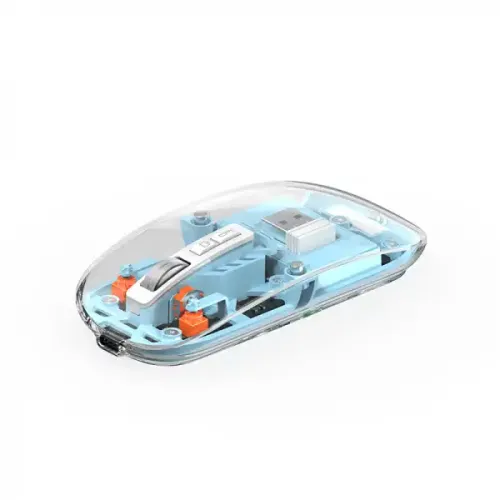
- Transparent design with removable magnetic cover

All categories
 New condition
Computer Accessories
Wiwu · WM105
WiWU WM105 transparent wireless mouse with a magnetic cover, Bluetooth and 2.4 GHz modes. Retailers list a 400 mAh battery; confirm dimensions and included receiver.
Approximate Market Price
BDT 1,000 – BDT 1,100
Informational market estimate only; this is not a current Store offer. Last checked Sep 14, 2026.
Compare store prices
No live offers for this variant
BDT 1,000 – BDT 1,100
Approximate Market Price
Informational market estimate only; this is not a current Store offer. Last checked Sep 14, 2026.
Loading history…
Product story
The WiWU WM105 is a wireless mouse with a transparent-style body and a removable magnetic cover, according to local retailers. Listings describe two Bluetooth channels and a 2.4 GHz wireless mode, allowing the mouse to switch between compatible paired devices. The 2.4 GHz mode requires a compatible USB receiver and host port.
For Bluetooth use, pair the mouse with a compatible device using its Bluetooth settings. For 2.4 GHz use, connect the matching receiver to a suitable USB port. Retailers describe three connection channels; the exact switching method and number of remembered devices should be confirmed for the unit offered. A mouse normally controls the selected host rather than multiple computers at once.
Retailers list a 400 mAh battery and one describes a USB-C charging port. Confirm the charging connector, cable and charging instructions with the seller for the exact version. Battery capacity is not a runtime measurement: usage time depends on settings, conditions and battery age, and no independently verified runtime is available.
The transparent cover is described as magnetically attached and removable. Local listings commonly state five buttons, though another source lists a different count. Dimensions also differ substantially between sellers, so verify measurements and button layout with the seller before ordering. Do not assume a particular DPI setting or colour variant without checking the offered unit.
Charge the mouse according to its instructions, choose the desired wireless mode and pair or attach its receiver. If tracking is interrupted, check charge level, selected channel and receiver or Bluetooth connection. Confirm model, colour, receiver, charging accessories, device compatibility and local warranty terms before purchase. These specifications are based on retailer information and have not been independently tested.
Helpful answers
Product-specific answers maintained with the catalog information.
Retailers list both Bluetooth and 2.4 GHz modes. The latter needs a matching USB receiver; confirm it is included with the seller.
Retailers list a 400 mAh battery, but reliable runtime was not verified. Actual usage time depends on conditions and battery age.
Retailers describe three wireless channels for switching between devices. Confirm the pairing and switching procedure for the exact unit.
Customer community
Become a merchant
Join BiponiBD, publish accurate offers and start free.