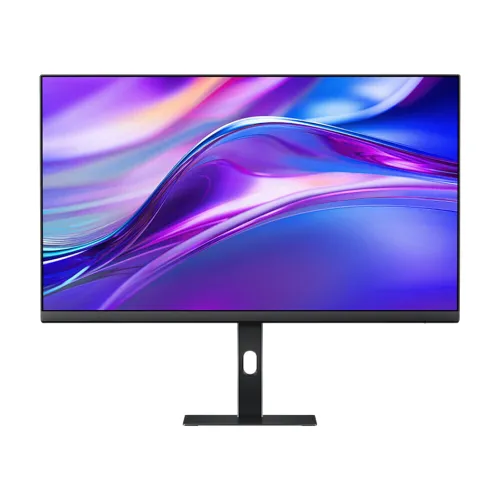
Xiaomi Redmi A27Q 2025 P27QCB-RA is a 27-inch QHD IPS monitor with a 100Hz refresh rate and multi-function adjustable stand. It is designed for office work, study, everyday media and casual gaming where a sharper 2560 × 1440 workspace and stand flexibility are useful. This listing identifies the P27QCB-RA multi-function stand version; check the suffix because the similar P27QCA-RA is a different configuration.
Identify the 2025 multi-function stand version
The Xiaomi Redmi A27Q 2025 is a 27-inch QHD monitor family. This product record is specifically for model P27QCB-RA, the multi-function stand version. That suffix matters: the P27QCA-RA standard stand version is a separate configuration, and sellers sometimes reuse similar titles or photos across both. Before buying, compare the product label, carton model, stand photos, invoice and warranty document. This description follows the P27QCB-RA feature set where verified.
The monitor is a flat, 16:9 IPS desktop display. The model-specific local listings and launch reporting agree on 2560 × 1440 resolution and 100Hz refresh. Some dimensions, colour-gamut details, power and mounting values come from retailer or independent specification records rather than an accessible global Xiaomi specification sheet. Those fields are identified as listing-derived so they can be checked against the exact unit.
QHD resolution and desktop workspace
A native resolution of 2560 × 1440 places about 3.7 million pixels across the panel. On a 27-inch screen, this gives text and interface elements more detail than 1920 × 1080 at the same diagonal size, while leaving room for side-by-side documents, a browser and a spreadsheet. The 16:9 shape works with common desktop apps, videos and games. Operating-system scaling can make text easier to read while retaining much of the extra workspace.
For the sharpest result, select the display’s native 2560 × 1440 mode. If a connected laptop only offers lower resolutions, check the dock, adapter, GPU output and cable specification. Scaling and app rendering vary, so users who prefer larger controls can increase display scaling without changing the panel’s physical pixel density. QHD is not 4K; compare resolution requirements and viewing distance before choosing.
IPS panel, viewing angles and colour
The IPS panel type is suited to shared viewing and everyday work because the listed viewing angle is 178 degrees horizontally and vertically. Colour and contrast can still shift away from the centre, and viewing-angle figures do not mean the image looks identical from every position. Independent launch reporting for the P27QCB-RA describes 95% DCI-P3 coverage and 8-bit colour. These figures make the monitor appropriate for general media and non-critical creative work, but do not establish factory calibration or professional colour accuracy.
Local retailer specifications are inconsistent about gamut: some pages list a second sRGB percentage or alternate colour figures. This record keeps the corroborated 95% DCI-P3 claim and does not convert one gamut metric into another. For print matching, colour grading or client-critical design, use a calibrated display workflow and verify measured coverage and accuracy; a gamut percentage alone does not guarantee a particular Delta E or calibration result.
100Hz refresh and actual frame rate
The model is listed for a maximum 100Hz refresh rate. Compared with a conventional 60Hz setting, a compatible 100Hz signal can update the image more often and make scrolling, cursor movement and supported games appear smoother. A high refresh setting does not create extra frames: the computer or console must render and send them. Resolution, graphics settings, game engine, processor, GPU and connection all affect the achievable frame rate.
Connect directly when checking a new setup, select 2560 × 1440, then choose 100Hz in the operating system or graphics settings. If 100Hz is absent, check whether the selected HDMI or DisplayPort output, adapter, dock and cable support the mode. Some devices may expose different refresh options by port. Avoid assuming every console can use 100Hz at QHD; consult its video-output specifications and the monitor’s supported timing information.
Response time and motion expectations
Local specifications list 6ms grey-to-grey (GTG) response time. GTG describes a transition between grey levels under a specified test method. It is not a promise that every pixel transition completes in exactly 6ms, and it is not interchangeable with MPRT. Motion clarity is affected by the panel response, refresh rate, frame pacing, source frame rate, overdrive setting and the content itself.
If moving objects show trails or overshoot, try a less aggressive response-time setting and compare it in the games or applications you use. The best setting can depend on refresh rate and personal sensitivity. For fast esports, users who prioritize the lowest blur may prefer a higher-refresh model with independently tested response behavior. For mixed office use and casual games, 100Hz may be a practical middle ground.
Brightness, contrast and SDR viewing
The listed typical brightness is 250 cd/m² and the listed typical static contrast is 1000:1. These are conventional SDR monitor values for office lighting and home use. Bright rooms, direct sunlight and strong reflections can make the image harder to see. The flat screen and IPS viewing angles can help a shared desk setup, but the monitor is not specified here as a high-brightness HDR display.
Set brightness to suit the room and avoid using maximum brightness automatically in a dim workspace. The 1000:1 contrast figure is a typical static specification, not a measured guarantee for every unit. Retail pages may use marketing language such as HDR or eye-care without a corresponding model-specific certified feature list; this record does not promise HDR performance.
Stand ergonomics for the P27QCB-RA
The P27QCB-RA version is distinguished by its multi-function stand. Local model-specific listings describe height adjustment, swivel, pivot and tilt, letting users reposition the screen for seated posture, portrait documents or a shared viewing direction. Adjust the stand on a stable surface, support the display while changing orientation and keep cables slack so that turning or raising the panel does not pull on a port.
The standard P27QCA-RA version has a different base and should not be treated as interchangeable. Product photography can be reused across retailer pages, so confirm the model code and stand mechanism before ordering. Exact adjustment ranges are not included here because current primary documentation was not available to verify degrees or travel.
VESA mounting and desk planning
A 75 × 75mm VESA mounting pattern is reported in local listings for this product family. Verify the pattern on the back of the P27QCB-RA unit before selecting a wall bracket or monitor arm. Check the fastener type and insertion depth in the user guide, respect the arm’s weight limit and use a mount suitable for the wall or desk. Do not force screws or use an arm that can overextend the stand or cable connections.
Retail listings report an approximate assembled footprint of 612.5 × 185 × 510.4mm and approximately 5.3kg for the multi-function version. Treat those dimensions and weight as secondary-source values until the carton or manual for the supplied unit confirms them. Leave clearance behind the monitor for connectors and airflow, and measure desk depth if the stand base sits close to the keyboard.
HDMI, DisplayPort and audio connection
The P27QCB-RA local listings specify one HDMI 2.0 input, one DisplayPort 1.4 input and a 3.5mm audio output. HDMI and DisplayPort let a desktop or laptop connect using common digital video connections; supported resolution and refresh still depend on the source, cable and adapter. If image or refresh issues occur, test a direct connection, confirm the selected input in the on-screen menu and update the computer’s graphics driver.
The 3.5mm jack is an audio output and does not mean the monitor has built-in speakers. Connect headphones or powered speakers, or route audio through the computer. Included cable types can differ by seller, region or package batch, so check the box contents before relying on a cable being supplied.
Low-blue-light and comfort features
Local listing data identifies a low-blue-light feature. This can be useful for users who prefer a warmer image in evening conditions, but display settings do not prevent eye strain or replace breaks, appropriate room lighting and a comfortable viewing distance. Use the on-screen controls or compatible display mode documented for the unit. The monitor’s listed specifications do not establish medical eye-protection benefits.
Brightness, text size, ambient light and glare often matter as much as colour temperature for comfort. Position the screen so that windows and overhead lights do not reflect directly into the panel. If a warmer mode changes colour-critical work, return to a neutral setting when colour judgement matters.
Power, size and setup details
Retail listings report 36W rated power and a 100–240V, 50/60Hz input range for this model family. Confirm the electrical label and the supplied power adapter on the local unit because regional packages can differ. Use the adapter and cable supplied or explicitly approved for the monitor. Disconnect power before moving connections and route cables so that the adjustable stand does not pinch or strain them.
The black finish fits many home and office setups. Secondary sources list the multi-function version at about 612.5mm wide, 185mm deep and 510.4mm high, with a weight around 5.3kg. Those are planning references, not guaranteed shipping measurements. Carton dimensions and gross weight can be larger; ask the seller if delivery or mounting clearance depends on precise measurements.
Choosing it for work, study and media
For office work, QHD can provide a useful balance of readable text and a larger workspace at 27 inches. Students can keep reference material beside notes, and home-office users can arrange windows without immediately adding a second screen. The 100Hz refresh may make scrolling feel more fluid than 60Hz. Video playback depends on the source frame rate, and a monitor does not improve the quality of a low-resolution video automatically.
For photo and design work, the reported 95% DCI-P3 coverage is a useful colour-space indicator but not a substitute for a calibration report. For long spreadsheets or portrait documents, the P27QCB-RA pivot stand can help reposition the screen. For gaming, compare GPU capability, preferred refresh rate and response performance; competitive players may want a faster panel, while mixed-use users may value the stand and QHD workspace.
What to confirm before buying in Bangladesh
Monarch IT listed the P27QCB-RA at ৳22,900 and in stock when reviewed. Ultra Technology also showed ৳22,900 on its product page. Seller prices, availability, promotions and delivery coverage change; these observations are comparison information and are not a BiponiBD offer. Confirm the final payable amount, exact model suffix and stock directly with the seller before placing an order.
Ask for the local warranty provider, duration, service process and proof of purchase. This record does not independently verify the current Bangladesh serial-warranty terms. Confirm whether the carton includes a power adapter, AC cable, HDMI or DisplayPort cable, stand and manuals. Keep the invoice and packaging until the monitor has been inspected and tested.
Who should consider another monitor?
Choose another model if you need 4K resolution, a 144Hz-or-higher refresh rate, built-in speakers, USB-C laptop charging, multiple high-speed ports or professional colour-calibration guarantees. The P27QCB-RA is a 100Hz QHD IPS monitor with one HDMI and one DisplayPort in the local listings, not a docking monitor with a USB hub. Check the feature list against your actual computer and accessories.
Also compare the stand carefully if height and portrait orientation are important. This listing refers to the multi-function P27QCB-RA, while the similar P27QCA-RA may use a simpler stand. The two codes should not be combined in one purchase assumption. Buyers who need a different port count, a particular refresh at a console resolution or a specific VESA screw size should verify the manual and local unit before paying.
Care, cleaning and long-term use
Place the display on a firm, level desk and keep ventilation openings clear. Use a clean microfiber cloth for dust and follow Xiaomi’s cleaning guidance; do not spray liquid directly onto the panel or use abrasive cleaners. Hold the frame rather than pressing on the LCD surface when moving the monitor. Disconnect cables by their connectors, not by pulling the wire, and support the screen when making stand adjustments.
Inspect the screen for pixel, backlight, port or stand issues promptly after delivery and follow the seller’s return and warranty procedures. Store the invoice, serial number and packaging details. If the display does not show the expected resolution or refresh rate, troubleshoot the source, cable, port and graphics settings before concluding that the panel is defective.
Verified model specifications and source notes
Confirmed model-level information includes a 27-inch IPS screen, 2560 × 1440 resolution, 16:9 aspect ratio, 100Hz refresh, 6ms GTG, 250 cd/m² typical brightness, 1000:1 typical contrast, 178-degree viewing angles, 95% DCI-P3 and 8-bit colour. P27QCB-RA is the multi-function stand variant. Local retailer pages list HDMI 2.0, DisplayPort 1.4 and 3.5mm audio out. Colour and mechanical details are source-sensitive; see the specification list and ask the seller to confirm the exact box before purchase.
Retailer observed price: ৳22,900 at Monarch IT on 2026-11-08; the separate Ultra Technology listing also showed ৳22,900. These are seller snapshots, not a current BiponiBD selling price or guaranteed stock. Warranty availability and terms must be confirmed with the seller.