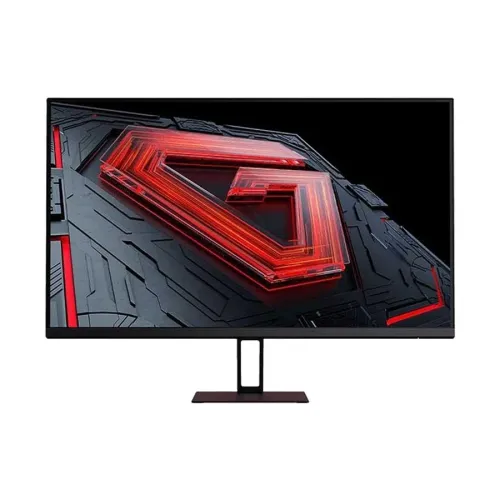
Xiaomi Redmi G27 27-inch Full HD 180Hz IPS Gaming Monitor
The Xiaomi Redmi G27 is a 27-inch Full HD IPS gaming monitor with a 180Hz maximum refresh rate. It combines a 1920 × 1080 resolution, 1ms GTG response claim, HDMI and DisplayPort inputs, an audio output and a tilt-adjustable stand. Its larger screen can suit desk gaming, video and everyday work, while 180Hz is intended for fast motion when the computer can produce a high frame rate. The G27 name is easy to confuse with Redmi G27Q, Xiaomi G27Qi and newer 200Hz G27 variants; confirm the exact model and resolution before purchase.
This page describes the Redmi G27 27-inch FHD 180Hz version recorded in the catalog. Xiaomi's online product page for the China-market energy-saving edition identifies a 27-inch, 1920 × 1080 IPS display with 180Hz and 1ms GTG. Regional products may differ in ports, stand, power adapter, warranty and appearance. Check the model label, regional SKU and connector panel of the unit offered by the seller.
27-inch screen and Full HD resolution
The monitor uses a flat 27-inch IPS display with native Full HD resolution of 1920 × 1080 pixels and a 16:9 aspect ratio. A 27-inch panel provides a large image for games, video and split-screen work. At this size, Full HD has fewer pixels per inch than the same resolution on a smaller monitor. Text and fine interface elements may appear less dense, and there is less desktop workspace than a QHD display. Consider your normal viewing distance and whether sharper text or a larger image matters more.
Bangladesh retailer specifications list 250 cd/m² brightness, 1000:1 typical contrast and 178-degree viewing angles. The panel is described as IPS, which generally offers broad viewing angles for shared viewing and desk use. Those figures are source specifications rather than measured performance guarantees for every unit. The anti-glare surface and flat panel suit ordinary indoor use, but a bright window or lamp can still cause reflections.
Some retailer specifications list 99% sRGB, while Xiaomi's product page reviewed for the China-market edition does not present the same gamut figure. Treat that percentage as an unverified regional retailer claim, not a guaranteed colour-coverage result. No factory calibration report or colour-accuracy certification was verified for the exact catalog unit. For photography, print or grading work, request regional documentation and independent measurements before relying on it.
180Hz refresh and response time
The Redmi G27 supports up to 180Hz according to Xiaomi and Bangladesh retailer specifications. A high refresh rate can display motion more frequently than a 60Hz monitor, so supported games, scrolling and pointer movement may look smoother. To use 180Hz, the source device, graphics output, HDMI or DisplayPort connection, cable, operating system and selected resolution must support the mode. The monitor does not create additional frames; the computer or console must render them.
Xiaomi's product listing states 1ms GTG response. Response-time results depend on the test method and monitor setting. A fast overdrive setting can reduce some transitions but may cause overshoot or inverse ghosting. The 1ms claim is not a guarantee of blur-free motion in every game or scene. Choose the response mode that looks clear without bright trails and review motion at the refresh rate you actually use.
The catalog and retailer pages list FreeSync or Adaptive-Sync support, and some descriptions mention HDR10. Compatibility depends on the exact regional model, graphics hardware, driver, port and settings. This page does not claim NVIDIA G-SYNC certification. Verify the monitor's on-screen display and your GPU software for supported variable refresh and HDR options after setup.
HDR10 and visual expectations
Retailer descriptions advertise HDR10. The reviewed Xiaomi product information for the China-market edition highlights the high refresh display but does not confirm a VESA DisplayHDR certification. A 250-nit brightness and 1000:1 contrast rating, as reported by Bangladesh sellers, are modest for HDR. Treat HDR10 as a signal or mode claim rather than an assurance of strong peak highlights, deep blacks or local dimming. If HDR is central to your buying decision, ask the seller for the exact regional datasheet or certification record.
Low-blue-light functions are listed by local product pages. Use these settings if you prefer a warmer picture, but remember that they can shift colours and are not medical protection. Adjust brightness for the room, position the screen comfortably and take breaks. For colour-sensitive work, evaluate the display in its intended picture mode instead of assuming an eye-comfort preset preserves colour accuracy.
Ports and sound
The reviewed product information lists one HDMI input, one DisplayPort input and one audio output. Xiaomi's product page for the China-market version identifies DP, HDMI, audio and DC-in connections. Some retailer records simply say HDMI and DP without clarifying port version, so confirm the exact connector version and maximum refresh for the unit you are buying. No USB-C or USB hub is listed for this product.
The G27 does not have built-in speakers or an integrated microphone according to local model listings. Connect headphones or external speakers through the audio output or your computer. Check that the computer routes sound to the intended output; using HDMI or DisplayPort does not automatically select the monitor's audio path in every operating system. If you need a combined headset microphone, connect it to a suitable audio input on the computer or an external audio device.
Stand, VESA mounting and desk placement
The stand supports forward and backward tilt according to Xiaomi's product page. It does not list height, swivel or pivot adjustment for this regional version. The catalog and Bangladesh seller listings report a 75 × 75mm VESA pattern. This is smaller than the 100 × 100mm pattern common on many monitor arms, so verify bracket compatibility and screw size before ordering. Do not assume the G27 has the same mount as a G27Qi or another Xiaomi monitor.
Bangladesh catalog specifications list dimensions around 612.3 × 170 × 451.7mm and weight around 3.6kg; retailer pages may present a different depth or use rounded measurements. The Xiaomi China-market edition lists different regional measurements. Use the dimensions printed in the manual or on the exact unit if your desk space is tight. Allow enough depth for the stand and space behind the monitor for video and power cables.
Power and package contents
Retailer specifications list about 36W power consumption. Xiaomi's product listing shows a DC input, but the exact adapter rating and included accessories can vary by region. Use the power adapter supplied with the Bangladesh unit and check its voltage and current label. Do not substitute an adapter based on plug shape alone. Confirm whether the box includes HDMI or DisplayPort cable, power adapter, stand components and setup documentation.
Bangladesh price and warranty
A Bangladesh retailer listed the Redmi G27 at ৳17,600 and marked it out of stock during this review. Another local seller listing showed a similar price, while a separate marketplace listing showed a higher price and one-year official warranty. These are third-party observations that can change and are not BiponiBD offers. Confirm live stock, delivered price, model version and return terms directly with the seller.
The reviewed Bangladesh retailer listing states a one-year warranty. This is a seller claim for its offer, not proof that every Redmi G27 import has identical coverage. Ask who provides service, whether the serial number is eligible for Xiaomi-authorized local support, how dead pixels are handled and what documents are required. Obtain the terms for the exact unit in writing before purchase.
Who should consider the Redmi G27?
Consider it if you want a large 27-inch FHD screen with a high 180Hz refresh ceiling, IPS viewing angles and digital HDMI/DisplayPort connections. It may suit players whose PC can deliver high frame rates at 1080p, as well as users who prefer a larger image for general browsing and video. Adaptive-Sync support can help reduce tearing when the computer and display mode are compatible.
Compare alternatives if you want QHD clarity at 27 inches, verified colour calibration, stronger HDR performance, integrated speakers, USB-C docking, adjustable height, or a common 100 × 100mm VESA mount. For mixed productivity and games, decide whether a sharper QHD display at a lower refresh rate better fits your needs. If you choose the G27, check the exact 180Hz FHD model and its port/mount details rather than relying on a similar model name.
Key features
- 27-inch flat IPS Full HD screen, 1920 × 1080
- Up to 180Hz refresh rate
- 1ms GTG response claim; results depend on mode and measurement
- HDMI, DisplayPort and audio output
- 250-nit brightness and 1000:1 contrast reported by local listings
- 178° viewing angles
- FreeSync / Adaptive-Sync listed; compatibility depends on setup
- HDR10 mentioned by sellers; certification not verified
- No built-in speakers or microphone listed
- Tilt-adjustable stand and 75 × 75mm VESA pattern in local listings
- Approx. 36W power consumption reported by local listing
- Bangladesh listing states 1-year warranty; confirm serial eligibility
Advantages
- 180Hz can make supported high-frame-rate motion smoother than a 60Hz display.
- 27-inch screen provides a large viewing area for games and video.
- IPS panel offers wide viewing angles for common desk use.
- HDMI and DisplayPort support modern digital sources.
- VESA mounting provides an alternative to the tilt stand if the arm supports 75 × 75mm.
Limitations to consider
- Full HD is less sharp and provides less workspace than QHD at 27 inches.
- HDR10 wording does not establish VESA certification or premium HDR capability.
- No built-in speakers or microphone are listed.
- The 75 × 75mm VESA pattern may not fit an arm designed only for 100 × 100mm.
- Stand adjustment is limited to tilt in the sources reviewed.
- Current retailer stock was limited and local warranty terms need confirmation.
Frequently asked questions
What are the size and resolution?
The catalog model is a 27-inch IPS monitor with Full HD 1920 × 1080 resolution and a 16:9 aspect ratio.
Does it support 180Hz?
Yes, model listings specify up to 180Hz. Confirm that your source, port, cable and selected 1080p mode also support 180Hz.
Does the monitor have built-in speakers?
No built-in speakers are listed. Use headphones or external speakers through the audio output or your computer.
Which ports does it include?
One HDMI, one DisplayPort and one audio output are listed for the regional model. Confirm exact port versions with the seller.
Does it support Adaptive-Sync?
Local listings identify FreeSync or Adaptive-Sync. Check compatibility and operating range with your GPU and exact regional unit.
Can I use a monitor arm?
Local product details list 75 × 75mm VESA mounting. Confirm that the arm supports this pattern, screw size and monitor weight.
What warranty applies in Bangladesh?
A local retailer listing states one year. Verify provider, service location, serial eligibility and dead-pixel terms for the exact unit.
What is the Bangladesh price?
A retailer listing showed ৳17,600 while out of stock. Price and availability can change, and this is not a BiponiBD offer.
Before ordering: check the 27-inch FHD 180Hz Redmi G27 version, exact ports and VESA pattern, current stock, included adapter/cables and written local warranty.