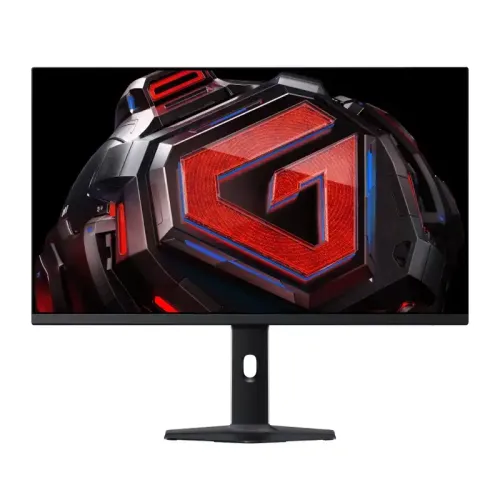
Redmi G27Q 2025 overview
The Redmi G27Q 2025 Edition in this catalog is a 27-inch flat IPS gaming monitor listed with 2560 × 1440 QHD resolution and 180Hz refresh. Xiaomi’s official China product page identifies a 2025 G27Q multi-function-stand edition, but its accessible page text does not expose a complete specification table. Therefore, technical details below are labelled according to whether they come from the current catalog record or are independently visible in Xiaomi’s exact model page. Xiaomi’s separate global G27Qi monitor is a related product, not automatically the same regional SKU; its specifications should not be silently substituted. Confirm the exact label and stand variant with the Bangladesh seller.
Screen size and QHD workspace
The catalog identifies a 27-inch flat screen with 2560 × 1440 QHD resolution and 16:9 aspect ratio. QHD gives more pixels than Full HD at the same diagonal, allowing finer detail and additional desktop workspace for supported games and applications. Text scaling can be adjusted in the operating system to match your viewing distance. A 27-inch QHD panel is commonly used for a single-monitor PC setup, but the actual clarity depends on source resolution, scaling and viewing conditions. The official Xiaomi page reviewed identifies the G27Q 2025 multi-function stand edition; the numerical panel details remain catalog-listed until the matching regional technical table is confirmed.
IPS panel and viewing characteristics
The existing catalog identifies an IPS panel and flat screen. IPS technology is typically chosen for consistent off-axis color and broad viewing, while the specific contrast, uniformity and response behavior depend on the unit and settings. The record lists a 1000:1 contrast ratio and 300-nit typical brightness, but those numbers were not visible in the accessible exact-model Xiaomi page text. Treat them as catalog values pending the original regional datasheet or label. Avoid assuming panel uniformity or color accuracy based only on the panel type. For color-sensitive work, request the exact product calibration specification and use a measured profile.
180Hz refresh and gaming
The product title and catalog attributes list a 180Hz refresh rate. A high refresh rate can make motion appear smoother when the connected graphics card supplies enough frames and the display is configured for the mode. The official exact-model China page identifies the G27Q 2025 product family, but the accessible page text does not state the refresh value. A monitor’s maximum refresh is not a guarantee that a game will render at 180 frames per second. Frame rate varies by graphics hardware, game, resolution and image-quality settings. Verify the selected refresh in the operating system and monitor menu after setup.
Response time and motion clarity
The catalog lists a 1ms GtG response figure. GtG is a pixel-transition measurement and should not be confused with refresh rate or input lag. The exact official Xiaomi page text retrieved here did not confirm the measurement method or response-time settings. Motion clarity depends on pixel transitions, refresh, frame rate, overdrive and variable-refresh configuration. If the monitor provides response or overdrive presets, compare them with fast-moving content and avoid a setting that causes distracting inverse ghosting. Treat 1ms as a catalog specification rather than a guaranteed result for every transition.
Color gamut and color depth
The catalog record lists 95% DCI-P3 and 100% sRGB color gamut, plus 16.7 million colors. These values are not present in the accessible exact-model manufacturer page text used for this update, so they remain retailer-derived claims pending a primary datasheet. Gamut coverage tells how much of a color space the display can reproduce; it does not by itself establish color accuracy or factory calibration. If using the monitor for design, photography or print, request model-specific measurement evidence and choose the appropriate color mode. For games and general media, select a preset that looks natural to you.
Brightness, contrast and HDR claims
The catalog lists 300 nits typical brightness and 1000:1 contrast. The exact page for the 2025 multi-function stand edition did not expose those values in the available text. No exact-model HDR certification was verified in the official source reviewed; do not infer HDR performance from a related Xiaomi monitor or from a generic label. Typical brightness and contrast also differ from peak or dynamic marketing values. If bright-room visibility or HDR is a purchase requirement, ask the seller for the exact regional model datasheet and confirm the brightness and certification before ordering.
Video inputs and port verification
The catalog lists two HDMI ports, two DisplayPort ports and one headphone output. It does not provide version numbers or a verified port-specific maximum timing, and the exact-model Xiaomi page text did not reveal a connector table. Do not assume that both HDMI and DisplayPort support 2560 × 1440 at 180Hz until the correct manual or seller specification confirms it. Choose a cable rated for the intended resolution and refresh and connect directly to the graphics card where possible. A dock, adapter, cable or older source can lower the maximum mode. Confirm the exact port layout on the unit before purchase.
Adaptive sync and tearing reduction
The catalog lists both FreeSync and G-Sync support, but neither support range nor certification was confirmed from the exact model page accessible in this review. Xiaomi’s similarly named products may use different adaptive-sync wording or capabilities. Verify the exact Redmi G27Q 2025 stand edition’s manual and graphics compatibility before relying on a specific feature. Adaptive sync, when supported, coordinates display refresh with compatible GPU frame output within a range. A driver toggle alone does not establish certification. If variable refresh is important, test the feature with your graphics card and selected input after delivery.
Stand, adjustment and VESA mounting
The catalog says height adjustment is available, lists a 75 × 75mm VESA pattern, and gives tilt of approximately 5 degrees forward and 21 degrees backward. Xiaomi’s exact product page identifies a multi-function stand edition, but the accessible text does not publish its full travel ranges or mounting dimensions. Confirm the physical stand functions and VESA pattern from the product label or manual before purchasing an arm. Adjust the monitor on a stable desk, keep cables clear of moving joints and verify the arm’s load capacity. Do not treat figures from another G27Q or G27Qi variant as exact without checking.
Eye comfort and screen surface
The catalog lists flicker-free and low-blue-light features. These claims were not confirmed in the accessible text of Xiaomi’s exact model product page during this check. Display comfort also depends on brightness, room lighting, reflections, viewing distance and breaks. If the monitor has a low-blue-light mode, note that it may make the image warmer and less suitable for color-critical tasks. Do not present eye-care features as treatment or a medical guarantee. Request the exact model’s certification or manual if flicker-free operation or low-blue-light certification is a deciding factor.
Audio and built-in speakers
The catalog lists one headphone output and states that built-in speakers are not available. The exact Xiaomi page text reviewed did not list audio hardware. Plan to connect external headphones or speakers through the source device or monitor audio output as compatible. Audio output depends on whether the HDMI or DisplayPort source sends sound and whether the operating system selects the monitor as its audio destination. Verify the port and speaker configuration on the local model before purchase if audio routing matters.
Power and product configuration
The catalog states power input of 24V, 2A, but the accessible exact-model Xiaomi page did not display an electrical specification table. Use the adapter supplied with the exact monitor and verify the label voltage and current rather than substituting a power adapter based on connector fit. The record also lists a weight of 5.6kg including the base. Confirm stand-inclusive weight and dimensions for desk or arm planning. Package contents can vary by country, so verify the local adapter, cables, stand components and documentation with the seller.
Advantages and practical trade-offs
The catalog-listed strengths are a 27-inch QHD IPS panel, 180Hz refresh, a multi-function stand, dual HDMI and DisplayPort connections, a headphone output and broad color-gamut claims. These can fit a PC gaming desk that values resolution and refresh. Practical trade-offs are Full specification verification: input timing, adaptive sync, eye-care certification, color measurements and stand range were not exposed in the exact product page text available here. The Bangladesh unit may also be a regional version. Ask for a matching model datasheet before paying if any unverified number determines your purchase.
Warranty and Bangladesh purchase details
The current catalog lists a one-year warranty. Xiaomi’s China product page references service for its own marketplace, which does not establish warranty rights for a Bangladesh-imported unit. Ask the seller to confirm whether support is official or seller-provided, which service center handles the serial number, what panel and dead-pixel terms apply, and whether the warranty begins from invoice or import date. Current BiponiBD stock, price, delivery fee and promotional terms were not verified in this editorial check. Obtain the local conditions in writing and keep the invoice and serial details.
Setup and troubleshooting
Place the monitor on its supplied stand or a correctly rated VESA mount, connect the correct power adapter and attach the video cable. Select the active input in the monitor menu. Start with 2560 × 1440 and a stable refresh mode, then select 180Hz if the graphics device, cable and input support it. If 180Hz is unavailable, check the manual, direct graphics-card output, cable rating, display driver and operating-system mode list. If the image flickers or loses signal, lower the refresh temporarily and test another supported cable or input. Enable adaptive sync only after confirming support for the exact version.
Buyer checklist and model identity
Before purchase, confirm the product is Redmi G27Q 2025 Edition and whether it is the multi-function-stand version. Ask the seller to show the exact model/region label and matching technical sheet. Verify QHD at 180Hz on the intended port, response-time method, gamut measurement, brightness, adaptive sync, input versions, stand travel, VESA pattern, audio, adapter and local warranty. Related Xiaomi G27Qi or older G27Q variants should not be treated as automatically identical. This distinction helps prevent incorrect specs from carrying across different versions.
Summary
Redmi G27Q 2025 Edition is listed in the BiponiBD catalog as a 27-inch QHD 180Hz IPS monitor with dual HDMI, dual DisplayPort and an adjustable stand. Xiaomi’s official China pages identify both the standard 2025 G27Q and a multi-function-stand edition, but the technical table was not available in the accessible page text reviewed. The catalog values for brightness, gamut, response, adaptive sync, ports, VESA, power and warranty therefore need an exact local datasheet check. Confirm the shipped model and Bangladesh serial warranty before ordering.