Pros
- UWQHD resolution gives a broad desktop canvas with 1440 vertical pixels.
- 180Hz refresh supports smooth compatible gaming.
- 1500R curve suits a centered ultrawide setup.
- FreeSync Premium can reduce tearing with compatible systems.

All categories
 New condition
Monitors
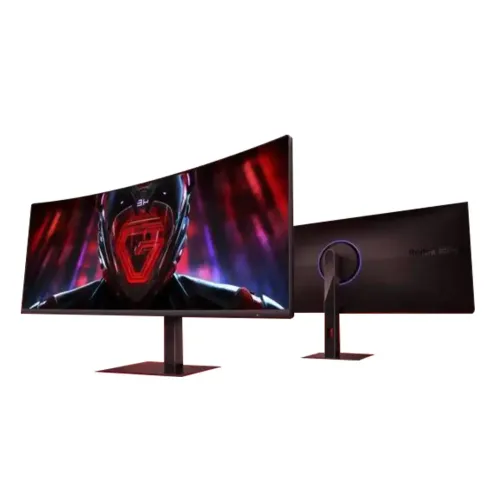
Xiaomi · Redmi G34WQ 34-inch 180Hz UWQHD Curved
34-inch 1500R ultrawide gaming monitor with 3440 × 1440 resolution, 180Hz and FreeSync Premium support.
Price unavailable
Price range updating
No verified price is available yet. Store offers will appear when merchants publish them.
Compare store prices
No live offers for this variant
Offers will appear when merchants publish them.
Loading history…
Product story
The Redmi G34WQ is a 34-inch curved ultrawide monitor with 21:9 aspect ratio, 3440 × 1440 resolution and 180Hz refresh. Xiaomi’s official product page identifies the G34WQ model; retailer listings may also include a G34WQ 2026 edition with a different suffix. Do not mix the two generations’ accessories, ports or warranty details. The standard product is commonly described with a 1500R VA panel, FreeSync Premium, 350-nit brightness and ergonomic stand. Confirm the carton model code and regional specification.
The native resolution is 3440 × 1440 pixels in a 21:9 ultra-wide format. Compared with standard QHD, the additional horizontal pixels make side-by-side windows and compatible game scenes wider while retaining 1440 vertical lines. Set native resolution for sharp text. Scaling and app layout depend on the operating system. Confirm the computer supports this resolution and that the selected cable and GPU output can deliver the intended refresh.
The 1500R curve is designed to keep the wide panel visually consistent from a centered sitting position. The edges angle toward the user more than on a flat monitor. Curved screens can feel immersive for a single-user desk but may be less suitable for group viewing or color evaluation from the side. Sit near the center and choose a viewing distance that lets you see both edges comfortably without turning your head excessively.
The VA panel is associated with high native contrast, which can make dark scenes appear deeper than on many IPS monitors. Published listings for this generation commonly state a 3000:1 ratio, but the exact official regional specification should be checked for the full product code. Contrast and black uniformity vary by unit and room lighting. For dependable color and shadow detail, choose a balanced picture mode rather than relying on a contrast enhancement setting.
The display supports up to 180Hz. Higher refresh can improve motion smoothness and responsiveness when a game produces enough frames. Choose 3440 × 1440 at 180Hz in the operating system or graphics control panel and verify the active mode. A dock, adapter, cable or GPU may limit available timing. The panel’s maximum refresh does not cause a game to render at 180 frames per second by itself.
Retail and Xiaomi-generation listings commonly advertise a 1ms response figure, but the measurement mode and conditions matter. Check the exact G34WQ manual for whether the figure is MPRT or GtG and which overdrive setting applies. Response time is not input lag. Strong overdrive can cause inverse ghosting, while motion reduction can alter brightness. Compare modes with the games and frame rates you actually use.
The G34WQ is marketed with AMD FreeSync Premium support. Variable refresh synchronizes compatible display updates with GPU output over a supported frame-rate range to help reduce tearing. Enable the feature in both monitor and graphics settings, then test for stable operation. Support depends on the GPU, driver, connection and game. It does not improve rendering speed or guarantee identical behavior across every computer.
Published specifications for the original G34WQ commonly list 350 nits brightness, 95% DCI-P3 and Delta E below 2. These figures are model and regional dependent and should be matched to the full product code. Gamut coverage describes color range, not guaranteed accuracy for each unit. If the display is used for color-critical production, confirm calibration documentation and use a calibrated color profile. Use moderate brightness in a dim room.
Many PC games support 21:9 and can show more horizontal scene content, but not every game does. Some titles use side bars, crop the image or restrict ultrawide modes for competitive balance. Confirm the games you play support 3440 × 1440. The GPU must also render the larger pixel count; graphics settings may need adjustment to maintain high frame rates. Console devices may output only standard 16:9 modes.
A 21:9 display can use much of its width for cinema-format content. Standard 16:9 video usually leaves vertical or side bars depending on how it is fitted, which is expected rather than a defect. Browser windows, spreadsheets and editing timelines can benefit from the extra horizontal area. Adjust window snapping and scaling to make good use of the canvas. Full-screen behavior depends on the app and source aspect ratio.
The original generation is commonly listed with DisplayPort and HDMI inputs and a 3.5mm audio output, but exact port versions and counts vary by G34WQ edition and region. Verify the rear-panel diagram for the precise suffix before ordering. For high refresh at native UWQHD, use the input and cable recommended by the Xiaomi specification. Check whether required cables are in the local package; do not assume USB-C or laptop power delivery.
The G34WQ is sold with a multifunction stand on many regional listings, including height and tilt adjustment. Wall or arm mounting depends on the exact VESA pattern and product generation. Check the official manual for supported mount dimensions and weight before buying an arm. A 34-inch wide curved panel needs sufficient desk width and depth. Position the top edge comfortably and keep the panel centered with the user.
Regional G34WQ descriptions include low-blue-light and flicker-reduction features, with certifications and wording varying by edition. These are display comfort modes, not medical treatment. Choose brightness appropriate for ambient lighting, use a comfortable viewing distance and take breaks during long sessions. If low-blue-light mode changes color noticeably, switch it off for color work and use a calibrated display profile where accuracy matters.
The monitor generation may include a headphone output, but built-in speakers and webcam should not be assumed unless confirmed in the matching official specification. Retail packages can differ across import markets. Check the included stand, power adapter, cables and documentation against the seller’s exact product listing. External audio equipment may be required for sound. Keep packaging until the display has been tested and serial details recorded.
Driving 3440 × 1440 at high frame rates requires more GPU work than standard 1080p. A powerful graphics card is helpful if the goal is to approach 180 frames per second in demanding titles. Set a refresh target that matches the system’s actual performance and use FreeSync where supported. If performance varies, adjust rendering quality or frame caps. The monitor improves presentation but cannot replace GPU capability.
Connect the computer directly to a verified display input, select the matching input source and set 3440 × 1440 with the desired refresh. If 180Hz is missing, check the GPU output, cable bandwidth, adapter, driver and display menu. Set the correct aspect ratio to avoid stretching. For flicker or tearing, test FreeSync with a supported frame-rate range and compare settings. Save a comfortable color and brightness preset for desktop use.
Ultrawide support is inconsistent across games, video and consoles. The large resolution needs a capable GPU for high frame rates. Exact ports, brightness, color claims and stand options differ among G34WQ and G34WQ 2026 variants. A 1500R curve is intended for centered viewing. Local serial warranty, return conditions and accessories cannot be inferred from the global product family page; verify the actual unit before purchase.
The Xiaomi global product page does not establish warranty coverage for a particular imported or local Bangladesh unit. Ask the seller to confirm local authorization, warranty duration, service location, dead-pixel policy and required invoice. Match the complete model suffix and serial across the display, carton and purchase record. Confirm current price, stock and accessory bundle at checkout because availability and offers change over time.
Use a stable desk that can support the monitor and stand. Lift the display by its frame and avoid pressure on the LCD. Keep the curved panel protected during transport and leave clearance for tilt and height adjustment. Before cleaning, power off the device and follow the manufacturer’s care instructions with a soft cloth. Avoid spraying liquid directly onto the screen or using abrasive cleaners.
Choose the G34WQ if your games and work applications benefit from a 34-inch 21:9 canvas and your computer can drive 3440 × 1440. Compare it with flat 16:9 and 32:9 options based on desk space, content compatibility and viewing position. Review the complete model suffix, stand, connections, color data and local service terms. The 180Hz headline matters most when both the source and software can deliver high frame rates.
Helpful answers
Product-specific answers maintained with the catalog information.
3440 × 1440 UWQHD in a 21:9 format.
34 inches with a curved ultrawide panel.
The original Redmi G34WQ is listed at up to 180Hz.
Published specifications identify a 1500R curve.
AMD FreeSync Premium is listed for this product generation.
No. Ultrawide support varies by game and device.
Check the exact G34WQ regional suffix for port count and version.
Do not assume built-in speakers; verify the matching official specification.
Confirm the exact serial’s local warranty and service terms with the seller.
Customer community
Become a merchant
Join BiponiBD, publish accurate offers and start free.