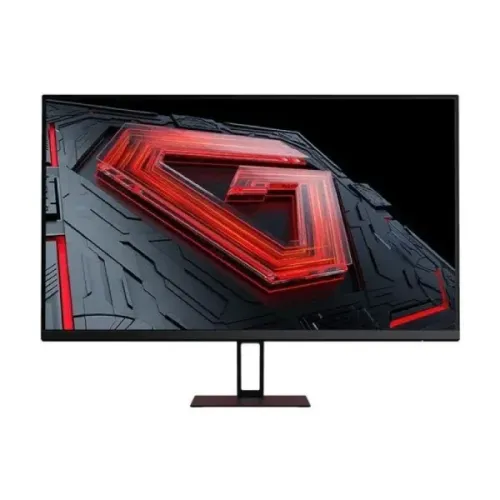
Xiaomi Redmi X27G 27-inch Full HD IPS gaming monitor
The Xiaomi Redmi X27G in this BiponiBD catalog listing is described as a 27-inch Full HD IPS gaming monitor with an advertised 180Hz refresh rate. Bangladesh retailer specification pages also list Adaptive-Sync, one DisplayPort 1.4 input, one HDMI 2.0 input and an audio jack. The product listing reports a one-year warranty. The exact unit revision, seller stock and local warranty entitlement should be confirmed before purchase.
There is an important revision detail: the model code P27FBA-RX has appeared in seller listings at both 165Hz and 180Hz. One marketplace seller says older and newer revisions were sold under the same product card, which explains mixed user reviews. This is seller information rather than an official Xiaomi announcement. This page preserves the 180Hz specification advertised for this catalog listing; check the carton, monitor on-screen display and computer display settings to confirm the delivered unit. A primary Xiaomi datasheet for this exact regional configuration was not located, so the detailed values below are clearly identified as retailer-reported where appropriate.
27-inch Full HD IPS panel
Retailers describe a 27-inch IPS panel with 1920 × 1080 Full HD resolution and a 16:9 aspect ratio. This standard resolution is compatible with a broad range of desktop computers, laptops, consoles and media devices. IPS technology is commonly selected for broad viewing angles and consistent everyday viewing from more than one seat. Local retailer tables report horizontal and vertical viewing angles of 178 degrees, but panel uniformity and perceived contrast can vary with the actual unit, room lighting and viewing position.
At 27 inches, Full HD produces larger pixels than QHD at the same screen size. That can make interface elements and text look larger, while fine text and detailed images will not appear as sharp as on a 2560 × 1440 monitor. Buyers who spend the day reading small text, editing detailed images or working with multiple windows may prefer a 27-inch QHD display. Full HD is also less demanding for a graphics card to render at high frame rates, which can be useful when targeting high refresh in competitive games.
Advertised 180Hz refresh rate and revision check
The current catalog name identifies the monitor as 180Hz, and several Bangladesh retailer pages advertise the Redmi X27G at 180Hz. A different listing reports a 165Hz variant. A marketplace response associated with P27FBA-RX says two revisions were sold: an earlier 165Hz version and a newer 180Hz version. Because user reviews may combine both revisions, do not use a review alone to establish the capabilities of the exact unit for sale.
To use a high refresh rate, the monitor revision, computer graphics output, cable and selected timing must all support it. After connection, open Windows Display Settings or the graphics control panel and inspect the available refresh rates at 1920 × 1080. Select the highest supported option and check the monitor on-screen display if it shows the incoming signal frequency. If 180Hz is essential, ask the seller to confirm the revision in writing and provide a photo of the carton model label or OSD before ordering. The advertised maximum does not mean every source device or HDMI/DisplayPort setup will automatically run at that rate.
Response time and Adaptive-Sync
Retailer pages commonly advertise a 1ms response time, but the available descriptions do not establish a consistent measurement method such as GtG or MPRT. Response-time figures measured using different methods are not directly interchangeable. The overdrive setting, refresh rate, pixel transition, brightness and test conditions all affect motion behaviour. Treat 1ms as a seller claim unless the exact revision documentation specifies the method and conditions.
Adaptive-Sync is listed by local retailers. Variable refresh can help reduce tearing or uneven frame delivery when the graphics card and display operate within a compatible range. The exact adaptive range, certification, connection requirements and vendor support for this unit were not confirmed from a Xiaomi primary source. Enable the feature only after checking the graphics driver and monitor menu, and compare its behaviour in the games or applications you actually use.
Brightness, contrast and colour claims
Bangladesh seller specification tables report 250 cd/m² brightness and a 1000:1 contrast ratio. They also list 8-bit colour support, 99% sRGB coverage and Delta E below 2. An exact-model manufacturer specification or independent calibration report establishing these values was not found during this review. These should therefore be treated as retailer-published claims, not guaranteed measured performance for every delivered unit.
If your work depends on accurate colour for print, design, photography or video, ask for documentation for the exact revision and consider a calibrated measurement. A wide or nominal gamut claim does not by itself establish factory calibration, uniformity, colour stability or calibration across brightness levels. For games, video and general desktop use, adjust the picture mode and brightness to the room and your preference rather than assuming a particular colour result from the listing figures.
Connections and audio
Bangladesh retailers list one DisplayPort 1.4 input, one HDMI 2.0 input and one audio jack. These are the connections reported for the local listing; confirm the physical ports on the delivered unit, especially if your setup depends on a specific input or refresh mode. DisplayPort is often used for high refresh computer connections, while HDMI is common on PCs, laptops and consoles. The supported maximum frequency can depend on the monitor revision, graphics output, cable and timing.
Retailer tables say the monitor has no built-in speakers. If audio is needed, connect headphones or external speakers to the audio jack if it carries audio from your chosen source, or connect the audio device directly to the computer or console. A monitor audio jack does not create sound by itself and the exact signal-routing options may depend on the input device.
Ergonomics, mounting and physical setup
Local seller pages report tilt adjustment and a 75 × 75mm VESA mounting pattern. Height adjustment, swivel and pivot were not established, so plan for a fixed-height stand unless the seller confirms otherwise. Check the VESA holes and the required screw length on the actual monitor before attaching an arm or wall bracket. The mounting arm must safely support the monitor, and cable clearance should be checked before installation.
Retailer specifications list a black finish and approximate dimensions of 612.3 × 170 × 451.7mm. The listing does not make clear whether every dimension is measured with the stand, so use the packaging or seller measurement to confirm desk depth and height. The existing catalog also lists a 12V, 3A adapter and approximately 36W power consumption. Verify the adapter label and power rating on the regional unit before replacing a power supply or estimating exact operating cost.
Low Blue Light and daily comfort
Low Blue Light is listed by retailers. The precise implementation and any certification were not confirmed for this exact revision. Display comfort also depends on brightness, room lighting, viewing distance, posture, font size and breaks. Lowering brightness to suit the room and keeping the screen at a comfortable distance can help reduce discomfort. No display feature can guarantee that extended use will not cause eye strain.
Who is this monitor for?
The Redmi X27G may suit a buyer who wants a large Full HD IPS display and is interested in the smoother motion associated with the advertised 180Hz revision. It may also work for general desktop tasks, streaming and casual play when the listed inputs match the computer or console. It is worth comparing the actual delivered revision and seller warranty with alternative monitors before deciding.
Consider a QHD monitor if sharper text and extra desktop space matter more than reaching very high frame rates. Consider a model with a clearly documented response-time measurement, proven adaptive-sync range, height-adjustable stand or built-in speakers if those are important. The retailer-reported Delta E and sRGB claims should not be the sole basis for choosing this display for colour-critical production.
Bangladesh price, stock and warranty
Bangladesh retailer pages checked for this review showed asking prices around ৳17,300 to ৳19,000 and commonly advertised a one-year warranty. These values are retailer observations and are not a BiponiBD store offer; prices, stock, delivery charges and promotions can change. One marketplace listing indicates a difference between older and newer refresh revisions, so confirm the 180Hz version is actually available rather than relying only on the listing title.
The catalog record states one year of warranty, but this review did not establish the local warranty provider, coverage exclusions, dead-pixel terms or serial eligibility for the actual unit. Before payment, ask for the warranty provider and written terms, confirm the monitor’s serial is eligible for service in Bangladesh, and retain the invoice and warranty card. Warranty terms displayed by another retailer do not automatically apply to the BiponiBD offer.
Frequently asked questions
Revision and specification note: this catalog listing advertises the 180Hz Redmi X27G. Seller listings report an earlier 165Hz revision under the same model code. Check the delivered carton, OSD and available computer refresh modes. Colour, response-time, power and warranty figures are retailer-derived unless confirmed for the exact unit.