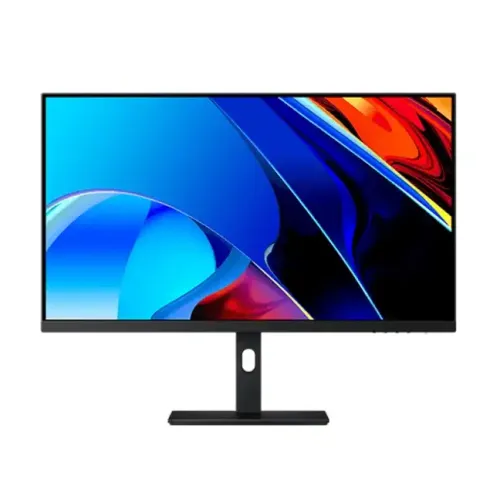
Verified model and regional variants
The catalog item is identified as Xiaomi RMMNT27NU, a 27-inch 4K monitor. Xiaomi’s China Redmi 27-inch 4K page uses model RMMNT27NU and lists 350 cd/m² typical brightness, 1200:1 contrast, 10.7 billion colors, 6ms GtG, 60Hz, HDMI 2.1 TMDS, DisplayPort 1.4 and USB-C. The global Xiaomi 4K Monitor 27 page uses XMMNT27NU and differs in brightness, contrast, power and weight. Because these model codes and regional specifications differ, confirm the rear label before promising a specific regional value.
27-inch 4K UHD resolution
The native and recommended resolution is 3840 × 2160 in a 16:9 format. At 27 inches, this produces dense detail for text, graphics and high-resolution media. Set native resolution and use operating-system scaling that keeps text comfortable. Older computers may require scaling for readable menus. Confirm that the GPU, dock and cable support 4K at 60Hz through the chosen input. A high pixel count does not guarantee that every app renders at native quality.
Panel and pixel density
The RMMNT27NU is a 27-inch LED LCD monitor with a 4K panel. The pixel pitch listed on Xiaomi’s China product page is approximately 0.1554mm. Fine text can look crisp when applications scale correctly. Pixel density describes detail potential, not color accuracy or uniformity. Use a comfortable viewing distance, enable appropriate text scaling and check that software is not rendering blurry at non-native resolution. Actual panel behavior can vary across production units.
60Hz refresh and response
Xiaomi lists a maximum refresh rate of 60Hz and a 6ms GtG response time for the RMMNT27NU regional page. This is a productivity and content monitor rather than a high-refresh gaming display. Set the source to 3840 × 2160 at 60Hz where supported. The response figure depends on test conditions and does not mean input lag. Motion behavior also depends on source frame rate and pixel transitions. Choose a gaming monitor if high-refresh motion is a primary need.
Brightness and contrast
The China RMMNT27NU listing specifies 350 cd/m² typical brightness and 1200:1 typical contrast. The global XMMNT27NU specification lists 400 cd/m² and 1000:1, demonstrating that values differ by regional code. These numbers should not be combined into a single guaranteed spec. Brightness is a rating rather than a recommended setting; adjust to room lighting. Contrast is a panel measurement and does not guarantee uniform blacks in every unit.
Color depth and professional workflow
Xiaomi’s China page lists 10.7 billion colors for RMMNT27NU. The global XMMNT27NU page specifies 1.07 billion colors and VESA DisplayHDR 400. A color count alone does not establish the gamut, calibration accuracy or bit-depth path for every mode. For photography, design and print work, use a calibrated profile and color-managed software, and verify the exact regional model’s gamut data. Do not infer professional-grade accuracy from “professional monitor” in a product name.
HDR certification differences
The global XMMNT27NU specification lists VESA DisplayHDR 400. The China RMMNT27NU page does not provide the same HDR statement in the specification excerpt. HDR capability should therefore be checked against the exact product code and certification record. An HDR label does not guarantee local dimming or high peak brightness beyond the certification tier. Use HDR with compatible source content and compare desktop SDR appearance if colors or brightness seem unusual.
HDMI, DisplayPort and USB-C
The RMMNT27NU China page lists two HDMI 2.1 ports, one DisplayPort 1.4, one USB-C, two USB 3.0 ports and an audio port. Xiaomi notes the HDMI 2.1 ports use TMDS, with bandwidth equivalent to HDMI 2.0-class signaling, and support 4K up to 60Hz. The global XMMNT27NU page also lists two HDMI, DP 1.4, USB-C, two USB-A and audio. Confirm exact regional port function and cable package on the carton.
USB-C and one-cable expectations
The product page lists USB-C, but its excerpt does not establish laptop charging wattage or every USB-C data/video feature for the RMMNT27NU. Do not assume it charges a laptop or replaces a dock. Check the local manual and port markings for DisplayPort Alt Mode, Power Delivery rating and data speeds. If connecting a computer over USB-C, use a full-featured cable and confirm the computer supports video over USB-C. The supplied USB-C cable may vary by market.
Ergonomic stand
The global XMMNT27NU specification lists up to 120mm height adjustment, tilt from -5 to +21 degrees, 90-degree side tilt and horizontal rotation from -33 to +33 degrees. The China RMMNT27NU page lists dimensions with height up to 517mm but does not show the same adjustment table. Treat ergonomic details as regional until matched to the specific unit. Position the monitor with the top near eye level and verify VESA support before ordering an arm.
Low-blue-light information
The global Xiaomi 4K Monitor 27 specification lists TÜV Rheinland low-blue-light certification. Certification and feature details may vary across the mainland RMMNT27NU and global XMMNT27NU variants. A low-blue-light mode can alter color temperature, so it may not suit color-critical work. Choose the setting for comfort and use neutral/calibrated modes for evaluating colors. These features are not a substitute for breaks or professional medical advice.
Power requirements and consumption
The China page lists 100–240V AC at 50/60Hz and 150W maximum rated power for RMMNT27NU. The global XMMNT27NU page lists 195W maximum, another regional difference. Actual draw varies with brightness, USB use and operating mode. Check the nameplate and power cable for the exact unit, and use a properly grounded supply. Do not infer local plug type or the adapter configuration from a different market’s product image.
Dimensions and placement
The China RMMNT27NU page lists dimensions of 613 × 205 × up to 517mm and net weight of 6.5kg. The global model page lists 612.9 × 200 × 514.9mm and 6.44kg. These are close but not identical. Leave room for the stand and adjustment movement, and ensure the desk supports the complete monitor. When lifting, hold the frame and avoid pressure on the LCD.
Ports for multi-device desks
With two HDMI inputs and DisplayPort on the listed configurations, the monitor can connect multiple video sources, subject to regional SKU. Select the active input through the monitor controls. USB-A ports are available on the listed specs, but USB-C and USB hub routing details need confirmation for the exact model. If switching keyboard or mouse between computers matters, verify KVM support; it is not established in the cited product specification.
Use for documents and office work
The 4K resolution provides room for detailed spreadsheets, editing timelines and multiple windows. At 27 inches, operating-system scaling often improves text comfort while preserving workspace. A 60Hz refresh is adequate for many office tasks but is less fluid than high-refresh models when scrolling or gaming. Set brightness for the room, select a readable scaling level and confirm that the computer can drive 4K at 60Hz before purchase.
Use for photo and video work
The high resolution can show detailed still images and 4K video, but professional output depends on gamut, calibration and the exact regional panel. The global variant’s DisplayHDR 400 listing should not be assigned automatically to the China RMMNT27NU. Check whether the software uses color management and calibrate the actual display. For video editing, confirm the working color space, bit depth and expected monitoring standards with the exact SKU documentation.
Gaming expectations
This monitor is limited to a listed 60Hz maximum, so it is suited to casual and slower-paced gaming rather than competitive high-refresh play. 4K detail can look sharp, but rendering 3840 × 2160 requires a capable graphics card. Ensure the game supports 4K output and choose image quality settings your GPU can sustain. If fast motion and responsiveness matter most, compare a 120Hz-or-higher gaming display instead.
Limitations and tradeoffs
The 60Hz refresh is modest for gaming. USB-C charging power and data functions are not confirmed by the cited China page. HDR and brightness differ between RMMNT27NU and XMMNT27NU regional versions. The product name’s “professional” label does not prove factory calibration or a particular color gamut. Match the exact model code, package and local warranty to the unit rather than blending specifications from global listings.
Bangladesh warranty and import checks
Xiaomi’s international product pages do not establish coverage for a particular Bangladesh serial or imported region. Ask the seller to confirm local authorization, warranty duration, service center, panel policy and invoice requirements. Match the model and serial labels on the monitor, box and receipt. Confirm whether the required cable, power lead and stand are included and test the display during the stated return period.
Setup and troubleshooting
Connect the monitor using an input supported by the source, then select 3840 × 2160 and 60Hz. If the mode is missing, check the GPU, cable rating, selected input, driver and dock. For USB-C, verify video capability of both host and cable. Use the monitor controls to set brightness, input and picture mode. If text appears soft, use native resolution and adjust operating-system scaling rather than running a non-native mode.