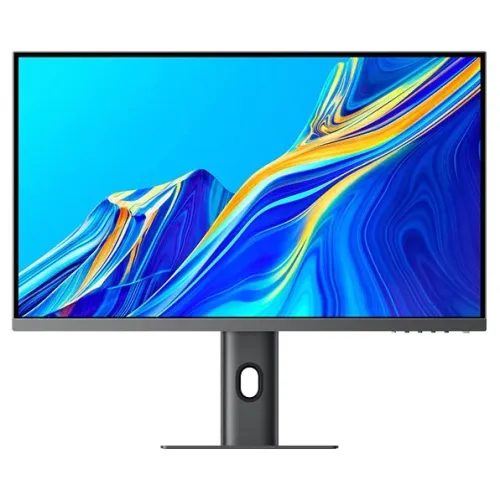
Verified model overview
The Xiaomi 4K Monitor 27 model XMMNT27NU is a 27-inch professional display with 3840 × 2160 resolution, 60Hz refresh and VESA DisplayHDR 400 certification. Xiaomi lists 400 cd/m² typical brightness, 1000:1 typical contrast, 1.07 billion colors and 6ms gray-to-gray response. It has two HDMI 2.1 TMDS ports, DisplayPort 1.4, USB-C, two USB-A ports and audio output. The stand supports up to 120mm lift, tilt, swivel and portrait rotation. HDMI 2.1 ports use TMDS, not FRL, and are specified up to 4K 60Hz.
27-inch 4K workspace
The 27-inch panel has native 3840 × 2160 4K UHD resolution in a 16:9 aspect ratio. Xiaomi lists 68.46cm diagonal viewing size and a fine 155.4-micrometre dot pitch. 4K provides detailed text and a large workspace for photo, video, document and design tools, but may require operating-system scaling on a 27-inch screen. Set native resolution for sharp output, then adjust scaling to keep controls readable. The display is rated for 60Hz, not high-refresh gaming.
DisplayHDR 400 and brightness
Xiaomi specifies VESA DisplayHDR 400 certification and typical brightness of 400 cd/m². The certificate provides a defined HDR capability, but does not promise OLED-level blacks or local dimming. HDR appearance depends on the content, computer settings and display mode. Compare HDR and SDR material you know and adjust brightness for the room. The 195W maximum rated power includes system operating conditions and should not be treated as typical display draw.
Color depth and professional workflow
The monitor supports 1.07 billion colors and is described as a professional display. Xiaomi’s product specification page lists color depth but not a full color gamut or Pantone validation figure in the same specification table. Do not infer ΔE accuracy or factory calibration from the model name. For color-critical work, confirm regional calibration documentation and calibrate the individual unit. Use color-managed applications, the correct profile and suitable ambient light when reviewing images or video.
60Hz refresh and response time
The recommended and maximum refresh rate is 60Hz, with a listed 6ms gray-to-gray response time. This supports general desktop tasks and professional viewing but is not a high-refresh gaming mode. Cursor movement and scrolling are limited by 60Hz timing. If gaming performance is a priority, compare a monitor designed for higher refresh. Configure the operating system to 3840 × 2160 at 60Hz and check the input cable and graphics output for compatible 4K timing.
HDMI 2.1 TMDS clarification
Xiaomi specifically states each HDMI 2.1 port uses the TMDS protocol. TMDS bandwidth is equivalent to HDMI 2.0-class bandwidth; the label does not indicate HDMI FRL bandwidth. Xiaomi lists maximum HDMI resolution of 3840 × 2160 at 60Hz. This clarification helps set expectations when connecting a console or PC. Confirm the device, cable and display settings support the desired 4K60 output, and do not assume higher refresh or 4K120 from the HDMI 2.1 connector name alone.
DisplayPort and USB-C connectivity
The monitor includes one DisplayPort 1.4, one USB-C port, two HDMI 2.1 TMDS ports, two USB-A ports, AC-in and an audio port. USB-C can carry video and support laptop power delivery according to regional feature descriptions, but Xiaomi’s specification table here does not identify the wattage in the port list. Check the included documentation and exact region for the supported USB-C charging level. DisplayPort or HDMI can connect desktop computers; select the correct source in the OSD.
USB hub and peripherals
Two USB-A ports are listed for attaching compatible peripherals. USB-C and the monitor’s upstream connection can link a computer to the integrated hub depending on the regional configuration. Connect the proper upstream cable if USB-A devices are not detected. The number of USB ports does not imply Ethernet or a full docking station. Check port speed, power delivery and cable contents in the supplied manual for the exact SKU before relying on a keyboard, mouse or storage drive through the display.
Ergonomic lift and orientation
The stand supports height adjustment from 0 to 120mm, forward/backward tilt from -5 to +21 degrees, horizontal rotation from -33 to +33 degrees and 90-degree sideways rotation for portrait use. Adjust the screen to a comfortable eye level and ensure the base remains stable. Leave slack in cables when lifting, swiveling or rotating the display. Portrait orientation can help with long documents and coding, but check application layout and desk clearance before turning the monitor.
Desk fit and weight
Xiaomi lists dimensions of 612.9 × 200 × 514.9mm and net weight of 6.44kg. Measure desk depth and height, allow room for the stand base and keep space behind the monitor for connectors and ventilation. The listed measurements are associated with the stand configuration in the product specification; exact packaging and regional versions may differ. When using a monitor arm, verify the exact VESA interface and load rating in the included manual, since the published product summary does not give all mounting details.
Power requirements and energy use
The monitor is rated for 100–240V AC, 50/60Hz, 3.0A input and 195W maximum rated power. Maximum rating is not the same as ordinary consumption; EU energy records list a much lower on-mode demand under standardized conditions. Actual use varies with brightness, HDR and USB-C charging or attached devices. Use the supplied power cable, a properly grounded outlet and keep ventilation open. Do not assume that 195W is typical display-only consumption or use a third-party adapter without checking requirements.
Low-blue-light certification
Xiaomi lists TÜV Rheinland Low Blue Light certification. This certification concerns a display characteristic and is not a medical claim. Viewing comfort also depends on brightness, room light, distance, text scaling and breaks. Use a comfortable picture mode for long document sessions and a neutral profile for color-sensitive work. Position the monitor to avoid reflections and adjust height so the screen does not encourage awkward neck posture. Certification does not guarantee that every user experiences the same comfort.
Audio output and speakers
The port list includes an audio port, but Xiaomi’s product specification page does not list integrated speakers. Plan to use external speakers or headphones. If the computer sends audio over HDMI, DisplayPort or USB-C, choose the correct monitor playback output and connect compatible equipment to the audio port. Verify the regional manual for jack behavior and supported audio formats. An audio connector alone does not mean a monitor has built-in sound or a microphone input.
Use with a laptop and USB-C
USB-C can simplify a compatible laptop connection by carrying video and possibly charging over one cable. The supported charge level is region and documentation dependent; check whether it can power the specific laptop. A computer that lacks USB-C video output will need HDMI or DisplayPort instead. USB-A accessories may require an upstream connection for hub data. Confirm which cables are included and use full-featured USB-C cables for video and charging, since charging-only cables may not carry display data.
Strengths and practical trade-offs
The XMMNT27NU combines 27-inch 4K detail, DisplayHDR 400, 400-nit typical brightness, USB-C, a USB hub and a flexible stand. It is limited to 60Hz, and the HDMI 2.1 ports use TMDS with maximum 4K60 support. USB-C charging wattage should be confirmed by exact regional documentation. The product specification page does not list integrated speakers or a VESA mounting pattern. These points help distinguish it from later Xiaomi A27Ui and gaming models with similar screen sizes and names.
Bangladesh warranty and exact model
The model number XMMNT27NU identifies this 4K monitor, but Xiaomi regional product pages do not establish warranty coverage for a particular Bangladesh serial. The existing listing says one year; confirm the local serial, warranty start, service location and eligible panel defects with the seller. Check that the carton says XMMNT27NU rather than A27Ui, RMMNT27NU or another 27-inch Xiaomi model. Verify current offer, stock, delivery, returns and payment terms at checkout and keep the invoice.
Setup and troubleshooting
Connect AC power, then use DisplayPort, HDMI or compatible USB-C video. Set the computer to 3840 × 2160 at 60Hz. HDMI 2.1 is TMDS and the listed maximum is 4K60, not 4K120. If 4K is unavailable, check cable capability, GPU output, input selection and display settings. For USB-A accessories, connect the appropriate upstream path. Adjust the stand before final cable routing. If audio is needed, choose the monitor source and connect external speakers or headphones to the audio port.
Who should consider this monitor
The Xiaomi XMMNT27NU can suit a user seeking a sharp 27-inch 4K desktop, HDR400 capability and USB-C connectivity for compatible laptop workflows. It can support detailed productivity and media review at 60Hz. Users who need fast competitive gaming, 4K120 console support over HDMI, integrated speakers or a fully specified charging dock should compare those requirements carefully. Confirm USB-C power delivery, VESA compatibility and Bangladesh warranty for the exact regional unit before ordering.
Specification summary
Xiaomi 4K Monitor 27 XMMNT27NU: 27-inch, 3840 × 2160 UHD, 16:9, 60Hz, 6ms GtG, 400 cd/m² typical, 1000:1 typical contrast, 1.07B colors, VESA DisplayHDR 400. Ports: 2 × HDMI 2.1 TMDS (maximum 4K60), DP 1.4, USB-C, 2 × USB-A, AC-in and audio. Stand: 0–120mm lift, -5° to +21° tilt, ±33° horizontal rotation and 90° sideways rotation. 6.44kg net; 100–240V, 195W max rated input. Confirm USB-C power and local warranty.