Pros
- Adds several USB-A connections through one host port
- Mix of USB 2.0 and USB 3.0 ports for compatible peripherals
- Short integrated cable keeps the hub close to the host

All categories
 New condition
Computer Accessories
Yuanxin · X-3328L
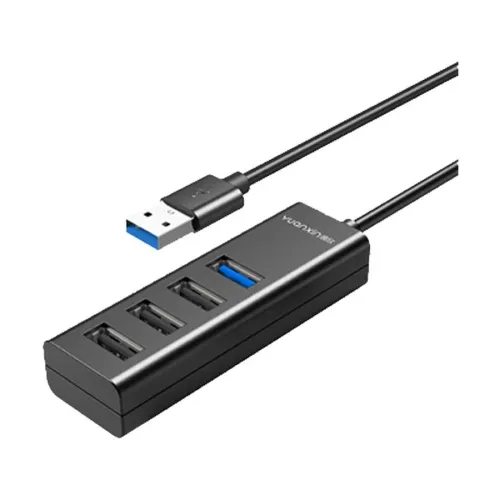
Yuanxin X-3328L adds four USB-A ports, including three USB 2.0 and one USB 3.0; up to 5Gbps is listed.
Approximate Market Price
BDT 600
Informational market estimate only; this is not a current Store offer.
Compare store prices
No live offers for this variant
BDT 600
Approximate Market Price
Informational market estimate only; this is not a current Store offer.
Loading history…
Product story
The Yuanxin X-3328L is a compact USB-A hub that adds four USB-A female ports from one USB-A male host connector. Retail specifications describe a four-port layout comprising three USB 2.0 ports and one USB 3.0 port. Star Tech and Techland list a maximum data rate of 5Gbps, which is the USB 3.0 link rate and not a promise that every connected device will reach that speed. The hub is intended for compatible laptops and desktop computers.
The host-facing end uses a USB male plug. The downstream side is listed as four USB female sockets, with the model name describing three USB 2.0 and one USB 3.0 port. Check the labels and product image to identify the USB 3.0 socket on the actual revision. USB 2.0 peripherals can be used in compatible USB-A ports, but a USB 2.0 connection remains limited by that interface.
Listings state data transmission up to 5Gbps, corresponding to the USB 3.0 port specification. This is a theoretical interface rate; actual transfers depend on the computer port, cable, peripheral, file workload, and other active hub ports. The hub shares the upstream connection among attached devices, and USB 2.0 ports have lower interface limits. Avoid interpreting 5Gbps as guaranteed real-world copy speed.
Star Tech and Techland list 5V, 900mA input and output power. The available listings do not clearly establish whether this model has an external power adapter or draws from the host USB port, so verify the power arrangement before connecting several high-draw devices. Keyboards, mice and flash drives are listed as typical uses. Power-hungry external drives may require their own power source.
Retailers list compatibility with laptops and desktops and support for Windows, macOS and Linux versions. Actual support depends on the host USB port, operating system, device drivers and peripheral power needs. The hub adds USB-A ports; it does not add video, Ethernet, charging, or USB-C connectivity. Confirm that the computer has a compatible USB-A port or use a separately sourced supported adapter.
The product listing specifies a 0.15m cable, black color, and ABS material in Ryans specifications. This short lead is suited to nearby port expansion and may leave the hub close to the computer. Keep the cable free of sharp bends and avoid pulling the hub by its cable. Physical details are retailer-provided and may differ between production revisions.
Connect the USB male plug to the computer, then connect one peripheral at a time. Allow the operating system to detect each device and confirm it appears before adding the next. For storage devices, use safe eject before disconnecting. If a device is not detected, test it directly on the computer, try another hub port, inspect the host connection, and check whether the device needs more power.
A four-port hub does not create four independent upstream connections: all attached devices share one host link. The three USB 2.0 ports are slower than the listed USB 3.0 port. No per-port switches, card reader, charging protocol, or external power supply are confirmed in the available model listings. Check the physical layout, power needs, and the specific peripheral requirements before purchase.
Star Tech and Techland list a one-year replacement warranty; confirm whether the same coverage applies to the BiponiBD seller and what exclusions or service process apply. Ryans lists the package as the Yuanxin X-3328L USB hub. The sources do not clearly confirm an included power adapter or other accessories. Check the package contents with the seller before ordering.
Keep the USB sockets clean and dry, and disconnect the hub before cleaning. Do not force a connector into a port. If connected devices disconnect intermittently, reduce the number of devices, check the host port and cable, and consider whether an externally powered hub is needed. Avoid using an unverified power source, and contact the seller if the unit or connectors appear damaged.
Retailers list four USB-A female ports: three USB 2.0 and one USB 3.0.
The listed upstream connector is a USB male plug for a compatible computer USB-A port.
Star Tech and Techland list up to 5Gbps for the USB 3.0 interface. Actual speeds vary and devices share the host link.
Yes, compatible USB peripherals can use the USB-A ports; USB 2.0 devices operate at USB 2.0 interface rates.
The available listings do not clearly confirm one. Check the power arrangement and peripheral requirements with the seller.
Retailers mention laptop and desktop use with devices such as pen drives, keyboards, mice and external drives. High-power devices may need separate power.
Windows, macOS and Linux versions are listed by retailers; support depends on the host and attached device.
Retail specifications list a 0.15m cable.
No. The available specifications describe USB-A ports only; those other functions are not listed for this model.
Star Tech and Techland list a one-year replacement warranty. Confirm terms for the specific BiponiBD offer.
Source basis: X-3328L model specifications compared across Star Tech, Techland, Creatus and Ryans. Shared bandwidth, power arrangement and seller-dependent warranty are stated explicitly.
Helpful answers
Product-specific answers maintained with the catalog information.
Retailers list four USB-A female ports: three USB 2.0 and one USB 3.0.
The listed upstream connector is a USB male plug for a compatible computer USB-A port.
Star Tech and Techland list up to 5Gbps for the USB 3.0 interface. Actual speeds vary and devices share the host link.
Yes, compatible USB peripherals can use the USB-A ports; USB 2.0 devices operate at USB 2.0 interface rates.
The available listings do not clearly confirm one. Check the power arrangement and peripheral requirements with the seller.
Retailers mention laptop and desktop use with devices such as pen drives, keyboards, mice and external drives. High-power devices may need separate power.
Windows, macOS and Linux versions are listed by retailers; support depends on the host and attached device.
Retail specifications list a 0.15m cable.
No. The available specifications describe USB-A ports only; those other functions are not listed for this model.
Star Tech and Techland list a one-year replacement warranty. Confirm terms for the specific BiponiBD offer.
Customer community
Become a merchant
Join BiponiBD, publish accurate offers and start free.