Pros
- HDMI and VGA connections in one adapter
- USB and PD connections alongside display outputs

All categories
 New condition
Computer Accessories
Yuanxin · X-3402
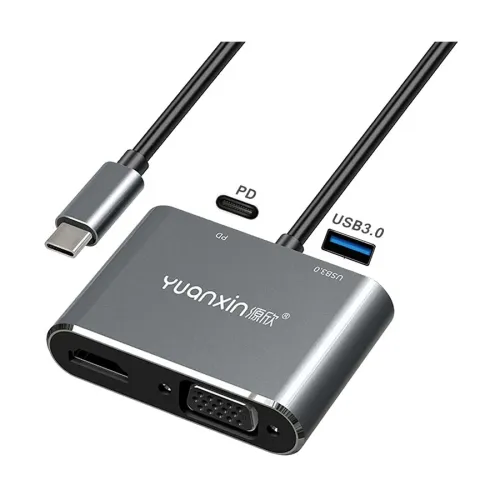
Yuanxin X-3402 USB-C multiport converter with HDMI, VGA, USB and PD ports for connecting a compatible device to a display and peripherals.
Approximate Market Price
BDT 1,100 – BDT 1,200
Informational market estimate only; this is not a current Store offer. Last checked Sep 14, 2026.
Compare store prices
No live offers for this variant
BDT 1,100 – BDT 1,200
Approximate Market Price
Informational market estimate only; this is not a current Store offer. Last checked Sep 14, 2026.
Loading history…
Product story
The Yuanxin X-3402 is a multiport converter for a compatible USB-C device. Its male Type-C connector attaches to the host, while HDMI and VGA connections provide options for a monitor, TV or projector. A USB port provides a connection for a peripheral, and a USB-C PD port supports power input with a compatible charger and host.
Use the HDMI connection with a compatible digital display or the VGA connection with a suitable VGA monitor or projector. The product is advertised with resolution up to 3840 × 2160; the achievable resolution and refresh rate depend on the selected output, display, cable and host. VGA is an analogue connection, so do not assume it supports the same resolution as HDMI. Confirm whether the two outputs can operate together and whether they mirror or extend before purchasing for a dual-screen setup.
Connect an appropriate USB accessory to the USB port. The USB port generation and maximum transfer speed should be confirmed with the seller. The PD port is intended for a compatible USB-C power supply; actual charging depends on the host, charger and adapter, and a charger or cable should not be assumed to be included. Confirm supported wattage and package contents before ordering.
For video output, the host USB-C port must support video output, typically DisplayPort Alternate Mode. A USB-C connector used only for charging or data does not by itself guarantee display support. Check the specifications of your exact laptop, tablet or phone and your display before ordering. Connect the adapter to the host, attach the appropriate display cable, select the display input and configure the display in your device settings. Use the PD connection only with a compatible power source.
HDMI and VGA offer flexibility for different displays, while USB and PD connections put several useful functions in one adapter.
USB-C video compatibility, simultaneous display behavior, refresh rates, USB speed, PD power rating and included accessories require confirmation. Warranty terms may differ by seller; check the offer shown by the merchant.
Helpful answers
Product-specific answers maintained with the catalog information.
No. The host USB-C port must support video output, typically DisplayPort Alternate Mode. Check the exact device specifications before ordering.
Simultaneous operation and mirror or extended display behavior are not confirmed for this model. Ask the seller and check your host device before buying for a dual-monitor setup.
The PD port is intended for power input from a compatible USB-C charger. Charging depends on the host and power supply; confirm the supported wattage and included accessories with the seller.
Customer community
Become a merchant
Join BiponiBD, publish accurate offers and start free.