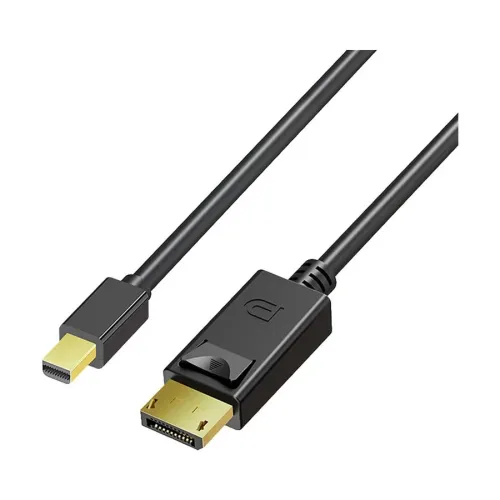
Yuanxin YDP-003 Mini DisplayPort to DisplayPort cable
The Yuanxin YDP-003 connects a compatible Mini DisplayPort source to a display with a full-size DisplayPort input. It has male connectors at both ends and a listed length of 1.8 metres. This makes it a practical option for a nearby external monitor or presentation display when the source has the correct video-output socket. Confirm the exact YDP-003 model and 1.8-metre length before ordering.
Match the connector and signal direction
The smaller plug is Mini DisplayPort and the larger plug is full-size DisplayPort. Neither is HDMI or USB-C. A similar-looking socket or a generic laptop compatibility claim does not establish the correct signal support. Check the source device documentation for Mini DisplayPort video output and the monitor documentation for DisplayPort input.
The checked listings describe a Mini DisplayPort source feeding a DisplayPort display. Reverse-direction operation was not verified, so obtain explicit confirmation if you intend to connect a full-size DisplayPort source to a Mini DisplayPort display. This cable is not documented as an HDMI converter, USB data cable or charging accessory. Any adapter used in the connection can introduce additional compatibility limits.
Resolution claims and missing refresh-rate detail
Ryans lists 3840 × 2160 resolution for this model, but does not specify the corresponding refresh rate. This is a retailer specification rather than an independently tested guarantee. Star Tech lists a 480 Mbps data-transfer figure without a supporting DisplayPort link specification. Because the checked evidence does not establish a validated video bandwidth, that figure is not used here as a confirmed performance rating.
Do not infer 4K at 60 Hz, 100 Hz, 144 Hz, HDR or variable refresh rate from the connector type alone. The source, display, cable and selected signal format must all support the desired mode. If a particular resolution and refresh rate is essential, request exact-model documentation or a seller demonstration before purchase. A DisplayPort version and VESA certification record were not verified.
Physical design and installation
The catalog image shows a black cable with a compact Mini DisplayPort plug and a larger DisplayPort plug with a latch-release button. The gold-tone connector appearance does not establish a particular plating specification. Align the connectors carefully with the matching sockets and avoid force. Release a latch before disconnecting the full-size DisplayPort plug, and pull on the housing rather than the cable.
Measure the cable route around the desk, stand and computer before choosing 1.8 metres. Leave slack at both ends and avoid crushing the cable behind furniture or bending it sharply at a connector. The checked sources do not establish the jacket material, shielding construction, wire gauge, net weight or tested bend life, so these should not be assumed from the photograph.
Using an external display
After connecting, select the DisplayPort input on the monitor and open the source device display settings. Choose a mode supported by the complete setup, then configure mirroring or an extended desktop if the source allows it. If no image appears, verify the monitor input, connector seating and graphics-output settings before changing other parts of the setup.
Exact audio-format support was not verified. A retailer describes the cable for video transmission, so do not promise a particular surround-sound or audio passthrough capability without confirmation. Graphics-driver and operating-system support are properties of the connected devices; the cable does not supply missing video-output hardware or add a new display mode.
Warranty and buying checks in Bangladesh
Star Tech and Ryans list one year of warranty coverage. Confirm the selling merchant, invoice requirements, exclusions and claim process. Ryans lists one cable in the package and identifies the part number as YDP-003. Inspect the delivered model, length and connector condition, and ask the seller to confirm package contents.
Reference prices reflect observed retailer offers, not guaranteed checkout totals. Availability, payment-method pricing and delivery charges may change. Manufacturer confirmation, exact refresh-rate support, validated bandwidth, barcode, origin of the delivered unit and packaging dimensions remain unverified. These evidence gaps should be resolved before relying on the cable for a demanding or unusual display configuration.