Pros
- Provides a path from Mini DisplayPort sources to DVI displays
- Supports a listed Full HD mode for compatible equipment
- Short adapter format avoids a long extra cable run at the source

All categories
 New condition
Computer Accessories
Yuanxin · YDP-011
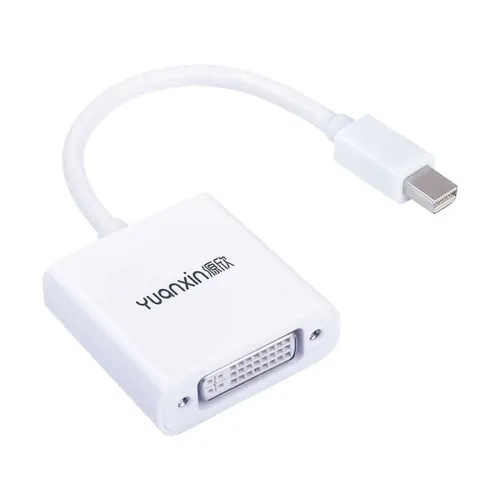
Yuanxin YDP-011 connects a Mini DisplayPort source to a DVI display; Full HD 1920 × 1080 is listed.
Approximate Market Price
BDT 490
Informational market estimate only; this is not a current Store offer.
Compare store prices
No live offers for this variant
BDT 490
Approximate Market Price
Informational market estimate only; this is not a current Store offer.
Loading history…
Product story
The Yuanxin YDP-011 is listed as a Mini DisplayPort male to DVI female converter. It connects a compatible Mini DisplayPort video output to a display or projector with a DVI input. Skyland lists Full HD 1920 × 1080 resolution and a 0.15m length; Ryans identifies a white YDP-011 model. The adapter is directional and does not convert a DVI source to Mini DisplayPort. A separate DVI cable is generally needed to connect the female DVI socket to the screen.
Plug the Mini DisplayPort male connector into a compatible source output, then connect a DVI cable from the adapter’s female DVI socket to the display’s DVI input. Confirm the connector shape and port before ordering: Mini DisplayPort is smaller than full-size DisplayPort, HDMI, and Mini-DVI. This model is specified Mini DisplayPort to DVI; it should not be used in reverse unless the source and display documentation explicitly supports the reverse direction.
The available YDP-011 listing specifies Full HD at up to 1920 × 1080. Actual resolution and refresh rate depend on the source graphics device, adapter implementation, DVI input, cable, and display settings. The retailer pages reviewed do not consistently specify DVI-D versus DVI-I, single-link or dual-link operation, or a complete refresh-rate table. Check the display and source requirements and do not assume support above the listed Full HD mode.
Skyland lists Windows, Mac OS, Android, and Linux in its YDP-011 catalog specifications; other retailers identify laptops and monitors as common use cases. Compatibility still depends on the device having an actual Mini DisplayPort output and the display accepting a compatible DVI signal. A USB-C port or HDMI output is not equivalent to Mini DisplayPort; verify the precise host connector and supported video mode.
Turn off or sleep the devices before attaching the adapter if their manuals recommend it. Connect the Mini DisplayPort plug to the source, connect a DVI cable to the adapter’s female socket and screen, then select the DVI input on the display. In the operating system, choose a supported resolution and configure duplicate or extended display mode. If no image appears, check the selected input, reseat both connectors, test another DVI cable, and confirm the source port can output video.
Skyland lists a 0.15m cable/adapter length, while Ryans identifies a white version. The available exact-model listings do not provide a consistent housing material, dimensions, or weight, so those details are not asserted here. The short adapter is intended for nearby connections; support the attached DVI cable so its weight does not strain the Mini DisplayPort connector.
The YDP-011 is described as a video adapter. The reviewed model listings do not establish audio output, USB ports, Ethernet, charging, or an external power connector. DVI is used for video in this setup; use a separate audio connection if sound is required. Do not expect the adapter to add networking, USB data, or power delivery.
This adapter requires a Mini DisplayPort output and a DVI input. It does not convert HDMI, full-size DisplayPort, or USB-C directly without separate compatible conversion hardware, and it is not bidirectional. DVI connector variants and display modes are not fully identified in the retailer pages. Confirm the DVI pin arrangement, included accessories, supported resolution, and device compatibility with the seller before purchase.
Ryans and other retailer pages identify the YDP-011 model, but available warranty details are inconsistent or not shown for this exact offer. Confirm the warranty duration, replacement policy, and package contents with the selected BiponiBD seller. A DVI cable is not confirmed as included by the available model information, so plan to obtain the required cable separately unless the seller confirms otherwise.
Keep the Mini DisplayPort plug and DVI socket free of dust and moisture. Disconnect by holding the connector body, not by pulling the cable. Avoid twisting or bending the short lead sharply. For intermittent image or flicker, check the display input, use a known-good DVI cable, lower the display mode to a supported setting, and test the source output with another display.
It connects a Mini DisplayPort video output to a DVI display input.
Retailers list a Mini DisplayPort male plug.
The YDP-011 is listed with a DVI female output socket, so a suitable DVI cable is generally needed.
Skyland lists Full HD 1920 × 1080. Confirm refresh rate and display support for your devices.
No reverse operation is specified; use it from Mini DisplayPort source to DVI display.
No. Mini DisplayPort is a distinct connector. Confirm the host port before buying.
Skyland lists 0.15m.
Skyland lists Windows, Mac OS, Android, and Linux; actual compatibility depends on the source hardware and video output.
The reviewed listings do not confirm an included DVI cable or audio function. Confirm package contents with the seller.
Warranty is not consistently confirmed for this exact offer. Ask the BiponiBD seller for its written warranty terms.
Source basis: YDP-011 details compared across Geary, Skyland, Ryans and Nexus. Unspecified DVI, refresh-rate, package and warranty details are marked for confirmation.
Helpful answers
Product-specific answers maintained with the catalog information.
It connects a Mini DisplayPort video output to a DVI display input.
Retailers list a Mini DisplayPort male plug.
The YDP-011 is listed with a DVI female output socket, so a suitable DVI cable is generally needed.
Skyland lists Full HD 1920 × 1080. Confirm refresh rate and display support for your devices.
No reverse operation is specified; use it from Mini DisplayPort source to DVI display.
No. Mini DisplayPort is a distinct connector. Confirm the host port before buying.
Skyland lists 0.15m.
Skyland lists Windows, Mac OS, Android, and Linux; actual compatibility depends on the source hardware and video output.
The reviewed listings do not confirm an included DVI cable or audio function. Confirm package contents with the seller.
Warranty is not consistently confirmed for this exact offer. Ask the BiponiBD seller for its written warranty terms.
Customer community
Become a merchant
Join BiponiBD, publish accurate offers and start free.