Pros
- Useful for connecting a compatible Mini DisplayPort computer to a VGA-only screen
- Compact pigtail format
- Retailer listings specify Full HD output

All categories
 New condition
Computer Accessories
Yuanxin · YDP-012
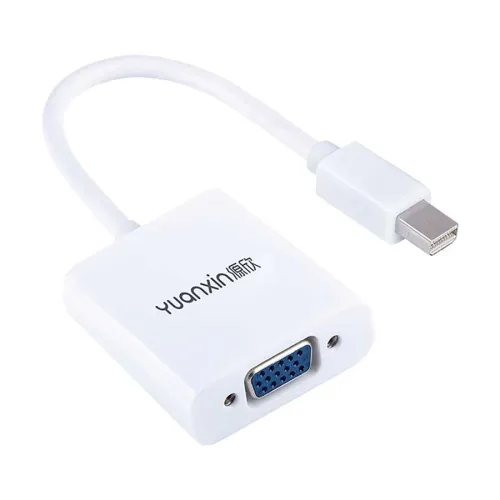
Yuanxin YDP-012 converts Mini DisplayPort video output to VGA female for a compatible display; listed up to 1920×1080 with a 15cm lead.
Approximate Market Price
BDT 450
Informational market estimate only; this is not a current Store offer.
Compare store prices
No live offers for this variant
BDT 450
Approximate Market Price
Informational market estimate only; this is not a current Store offer.
Loading history…
Product story
The Yuanxin YDP-012 is a compact video adapter with a Mini DisplayPort male input and a VGA female output. It is designed for a computer with a Mini DisplayPort video output and a monitor or projector with a VGA input. Retailer listings describe a 15cm lead and support up to 1920 × 1080. Because VGA is analog, output quality and supported modes depend on the source, display and connection.
The signal path is Mini DisplayPort source to VGA display. Plug the male Mini DisplayPort connector into a compatible output on a laptop or desktop, then connect a VGA cable from the adapter’s female port to the screen. It does not convert VGA to Mini DisplayPort, and it does not accept HDMI, USB-C or a full-size DisplayPort plug. Confirm the source connector carefully before purchase.
Retailers list Full HD up to 1920 × 1080; Ryans additionally lists 1080p at 60Hz. The source device, graphics driver, display and cable all affect the available mode. The VGA connection carries analog video and does not carry audio, so use a separate audio connection if needed. No higher refresh rate or resolution should be assumed from the available YDP-012 listings.
The adapter is listed for Windows, macOS and Linux, but operating-system support alone does not guarantee every computer has Mini DisplayPort output. It suits a Mini DisplayPort equipped source and a VGA equipped monitor, projector or display. Some USB-C sockets look similar but are not Mini DisplayPort; check the device manual and port markings. An HDMI-only source will need a different converter.
The listed 0.15m (15cm) length keeps the adapter close to the computer and provides a short pigtail for the VGA connection. Position the devices so the adapter is not pulled, sharply bent or left supporting the weight of a VGA cable. The retailer listing gives the length but does not establish a particular cable bend radius or strain-relief test.
Ryans identifies the YDP-012 as white and lists an ABS shell; other catalogue imagery can vary, so check the seller’s actual stock photos. Exact chipset, internal conversion method, shielding and connector plating are not specified in the reviewed model listings. Avoid assuming premium materials or capabilities that are not documented for this SKU.
Connect the adapter directly to the Mini DisplayPort output, attach a VGA cable to its female port, and select the external display in the operating system. Secure the VGA connector screws gently where present. If the screen is blank, check input selection, cable seating, source display settings and whether the computer supports video output over that port. Restart or reconnect only as recommended by device makers.
If the image flickers or looks soft, test a known-good VGA cable, lower the resolution or refresh rate, and avoid placing signal cables alongside strong electrical noise sources. If no image appears, confirm the Mini DisplayPort output is active and the display is set to VGA. This adapter does not add audio, power charging, USB data or network connectivity.
Disconnect by holding the connector body rather than pulling the cable. Keep the adapter dry, clean and free from dust in the ports; do not force a connector or use it if pins are damaged. Mini DisplayPort is a digital source interface and VGA is analog, so the adapter performs a format conversion. It is a one-way display accessory, not a general-purpose cable or bidirectional adapter.
Ryans and Skyland list a one-year warranty, while the actual warranty for this BiponiBD offer must be confirmed with the seller before ordering. Confirm that the delivered model is YDP-012, the connector direction is Mini DisplayPort male to VGA female, and the packaging condition matches the offer. Published market prices change and are not represented here as the current BiponiBD price.
It connects a Mini DisplayPort video output to a VGA display input.
The male Mini DisplayPort end plugs into the compatible computer output.
The YDP-012 listings specify a VGA female output, so a VGA cable with a male plug is typically needed.
No. Its listed direction is Mini DisplayPort source to VGA display.
Retailers list up to 1920 × 1080; Ryans lists 1080p at 60Hz. Actual modes depend on all connected equipment.
No. VGA carries video only, so use a separate audio cable or audio connection when sound is required.
Not by connector appearance alone. This model is specified for Mini DisplayPort; choose an adapter explicitly compatible with the source port.
Retailer listings describe operating-system compatibility, but do not provide a model-specific driver requirement. Check source-device documentation and seller guidance.
Retailer listings specify a 0.15 metre lead, which is 15 centimetres long.
Ryans and Skyland list one year, but confirm the warranty offered for the specific BiponiBD seller and order.
Source basis: Product-specific retailer specifications were checked against Ryans, Skyland and Nexus. Check seller-specific stock and warranty before ordering.
Helpful answers
Product-specific answers maintained with the catalog information.
It connects a Mini DisplayPort video output to a VGA display input.
The male Mini DisplayPort end plugs into the compatible computer output.
The YDP-012 listings specify a VGA female output, so a VGA cable with a male plug is typically needed.
No. Its listed direction is Mini DisplayPort source to VGA display.
Retailers list up to 1920 × 1080; Ryans lists 1080p at 60Hz. Actual modes depend on all connected equipment.
No. VGA carries video only, so use a separate audio cable or audio connection when sound is required.
Not by connector appearance alone. This model is specified for Mini DisplayPort; choose an adapter explicitly compatible with the source port.
Retailer listings describe operating-system compatibility, but do not provide a model-specific driver requirement. Check source-device documentation and seller guidance.
Retailer listings specify a 0.15 metre lead, which is 15 centimetres long.
Ryans and Skyland list one year, but confirm the warranty offered for the specific BiponiBD seller and order.
Customer community
Become a merchant
Join BiponiBD, publish accurate offers and start free.