Pros
- Can expand the usefulness of a compatible computer setup
- Model-specific Store offers are easy to compare

All categories
 New condition
Computer Accessories
Yuanxin · YDP-013
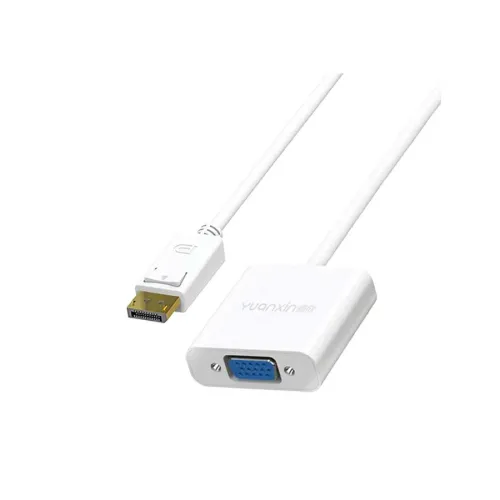
Yuanxin YDP-013 connects DisplayPort output to VGA display input at up to 1920 × 1080; tri-USB and LAN are described by some retailers.
Approximate Market Price
BDT 600
Informational market estimate only; this is not a current Store offer.
Compare store prices
No live offers for this variant
BDT 600
Approximate Market Price
Informational market estimate only; this is not a current Store offer.
Loading history…
Product story
The Yuanxin YDP-013 is listed as a DisplayPort male to VGA female converter. It connects a compatible computer DisplayPort output to a VGA monitor or projector. Retailer listings also describe a tri-USB and LAN female multiport hub, so check the product photos and port configuration with the seller before ordering. Listings specify Full HD resolution up to 1920 × 1080. The adapter is directional and does not convert VGA output back to DisplayPort.
Connect the DisplayPort male plug to a DisplayPort output on a desktop computer, laptop, or other compatible source. Connect a VGA cable from the converter’s VGA female socket to the display’s VGA input. The output is analog VGA, so this product is intended for older monitors and projectors that have VGA input. A VGA cable is not necessarily included; confirm package contents with the seller.
Techland and Geary describe the YDP-013 with three USB ports and a LAN female port in addition to video conversion. Their descriptions do not consistently specify USB generation, data rates, Ethernet speed, or power delivery. Treat the extra ports as listing-level information and verify the exact hardware revision and port functions from the seller before relying on them for a particular device or network setup.
Retail listings describe Full HD 1920 × 1080 output. Actual supported modes depend on the source graphics hardware, operating system, display, VGA cable, and the adapter’s implementation. Confirm that the source exposes a compatible DisplayPort signal and that the monitor accepts the desired resolution and refresh rate. No higher resolution or refresh rate should be assumed from the available model listings.
Ryans lists DC 5V power and compatibility with Windows, macOS, and Linux. The available listing text does not clearly establish whether power is supplied through a dedicated connector or how the hub behaves when all ports are used. Confirm host power and operating-system requirements with the seller, especially if USB or LAN features are important.
Ryans lists a white ABS housing, 0.15m length, dimensions of 45 × 45 × 15mm, and weight of 29g. These measurements are retailer specifications and may vary by revision. The compact form is designed to sit close to the source device; take care not to place strain on the DisplayPort connector or attached VGA cable.
Before connecting, check that the source has a full-size DisplayPort output and the screen has VGA input. Attach the converter, connect the VGA cable, select the matching VGA input on the display, then choose a supported screen mode in the source operating system. If the display remains blank, reseat both ends, confirm the selected input, test a lower supported resolution, and verify that the source port is DisplayPort rather than HDMI or Mini DisplayPort.
This is a DisplayPort-to-VGA direction converter; it is not a universal adapter and cannot reverse the signal direction. VGA carries analog video and does not carry digital audio. The product listing describes additional USB and LAN ports, but does not provide complete performance details for those functions. Check the exact port layout, included accessories, device support, and seller return and warranty terms before purchase.
Ryans lists a one-year warranty and a single Yuanxin YDP-013 converter in the package. Techland’s page presents conflicting warranty statements, showing no warranty in one place and one year elsewhere. Warranty coverage therefore remains seller-dependent and must be confirmed for the actual BiponiBD offer. The sources do not confirm that a VGA cable is included.
Disconnect the adapter before moving connected equipment. Avoid pulling on the DisplayPort plug or bending the VGA cable sharply. Keep the converter dry and clear of dust, and do not open its housing. If an attached USB or network device is unstable, disconnect peripherals and check the host, cable, and power requirements rather than assuming every port supports every device.
It is listed as a DisplayPort male to VGA female converter; some retailer listings also describe three USB ports and a LAN port.
From a DisplayPort output on the source device to a VGA input on the monitor or projector. It is not reversible.
Retail listings specify Full HD up to 1920 × 1080. Actual modes depend on the source, display, cable, and adapter revision.
Techland and Geary describe three USB ports and a LAN female port. Verify the exact hardware and port capabilities with the seller.
Ryans lists the housing as white.
Ryans lists a 0.15m length and dimensions of 45 × 45 × 15mm.
Ryans lists DC 5V. Confirm the power connection and requirements for the exact unit with the seller.
Ryans lists Windows, macOS, and Linux compatibility; source port and device support still apply.
The available listings do not clearly confirm a VGA cable in the package. Ask the seller before ordering.
Retailer warranty text conflicts: Ryans lists one year while Techland has conflicting entries. Confirm the warranty for the specific seller offer.
Source basis: YDP-013 exact-model specifications compared across Ryans, Techland, Geary and Star Tech. Direction, uncertain hub details and seller-dependent warranty are stated explicitly.
Customer community
Become a merchant
Join BiponiBD, publish accurate offers and start free.