Pros
- Enables HDMI output to connect with VGA displays
- FHD resolution listed by multiple sellers
- Separate analog audio connection is available

All categories
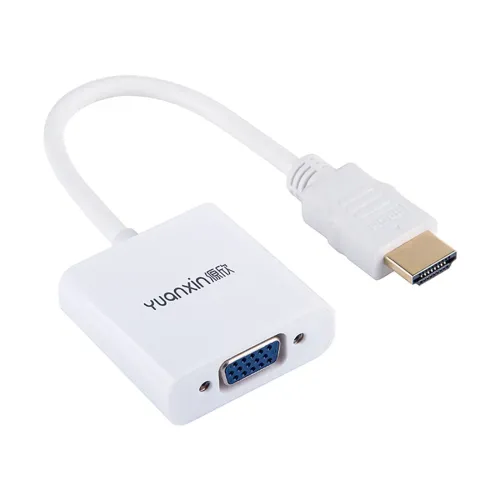 New condition
Computer Accessories
Yuanxin · YHV-011
Yuanxin YHV-011 converts HDMI output to VGA input up to 1920×1080, with 3.5mm audio and DC 5V power listed. Verify direction and setup.
Approximate Market Price
BDT 480
Informational market estimate only; this is not a current Store offer.
Compare store prices
No live offers for this variant
BDT 480
Approximate Market Price
Informational market estimate only; this is not a current Store offer.
Loading history…
Product story
Yuanxin YHV-011 is a compact HDMI-to-VGA converter with an HDMI male input plug and a VGA female output socket. Local listings specify Full HD resolution up to 1920×1080, a 3.5mm audio connection, DC 5V power and an attached lead of approximately 0.15m. It is intended to connect an HDMI source such as a computer or media player to a VGA display. Conversion is one-way; it does not convert VGA output to HDMI.
Connect the HDMI male plug to an HDMI output on the source, then use a VGA cable from the converter’s female VGA socket to the display. The signal direction is HDMI source to VGA monitor/projector. A VGA-to-HDMI setup requires a different converter. Confirm the connector orientation and the condition of the VGA cable before purchase because the converter has a VGA socket, not a VGA plug.
Retailer listings specify FHD 1920×1080 support. The exact refresh rate, color depth and supported timing combinations are not consistently specified. The source computer must be configured to a resolution and refresh rate accepted by the VGA monitor or projector. If the display remains blank, select a lower supported mode and check the display’s input/source setting.
VGA carries video only, so audio uses a separate 3.5mm connection listed for this converter. Route audio to a compatible speaker or display audio input, and confirm whether the YHV-011’s 3.5mm port is input or output for the particular setup. Audio cable direction and included accessories should be checked with the seller. Do not expect sound to travel through the VGA connection itself.
Local product listings specify DC 5V power. A converter may need auxiliary power for active signal conversion, especially when the HDMI source cannot supply enough current. Check the unit’s power socket and the seller’s package details. The available listings do not consistently establish whether a USB power lead or adapter is included. Use only the specified power input and avoid connecting an incompatible supply.
The converter may be used between HDMI outputs on computers, DVD players, media devices or TV boxes and VGA inputs on monitors or projectors, subject to compatible video modes. The source needs an HDMI output and the display needs VGA input. A device with only USB-C or DisplayPort needs a separate compatible upstream adapter, not included or confirmed here.
Retailers list an attached cable length of about 0.15m. Place the converter near the HDMI source and use a separate VGA cable for the longer run to the display. Avoid letting the converter hang from the HDMI port or putting strain on the plug. Secure the VGA connector screws where available and keep power and audio leads routed safely.
Connector fit alone does not guarantee a working picture. The source, converter, any external power and display must support compatible signal formats. This adapter is analog VGA output and cannot provide HDMI-only features such as HDCP-dependent protected playback unless the conversion chain supports the required content. EDID and protected-content behavior are not specified in the product listings.
Check that the converter is attached to an HDMI output, the monitor cable is secured to its female VGA socket and the display is set to VGA input. Confirm DC 5V auxiliary power if required. Set the source to a supported resolution, reseat connections and test the display/cable separately. If the source uses a different connector or direction, use the correct converter type.
Because VGA does not carry audio, connect the separate 3.5mm lead to the appropriate audio source or speaker path. Select the correct audio output on the computer and check volume and mute settings. The listing does not fully document the 3.5mm wiring direction or cable inclusions, so consult the product diagram or seller if audio is needed.
The sources do not consistently confirm included 5V power cable, audio lead, VGA cable, adapter or local warranty. Confirm exact box contents, current stock, warranty provider and return terms with the merchant. Inspect the product label to ensure it is YHV-011 and not a similarly named Yuanxin model with different connector direction.
The YHV-011 provides a compact HDMI-male to VGA-female conversion path with separate 3.5mm audio and listings for 1080p output. It is directional and may need DC 5V power. Refresh rate, audio-port direction, included power accessories and seller warranty are not consistently documented. Choose it only when the source has HDMI output and the target display has VGA input.
The YHV-011 has an HDMI male input plug and VGA female output socket. Use it from an HDMI source to a VGA display; it does not convert VGA output to HDMI input.
Local product listings specify Full HD up to 1920×1080. Supported refresh rate and compatibility depend on the source and display; a specific 60Hz mode is not confirmed in the sources checked.
Listings identify a 3.5mm audio connection. VGA does not carry audio, so connect the separate audio output to a compatible speaker or display audio input. Exact cable direction and inclusion should be confirmed with the seller.
Retailers state DC 5V power. Check whether the converter has a separate 5V input and whether the required USB/power cable is included. HDMI power alone may not be sufficient for every source/setup.
Yes, when the laptop has HDMI output and the monitor has VGA input, and both support a compatible resolution. Set the computer to a mode the monitor accepts.
No. This is an HDMI-source to VGA-display converter. A VGA computer connected to an HDMI television needs a different VGA-to-HDMI converter.
The product is described as HDMI male to VGA female. A standard VGA cable with male connector is typically used from this socket to a monitor’s VGA input.
VGA itself carries no audio. The separate 3.5mm connection is listed to pass or provide audio; route it to a suitable audio input or speaker.
Retail listings specify a short attached lead of approximately 0.15m. Check the product photos and seller details for exact cable and power leads supplied.
Warranty terms vary by retailer and were not consistently verified. Confirm seller, distributor, duration and claim process before ordering.
Helpful answers
Product-specific answers maintained with the catalog information.
The YHV-011 has an HDMI male input plug and VGA female output socket. Use it from an HDMI source to a VGA display; it does not convert VGA output to HDMI input.
Local product listings specify Full HD up to 1920×1080. Supported refresh rate and compatibility depend on the source and display; a specific 60Hz mode is not confirmed in the sources checked.
Listings identify a 3.5mm audio connection. VGA does not carry audio, so connect the separate audio output to a compatible speaker or display audio input. Exact cable direction and inclusion should be confirmed with the seller.
Retailers state DC 5V power. Check whether the converter has a separate 5V input and whether the required USB/power cable is included. HDMI power alone may not be sufficient for every source/setup.
Yes, when the laptop has HDMI output and the monitor has VGA input, and both support a compatible resolution. Set the computer to a mode the monitor accepts.
No. This is an HDMI-source to VGA-display converter. A VGA computer connected to an HDMI television needs a different VGA-to-HDMI converter.
The product is described as HDMI male to VGA female. A standard VGA cable with male connector is typically used from this socket to a monitor’s VGA input.
VGA itself carries no audio. The separate 3.5mm connection is listed to pass or provide audio; route it to a suitable audio input or speaker.
Retail listings specify a short attached lead of approximately 0.15m. Check the product photos and seller details for exact cable and power leads supplied.
Warranty terms vary by retailer and were not consistently verified. Confirm seller, distributor, duration and claim process before ordering.
Customer community
Become a merchant
Join BiponiBD, publish accurate offers and start free.