Pros
- Connects an HDMI source to a VGA-only monitor or projector
- Separate audio output helps retain sound through a VGA display setup
- Compact adapter with Micro-USB power input listed

All categories
 New condition
Computer Accessories
Yuanxin · YHV-012
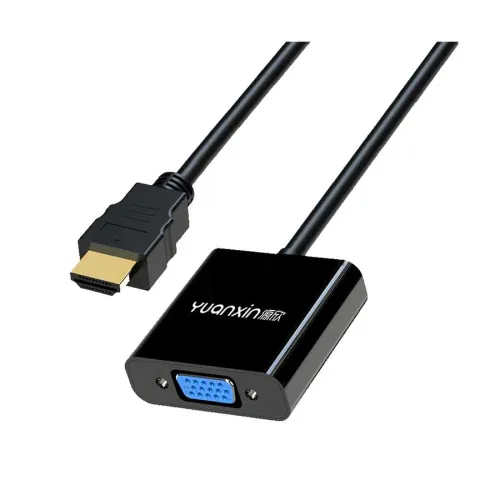
Yuanxin YHV-012 converts HDMI output to VGA display input and provides a separate 3.5mm audio jack; up to 1080p is listed.
Approximate Market Price
BDT 550
Informational market estimate only; this is not a current Store offer.
Compare store prices
No live offers for this variant
BDT 550
Approximate Market Price
Informational market estimate only; this is not a current Store offer.
Loading history…
Product story
The Yuanxin YHV-012 is an HDMI-to-VGA converter with an HDMI male input, VGA female output and separate 3.5mm audio jack. It is intended to connect a digital HDMI source to an analog VGA monitor or projector. Retailer specifications list up to Full HD 1920 × 1080, with Ryans describing 1080p at 60Hz. The converter is directional: it does not convert a VGA source to HDMI. A VGA cable is typically needed between the converter’s female VGA port and the display.
Connect the male HDMI plug to a source such as a laptop, media player or other HDMI output. Connect a VGA cable from the converter’s female VGA socket to the display’s VGA input. The HDMI-to-VGA direction is important; this adapter cannot be reversed. It does not convert DisplayPort or USB-C directly, and an HDMI source is required unless another suitable converter is used. Check the ports on both devices before purchase.
Ryans and other listings specify FHD 1920 × 1080; Ryans lists VGA display at 1080p @ 60Hz. Actual resolution and refresh rate depend on the HDMI source, converter, VGA cable, display and selected output mode. VGA is analog, so image quality can vary with the display and signal path. The available model listing does not establish support for 4K or higher refresh rates; do not assume modes beyond the stated FHD specification.
VGA does not carry audio. The YHV-012 provides a separate 3.5mm AUX audio jack so audio from a compatible HDMI source can be routed to speakers or headphones with a suitable 3.5mm cable. Select the appropriate audio output on the source device if sound does not play. The converter’s audio jack is not a microphone input or a speaker; external audio equipment is required. Confirm the source sends audio through HDMI.
Ryans lists DC 5V and a Micro-USB power-source port. Depending on source and setup, connect a suitable 5V supply through the converter’s power input if required. The USB power port is for powering the converter and is not a USB data or charging output for a phone. Use a compatible supply and follow the seller or device instructions; the reviewed sources do not specify a current rating for the required power adapter.
The converter is listed at approximately 0.15m (15cm) and has a compact adapter form. Position the source and display so the HDMI plug and VGA connection are not carrying strain. A separate VGA lead may be needed to reach the display. Avoid sharp bends, pulling on the HDMI connector or letting a heavy VGA cable hang unsupported from the adapter.
Ryans lists a black ABS shell and compatibility with Windows, macOS and Linux devices with HDMI output. Operating-system support depends on the source hardware and display settings; it does not replace the need for HDMI output on the source and VGA input on the display. Tablets and phones may require HDMI video output support or an additional adapter. Confirm the exact device’s video output capability before ordering.
Connect HDMI from the source to the converter, attach a VGA cable to the display and set the screen input to VGA. Add Micro-USB power if the converter requires it, then select the external display mode on the source. If there is no picture, check cable seating, the display input, output resolution and whether the source is actually sending HDMI. If the picture appears but there is no sound, choose HDMI audio on the source and connect the 3.5mm output to speakers.
This adapter does not add VGA audio; audio is available separately through the 3.5mm jack. It is not a bidirectional cable and does not provide USB data, Ethernet, charging or 4K conversion claims. Disconnect carefully by holding the connector body, and keep the ports dry and free of dust. Do not force connectors or use a damaged adapter. A digital-to-analog conversion can behave differently across display modes and devices.
Ryans and Techland list a one-year warranty; confirm that the selected BiponiBD seller provides the same coverage and claim route. Verify model YHV-012, HDMI male input, VGA female output, 3.5mm audio jack, Micro-USB power input and the black finish on the delivered item. The package contents should be checked with the seller, especially whether a VGA cable or power lead is included. Price and stock change over time.
It converts an HDMI video output from a source device to a VGA display input; the direction cannot be reversed.
Retailer specifications list an HDMI male input plug on the converter.
The YHV-012 has a VGA female socket, so a VGA cable with a male plug is typically required.
Listings specify up to 1920 × 1080; Ryans lists 1080p at 60Hz. Actual modes depend on all connected equipment.
Connect the converter’s separate 3.5mm audio output to compatible speakers or headphones and select HDMI audio on the source.
Ryans lists DC 5V and a Micro-USB power input; connect suitable 5V power if required by the source and setup.
No. This model converts HDMI source to VGA display, not the reverse.
The reviewed YHV-012 listings specify up to 1920 × 1080, not 4K.
Ryans lists Windows, macOS and Linux; the source device must also provide HDMI output.
Ryans and Techland list one year; confirm warranty service for the selected BiponiBD seller.
Source basis: YHV-012 exact-model specifications compared across Ryans, Techland, Computer Vision BD and Geary. Direction, audio and power limits are stated explicitly.
Helpful answers
Product-specific answers maintained with the catalog information.
It converts an HDMI video output from a source device to a VGA display input; the direction cannot be reversed.
Retailer specifications list an HDMI male input plug on the converter.
The YHV-012 has a VGA female socket, so a VGA cable with a male plug is typically required.
Listings specify up to 1920 × 1080; Ryans lists 1080p at 60Hz. Actual modes depend on all connected equipment.
Connect the converter’s separate 3.5mm audio output to compatible speakers or headphones and select HDMI audio on the source.
Ryans lists DC 5V and a Micro-USB power input; connect suitable 5V power if required by the source and setup.
No. This model converts HDMI source to VGA display, not the reverse.
The reviewed YHV-012 listings specify up to 1920 × 1080, not 4K.
Ryans lists Windows, macOS and Linux; the source device must also provide HDMI output.
Ryans and Techland list one year; confirm warranty service for the selected BiponiBD seller.
Customer community
Become a merchant
Join BiponiBD, publish accurate offers and start free.