Pros
- 3m reach suits a computer and printer placed apart
- Common USB-A host and USB-B printer connection
- Plug-and-play after compatible driver and operating-system setup

All categories
 New condition
Computer Accessories
Yuanxin · YUX-008
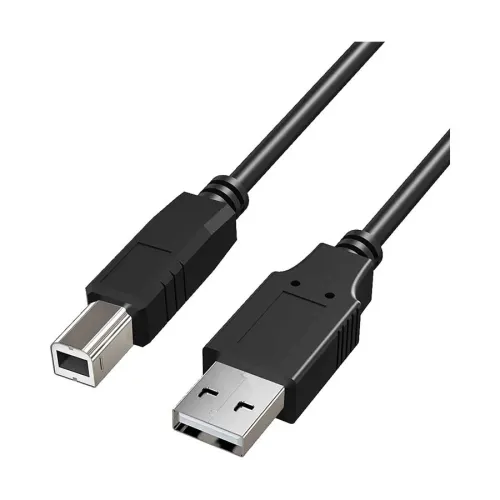
Yuanxin YUX-008 is a 3m USB-A male to USB-B male printer cable listed for USB 2.0 data up to 480Mbps.
Approximate Market Price
BDT 350
Informational market estimate only; this is not a current Store offer.
Compare store prices
No live offers for this variant
BDT 350
Approximate Market Price
Informational market estimate only; this is not a current Store offer.
Loading history…
Product story
Yuanxin YUX-008 is a 3-metre USB cable with a USB Type-A male connector for a host computer and a USB Type-B male connector for a compatible printer or peripheral. Bangladesh retailers list a USB 2.0 connection and a data rate up to 480Mbps. This is the rated USB 2.0 signaling speed; actual printer communication depends on the printer, computer, driver, software and data being sent. The cable carries data and is not a printer power cord.
Connect the Type-A male plug to a computer USB port and the squarish Type-B male plug to the printer’s USB device port. The YUX-008 is not a USB-C cable and does not convert other interfaces. Check both port shapes before ordering. A printer may use a separate mains power lead, which is not confirmed as included with this data cable.
Retail listings describe the YUX-008 as USB 2.0 with transfer up to 480Mbps. This figure is a maximum bus signaling rate, not an expected print-job speed. The host and printer must support USB data, and the operating system needs an appropriate driver. The connected devices, print workload and software determine how long a job takes. It does not provide USB 3.x speeds.
The cable is listed at 3 metres, giving more reach between a computer and printer than shorter desk leads. Measure the route and leave enough slack for the printer tray, service access and movement without letting the cable cross a walking path. Do not wrap tightly around furniture or pull on a connector. For a long route through a hub or extension, verify that the full connection remains stable.
The YUX-008 is marketed for printers and may also connect a compatible scanner or peripheral with a USB Type-B device port. Check the device manual for USB interface and host requirements. Some equipment uses different USB-B variants or a proprietary connector, so confirm the port shape carefully. This cable alone does not install a driver, configure network printing or make an unsupported device compatible.
Connect the cable securely at both ends and power on the printer as directed by its manufacturer. Install or select the correct printer driver, then choose the device in the operating system and print a test page. Some systems detect a compatible printer automatically; others need the vendor’s software. If connecting through a hub, test a direct computer port first when the device is not recognized.
Check the printer’s USB-B port, computer’s USB-A port and device status in the operating system. Reseat the plugs while holding their housings, try a different host port and verify the driver, default-printer selection and print queue. If communication drops, test directly without an unpowered hub and inspect the cable for visible damage. A problem can also arise from the printer, driver or application rather than the cable.
This product is a USB data cable, not a mains adapter or printer power supply. The YUX-008 listings do not establish special charging support, USB-C Power Delivery, shielding construction, conductor material, connector plating or a warranty package. Use the printer’s specified power cable and follow its safety guidance. Do not infer additional functions from the USB connector shapes.
Insert and remove the plugs by their connector housings rather than pulling the cable. Avoid sharp kinks, crushed sections, hot surfaces, liquids and furniture edges. Support the cable so it does not place sideways force on the computer or printer socket. Stop using it if the jacket is split or a connector is bent or loose, and replace damaged leads.
Confirm the exact model YUX-008, 3m length and Type-A male to Type-B male layout with the selected shop. Retailer pages list the cable in different colours; check the actual unit if colour matters. Warranty and current stock vary among sellers and were not established uniformly. Ask about returns and service, keep the invoice, and do not treat a third-party stock listing as a live BiponiBD offer.
YUX-008 offers a 3m A-to-B connection for compatible printers, with a USB 2.0 rate listed up to 480Mbps. Its length can suit a printer positioned away from a nearby computer. It remains a wired data link and requires a compatible USB-B port, proper drivers and separate printer power where needed. It does not provide USB 3.x speed or eliminate software and device compatibility requirements.
Yuanxin YUX-008 is a 3m USB Type-A male to Type-B male printer cable. Local listings describe USB 2.0 and up to 480Mbps. Connect the A end to a computer and B end to a compatible printer, install its driver and use the printer’s separate power supply. Warranty and available colour depend on the selected retailer.
Helpful answers
Product-specific answers maintained with the catalog information.
The model listed by local retailers is Yuanxin YUX-008.
It has a USB Type-A male host plug and a USB Type-B male device plug.
Star Tech and other Bangladesh retailers list a 3-metre length.
Retailers list USB 2.0 with a maximum signaling rate up to 480Mbps.
Yes, when the computer has USB-A and the printer has a compatible USB Type-B port.
No mains power supply is confirmed; use the printer’s specified power connection.
Driver needs depend on the printer and operating system; follow its manufacturer’s setup guide.
It may work with a scanner that has a compatible USB-B port and supports USB host communication.
No USB 3.x capability is listed; retailer specifications describe USB 2.0 up to 480Mbps.
Warranty varies by seller and was not consistently established; confirm it before ordering.
Retailer listings vary; check the colour of the specific unit offered by the selected shop.
Customer community
Become a merchant
Join BiponiBD, publish accurate offers and start free.