Pros
- Adds four USB-A ports from a single host connection
- 1.2m cable can provide flexible desk placement
- USB 2.0 peripherals such as keyboards and mice are supported by compatible hosts

All categories
 New condition
Computer Accessories
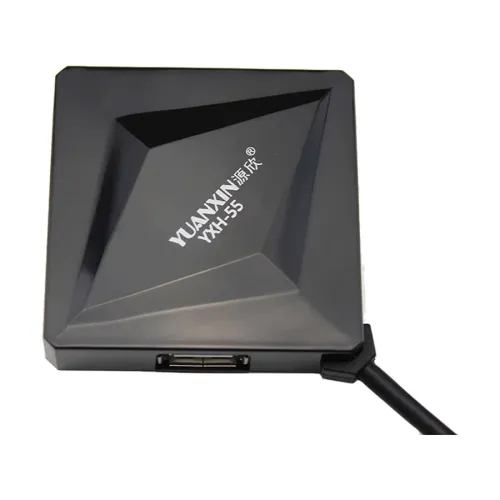
Yuanxin · YXH-55 4-Port USB 2.0 Hub
Yuanxin YXH-55 adds four USB-A ports through one USB input, with 480Mbps USB 2.0 and 1.2m cable listed. Check power limits, color and warranty.
Approximate Market Price
BDT 380
Informational market estimate only; this is not a current Store offer.
Compare store prices
No live offers for this variant
BDT 380
Approximate Market Price
Informational market estimate only; this is not a current Store offer.
Loading history…
Product story
The Yuanxin YXH-55 is a multiport hub that expands one USB host connection into four USB-A female ports. Bangladesh retailers list USB 2.0 and up to 480Mbps, with a 1.2-meter attached cable. It is intended for connecting compatible low-power peripherals such as keyboards, mice and printers to a computer, console or other supported host. All downstream ports share the upstream connection and available power, so performance depends on the host, hub and devices connected.
The product is listed with one USB male input and four USB female outputs. Retail listings identify the outputs as USB-A, but the source-side connector is not always described in full; confirm its plug type from the package or product photo. Connect the host end to a compatible USB port and plug peripherals into the four output ports. This hub does not add HDMI, Ethernet, SD card, USB-C charging or audio connections.
Star Tech and other Bangladesh retailers list USB 2.0 with a maximum transmission rate of 480Mbps. This is a theoretical bus signalling rate, not guaranteed file-copy speed. The actual link is limited by the slowest host port, peripheral and USB mode, while protocol overhead and simultaneous traffic reduce usable bandwidth. The YXH-55 should not be treated as a USB 3.x or 5Gbps hub.
The four downstream USB ports share one upstream connection. Connecting several devices at once divides available bandwidth and may affect throughput, especially for storage or other data-heavy peripherals. A hub cannot make a USB 2.0 host or device operate at a faster USB generation. For high-speed storage, video capture or large file workflows, use a hub and ports with documented USB 3.x support.
The reviewed YXH-55 specifications do not document an external power adapter, per-port current limit or total power budget. Do not assume it can power every external drive, phone or high-draw accessory. Several bus-powered devices can exceed what the host port provides, causing disconnects or unstable operation. Connect low-power peripherals first and use a separately powered hub for devices that require more current. Charger or power adapter inclusion is not confirmed.
Retailers list use with PCs, MacBooks, netbooks, tablets, PS3, Xbox and Wii. Compatibility still depends on the specific host model, operating system, console restrictions and peripheral class. A USB port does not guarantee that every console accepts a keyboard, storage device or other accessory. Install device software where required and check the host maker’s supported peripherals. The hub itself does not install drivers or configure a network connection.
Ryans and other sellers list an attached cable length of 1.2 meters. This can place the hub within reach of a nearby host, though the cable should not be stretched taut or routed where it may be crushed. Leave slack for desk movement, avoid sharp bends at the hub body and host plug, and keep the hub on a stable surface. A USB extension cable is not confirmed as included.
The existing catalog describes the YXH-55 as black, while Ryans lists a white version. Product photos and color may vary by batch or retailer, so verify the exact selected variant before ordering. The reviewed sources do not provide consistent dimensions, weight, casing material, indicator lighting, individual port switches or an external power supply specification. Check the package and device label on delivery.
Connect the hub to a supported host port, then attach low-power peripherals such as a keyboard or mouse. A printer may work through the hub if the operating system and printer driver support it; connect directly to the computer if initial installation fails. Avoid using an unpowered hub for multiple high-current devices. If peripherals disconnect when others are attached, reduce the load, test each device separately or use a powered hub.
USB storage may connect if the host supports the drive and filesystem, but the hub’s USB 2.0 rate and shared bandwidth can make large transfers slower than modern USB 3.x connections. A bus-powered hard drive may need more power than the hub can supply. Safely eject storage before unplugging it. For cameras, audio interfaces or other specialized devices, confirm driver, bandwidth and power requirements with the device maker.
If a peripheral is not detected, test it directly on the host, check the hub’s upstream plug, try another host port and reconnect one device at a time. For repeated disconnects, reduce the number of connected devices and consider the power budget. If transfers are slow, confirm that the host and device support USB 2.0 and account for shared traffic. Restart the host or reinstall the device driver when required. Inspect the cable and ports for damage.
The previous catalog record lists a one-year replacement warranty, but current terms depend on the selected store and distributor. Confirm the written period, replacement process, service location, return window and packaging requirements before purchase. Retailers also differ on black versus white color, so check the exact offer. Other sellers’ prices and stock do not establish the live BiponiBD offer. Keep the invoice and packaging for any service claim.
YXH-55 provides four USB-A outputs from one host connection, with a 1.2m cable and USB 2.0 speed up to 480Mbps listed. It can simplify connecting several basic peripherals to a nearby computer or compatible console. Its ports share bandwidth and host power; no external power adapter or current budget is documented. It is not a USB 3.x hub and should not be used where high-speed storage or guaranteed high-power charging is required. Confirm color and warranty.
Yuanxin YXH-55 is a 4-port hub with one USB male input and four USB-A outputs. Retailers list USB 2.0 up to 480Mbps and a 1.2m cable. All ports share upstream bandwidth and power; an external adapter is not confirmed. Compatibility depends on the host and peripheral. Catalog color is black, while a retailer lists white. Confirm exact color and seller warranty before ordering.
Helpful answers
Product-specific answers maintained with the catalog information.
The hub model is Yuanxin YXH-55.
Retailers list four USB female outputs, commonly USB-A.
Listings say USB male; confirm the exact source plug from the offer.
Retailers specify USB 2.0.
Up to 480Mbps theoretical USB 2.0 signalling; actual throughput is lower and shared.
Four outputs are listed, but bandwidth and power are shared; device combinations depend on the host and hub power.
An external adapter is not specified or confirmed as included.
A compatible printer may work if supported by the host and driver; connect directly for initial setup if needed.
Local listings specify 1.2 meters.
The catalog lists black, while Ryans lists white; confirm the selected variant.
Customer community
Become a merchant
Join BiponiBD, publish accurate offers and start free.